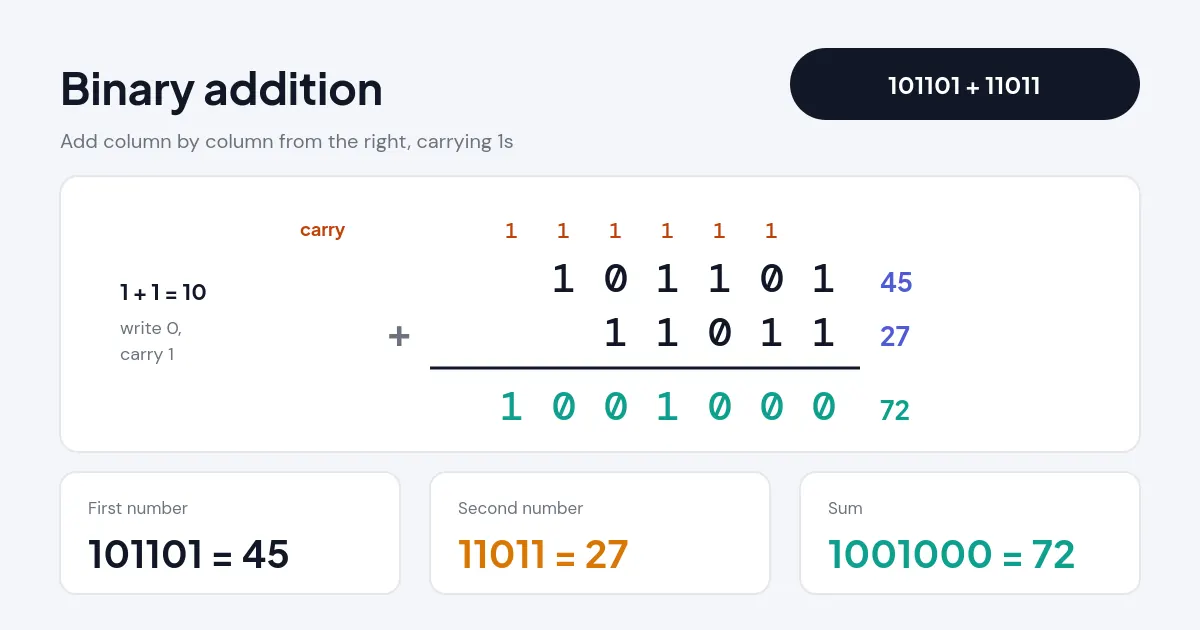
Quick answer: A binary calculator adds, subtracts, multiplies and divides base-2 numbers and shows the answer in binary, decimal and hex. For example, 101101 + 11011 = 1001000 in binary, which checks out in decimal as 45 + 27 = 72. This binary calculator handles any length, binary points, negatives and bitwise logic.
What Does a Binary Calculator Do?
A binary calculator does arithmetic directly on base-2 numbers, so you never have to convert to decimal and back by hand. Type two numbers made of 0s and 1s, pick an operation, and the result appears in binary along with its decimal, hexadecimal and octal values. For addition, subtraction and multiplication it also prints the column working, with the carry bits marked, which is exactly what a computer science homework sheet asks you to show.
There is no length limit, because the math uses arbitrary-precision integers, and you can include a binary point (101.11) to work with fractions. Bitwise AND, OR, XOR, NOT and shifts are included for programming tasks. If you need fixed-size CPU math with overflow flags, the programmer calculator is built for that, and for hex-first arithmetic there is a dedicated hex calculator.
How Do You Use the Binary Calculator?
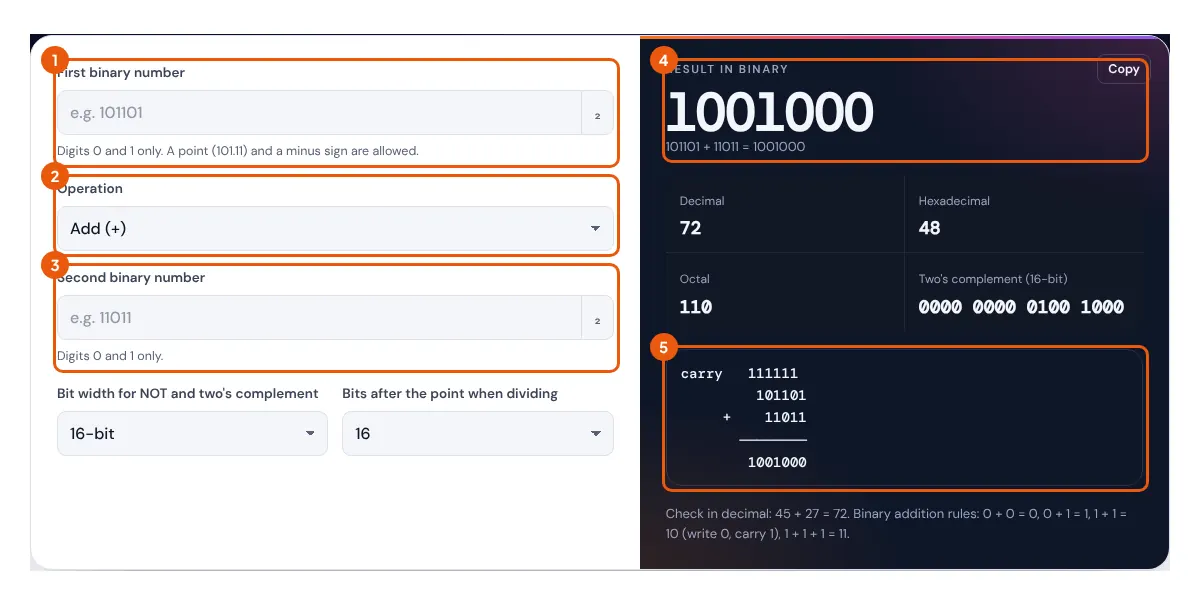
- Type the first binary number. Spaces are ignored, and a leading 0b or minus sign is fine.
- Choose the operation: add, subtract, multiply, divide, AND, OR, XOR, shift or NOT.
- Type the second binary number. For shifts, enter how many places to move instead.
- For division, choose how many binary places to keep after the point, or 0 for a whole quotient with a remainder.
- Read the binary answer, check it against the decimal line, and copy the column working if you need to show it.
The bit width setting only affects NOT and the two's complement view. Arithmetic itself never overflows, so a 200-digit binary number adds just as accurately as a 4-digit one.
What Are the Rules of Binary Arithmetic?
Binary arithmetic follows the same column methods as decimal, but each column holds only 0 or 1, so you carry or borrow whenever a column reaches 2.
Subtraction: 1 − 0 = 1, 1 − 1 = 0, 10 − 1 = 1 (borrow 2 from the next column)
Multiplication: 0 × 1 = 0, 1 × 1 = 1, so multiply by shifting and adding
Value of a binary number: dn×2n + … + d1×2 + d0 + d−1×½ + …
Worked example (addition): add 101101 (45) and 11011 (27). Starting at the right: 1 + 1 = 10, write 0 and carry 1. Next, 0 + 1 + 1 = 10, write 0, carry 1. Then 1 + 0 + 1 = 10, write 0, carry 1. Then 1 + 1 + 1 = 11, write 1, carry 1. Then 0 + 1 + 1 = 10, write 0, carry 1. Finally 1 + 0 + 1 = 10, write 10. Reading the answer gives 1001000, which is 64 + 8 = 72.
Worked example (multiplication): 1011 × 101 is 11 × 5. The second number has a 1 in the 1s place and in the 4s place, so copy 1011 once, copy it again shifted two places (101100), and add: 1011 + 101100 = 110111, which is 55.
Worked example (fractions): 101.11 + 1.011 is 5.75 + 1.375. Line up the binary points, pad with zeros (101.110 + 001.011), and add to get 111.001, which is 7 + 0.125 = 7.125.
How Do Binary Numbers Line Up With Decimal and Hex?
Each hexadecimal digit stands for exactly 4 binary digits, which is why programmers group bits in fours. The table shows a few values worth knowing by heart.

| Binary | Decimal | Hex | Why it matters |
|---|---|---|---|
| 1010 | 10 | A | First value that needs a hex letter |
| 1111 | 15 | F | Largest 4-bit value (one nibble) |
| 1000 0000 | 128 | 80 | Top bit of a byte; the sign bit in 8-bit signed numbers |
| 1111 1111 | 255 | FF | Largest byte; each RGB color channel |
| 100 0000 0000 | 1,024 | 400 | 210, the kibi in KiB |
| 1111 1111 1111 1111 | 65,535 | FFFF | Largest 16-bit unsigned value, also the top port number |
Powers of two are why storage sizes look odd: 210 is 1,024, not 1,000. The NIST guide to prefixes for binary multiples explains why 1,024 bytes is properly a kibibyte (KiB) while a kilobyte (kB) is 1,000 bytes. To turn readable text into bytes like these, use the binary translator.
How Does the Calculator Handle Negative Numbers?
Negative answers are shown with a minus sign in plain binary, for example 11 − 1000 = −101 (3 − 8 = −5), and the stats box also gives the two's complement form that a computer would store. In two's complement, you invert every bit and add 1, so −5 in 8 bits is 11111011. The bit width setting (8, 16, 32 or 64) decides how many bits are shown, and the calculator warns you if a value needs more bits than you picked.
NOT works inside the chosen width, because inverting an unlimited number of leading zeros has no end. NOT 101 in 8 bits gives 11111010, which is 250 unsigned or −6 signed, matching the rule NOT x = −x − 1. Shifts follow the same convention as most programming languages: shifting left by n multiplies by 2n, and shifting right divides by 2n and rounds down. For the remainder side of division with signed numbers, the modulo calculator compares how each language rounds.
Related Tools
- Programmer Calculator
- Hex Calculator
- Binary Translator
- Truth Table Calculator
- IP Subnet Calculator
- Modulo Calculator
Frequently asked questions
How do you add binary numbers?
Add column by column from the right. 1 + 1 makes 10, so write 0 and carry 1 to the next column. For example, 101101 + 11011 = 1001000.
What is 1 + 1 in binary?
1 + 1 = 10 in binary, which is 2 in decimal. With a carry coming in, 1 + 1 + 1 = 11, which is 3.
How do you check a binary answer?
Convert each number to decimal by adding the place values of its 1s, do the sum in decimal, then convert back. The calculator prints this check under every result.
Can the binary calculator handle fractions?
Yes. Use a binary point, such as 101.11 for 5.75. Addition, subtraction, multiplication and division all work, and division can be taken to 8, 16 or 32 binary places.
Why does 1/3 never end in binary?
Only fractions whose denominator is a power of two end in binary. One third becomes 0.010101… forever, so the calculator rounds it down to the number of places you choose.
What is the difference between AND, OR and XOR?
AND gives 1 only where both bits are 1, OR gives 1 where either bit is 1, and XOR gives 1 where the bits differ. So 1100 AND 1010 = 1000, OR = 1110 and XOR = 0110.