How to Use the Percentage Increase Calculator
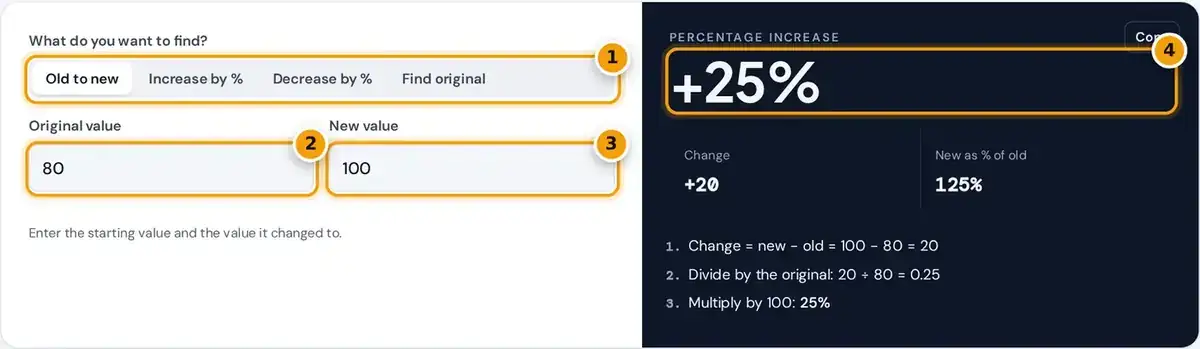
- Choose what to find: old to new, increase by %, decrease by %, or the original value.
- Enter the original (starting) value.
- Enter the new value it changed to.
- Read the percentage increase, the change and the worked steps.
Pick what you want to find first. Old to new compares two values, Increase by % adds a percentage, Decrease by % takes one off, and Find original works back to the number before a percentage increase.
Then enter the two numbers requested. The labels change with each mode, so Old to new asks for the original value and new value, while the other modes ask for a number and a percentage.
The answer appears instantly, along with the change, a multiplier and step-by-step working you can follow or copy into homework. The Copy button places the headline result on your clipboard in just a single click.
Percentage Increase Formula
To find a percentage increase, subtract the original value from the new value, divide the difference by the original, then multiply by 100. A positive answer is an increase, and a negative one, a decrease.
Increase a number by p%: result = number × (1 + p ÷ 100)
Decrease a number by p%: result = number × (1 − p ÷ 100)
Original before a p% increase = final ÷ (1 + p ÷ 100)
The vertical bars around old mean absolute value, which only ever matters when the starting number is negative. For ordinary positive numbers, the formula is simply the change divided by the old value, times 100.
The multiplier is the fastest shortcut. A 12% rise means multiplying by 1.12, and a 12% cut means multiplying by 0.88, which is exactly why this increase calculator shows the multiplier beside every single answer.
Worked Examples
Each example below matches a mode in the calculator, so you can type the same numbers and see identical steps. They cover comparing two values, applying a raise and removing sales tax from a bill.
- Old to new: 80 to 100 is a change of 20, and 20 ÷ 80 × 100 = 25%.
- Increase by %: a salary of 250 a day with a 12% raise becomes 250 × 1.12 = 280.
- Decrease by %: 250 with 12% off becomes 250 × 0.88 = 220.
- Find original: 113 including 13% tax was 113 ÷ 1.13 = 100.
The last case matters a lot in Ontario, where 13% HST is added to most purchases. To find the pre-tax amount, simply divide by 1.13, and never subtract 13% of the final total from it.
Taking 13% off 113 gives 98.31, which is wrong, because the tax was calculated on the smaller original number, not the total. The CRA GST/HST rates page lists each province's current rate and past changes.
Percent Gain on Prices and Investments
The Old to new mode works as a percent gain calculator for investments. A stock bought at 40 and sold at 52 shows a gain of 12, and 12 divided by 40 gives 30% growth.
The same gain calculator logic handles a rent increase, a markup on cost, a pay raise or rising grocery bill. Always divide by the earlier value, since that is the base the change grew from.
Official inflation figures use this method too. Statistics Canada reports the Consumer Price Index as a percentage change from the same month a year earlier. Type two index values into Old to new to check.
Percentage Increase Quick Reference
This quick reference shows common increases, the multiplier for each and the result when you start from exactly 100. Use the last column to reverse the increase and recover the original amount before any markup.
| Increase | Multiplier | 100 becomes | To reverse, divide by |
|---|---|---|---|
| 5% | 1.05 | 105 | 1.05 |
| 10% | 1.10 | 110 | 1.10 |
| 13% | 1.13 | 113 | 1.13 |
| 25% | 1.25 | 125 | 1.25 |
| 50% | 1.50 | 150 | 1.50 |
| 100% | 2.00 | 200 | 2.00 |
A 100% increase doubles a value, and a 200% increase triples it. Any rise larger than the original is over 100%, so going from 20 to 70 is a 250% increase, not a 70% increase.
For values between the rows, type your own numbers. The calculator keeps up to eight significant figures, so results such as 33.333333% for a rise from 30 to 40 are exact enough for most reports.
Common Percentage Mistakes
Most everyday percentage errors come from using the wrong base number or treating percentages like ordinary numbers that simply add together. The four traps below catch students, shoppers, journalists and even experienced analysts quite often.
- Dividing by the wrong number: 80 to 100 is a 25% increase, but 100 back to 80 is a 20% decrease.
- Adding consecutive increases: two 10% rises make 21%, because 1.10 × 1.10 = 1.21.
- Undoing a discount: a 20% cut then a 20% rise turns 100 into 80, then 96.
- Starting from zero: the increase is undefined, because you cannot divide by zero.
Also separate percent from percentage points. An interest rate moving from 4% to 5% rises by one percentage point, but that is a 25% increase in the rate itself, a very big difference in meaning.
When the original value is zero, the calculator shows a clear error instead of a misleading figure. In that case, report the absolute change, such as an increase of 30 units, rather than a percentage.
Negative Starting Values and Percentage Decrease
When the new value is lower, the result is a percentage decrease. From 50 to 37.5, the change is minus 12.5, and dividing by 50 gives a 25% decrease, which the calculator then labels clearly.
A negative starting value needs extra care. If a loss of −50 improves to −20, the calculator divides by the absolute value, 50, and reports a 60% increase, which correctly points in the right direction.
Some textbooks leave percent change undefined for a negative starting value, so state your method clearly whenever it matters, for example in business reports where a loss narrows or a profit turns into a loss.
Frequently asked questions
How do you calculate a percentage increase?
Subtract the old value from the new value, divide by the old value and multiply by 100. For example, from 80 to 100: (100 − 80) ÷ 80 × 100 = 25%.
How do I increase a number by a percentage?
Multiply the number by 1 plus the percentage written as a decimal. To increase 250 by 12%, multiply by 1.12 to get 280. The amount added is 30, which is 12% of 250.
What is the percent increase from 50 to 75?
The change is 75 minus 50, which is 25. Divide 25 by the original 50 to get 0.5, then multiply by 100. The increase is 50%, and the new value is 150% of the old.
How do I remove a percentage increase to get the original price?
Divide by 1 plus the percentage as a decimal. A price of 113 that includes 13% tax was 113 ÷ 1.13 = 100 before tax. Subtracting 13% of 113 gives the wrong answer.
Can a percentage increase be more than 100%?
Yes. Any increase larger than the original value is over 100%. Going from 20 to 70 is a 250% increase, and doubling a number is exactly a 100% increase.
What is the difference between percent increase and percentage points?
Percentage points measure the plain gap between two percentages, such as 4% to 5%, which is one point. The percent increase compares that gap to the start, which here is 25%.