Quick answer: To round a number, find the place you are rounding to and look at the digit just to its right. If that digit is 5 or more, round up; if it is 4 or less, keep the place digit and drop the rest. So 3.14159 rounded to two decimal places is 3.14. This rounding calculator does it for any place and nine methods.

What Does Rounding a Number Mean?
A rounding calculator shortens a number to a chosen place value, such as the nearest ten, the nearest whole number or two decimal places, while keeping it as close as possible to the original. It is the tool for checking homework on place value, tidying prices and measurements, and matching the rounding a spreadsheet or bank uses.
This one works on the digits as text rather than on binary floating point numbers, so it never falls into the classic trap where 2.675 rounds to 2.67 in some software. Type 2.675, choose hundredths and you get 2.68, as the rules say. It also rounds to any multiple, such as the nearest 5 or the nearest 0.25, and shows a table of your number rounded to every place from thousands to thousandths. For rounding by significant figures instead of place value, use the sig fig calculator.
How Do You Round to a Chosen Place Value?
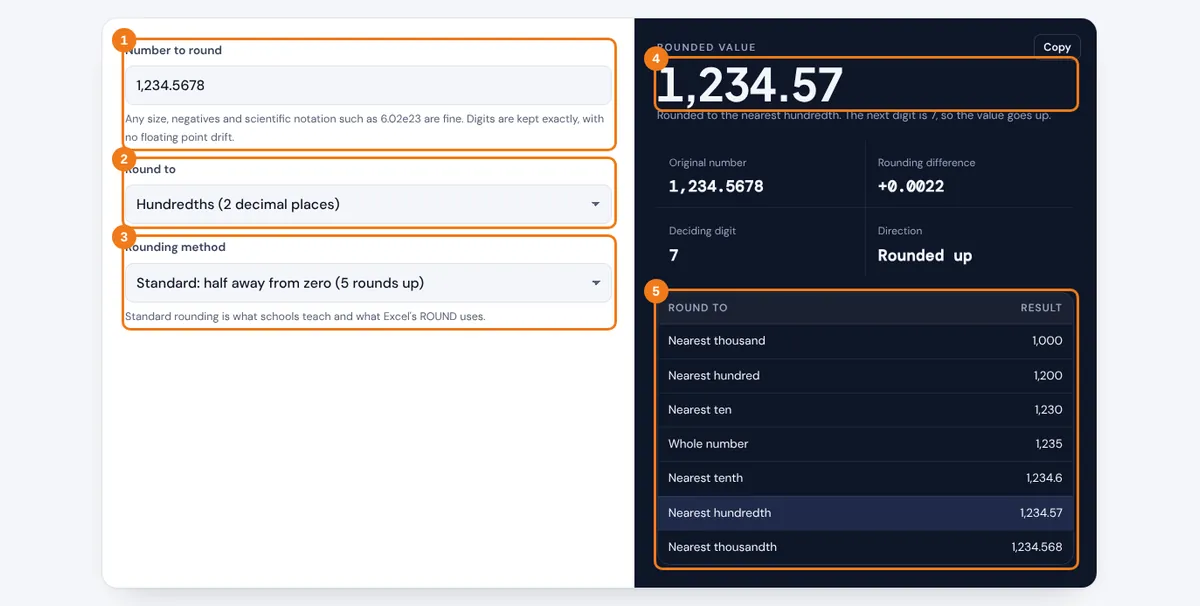
- Type the number you want to round. Commas, negatives and scientific notation are accepted.
- Choose the place to round to, from the nearest million down to ten decimal places, or pick nearest multiple and enter it.
- Leave the method on standard rounding unless your teacher, spreadsheet or bank uses a different rule.
- Read the rounded value, the deciding digit and whether the number went up or down.
- Check the table to see the same number rounded to every common place at once.
The result keeps trailing zeros on purpose. Rounding 7.5 to two decimal places gives 7.50, which tells the reader the value is precise to the hundredths.
What Is the Rule for Rounding Numbers?
The rule for rounding is to look only at the first digit after the place you keep. That single digit decides the answer, no matter what follows it.
Next digit 5, 6, 7, 8 or 9: add 1 to the place digit, drop everything after it
Nearest multiple m: rounded value = round(x ÷ m) × m
Worked example: round 1,234.5678 to the nearest hundredth. The hundredths digit is 6 and the digit after it is 7. Because 7 is 5 or more, the 6 becomes 7 and the result is 1,234.57. Rounded to the nearest hundred, the deciding digit is the tens digit 3, so 1,234.5678 becomes 1,200.
Carrying works the same way as in addition. Rounding 9.96 to one decimal place turns the 9 tenths into 10 tenths, so the answer is 10.0. Rounding to a multiple follows the same idea: $7.38 to the nearest quarter is 7.38 ÷ 0.25 = 29.52, which rounds to 30, and 30 × 0.25 = $7.50.
| Number | Nearest ten | Whole number | 1 decimal | 2 decimals |
|---|---|---|---|---|
| 3.14159 | 0 | 3 | 3.1 | 3.14 |
| 47.85 | 50 | 48 | 47.9 | 47.85 |
| 2.675 | 0 | 3 | 2.7 | 2.68 |
| -18.449 | -20 | -18 | -18.4 | -18.45 |
| 999.96 | 1,000 | 1,000 | 1,000.0 | 999.96 |
Which Rounding Method Should You Use?

Use standard rounding for schoolwork, prices and everyday answers. It rounds an exact half away from zero, so 2.5 becomes 3 and −2.5 becomes −3, matching Excel's ROUND function. The other methods exist because that rule has a small upward bias when you round thousands of values that end in 5.
Half to even, also called banker's rounding, sends an exact half to the nearest even digit, so 2.5 becomes 2 and 3.5 becomes 4. Over a large data set the ups and downs cancel out, which is why it is the default in IEEE 754 floating point, in Python's round function and in NIST's rules for rounding numbers in Special Publication 811. Ceiling and floor always move up or down the number line, which suits counting whole boxes or seats. Truncate simply chops the extra digits, which is how many tax forms want cents dropped.
| Value | Standard | Half to even | Ceiling | Floor | Truncate |
|---|---|---|---|---|---|
| 2.5 | 3 | 2 | 3 | 2 | 2 |
| 3.5 | 4 | 4 | 4 | 3 | 3 |
| -2.5 | -3 | -2 | -2 | -3 | -2 |
| 2.71 | 3 | 3 | 3 | 2 | 2 |
Very large or very small numbers are easier to round once they are in powers of ten, so the scientific notation calculator is a good companion when you work with constants or lab data.
Related Tools
- Sig Fig Calculator
- Scientific Notation Calculator
- Fraction Calculator
- Long Multiplication Calculator
- Average Calculator
Frequently asked questions
How do you round to the nearest tenth?
Look at the hundredths digit. If it is 5 or more, add 1 to the tenths digit; otherwise leave it. Then drop every digit after the tenths. 6.47 becomes 6.5 and 6.43 becomes 6.4.
Does 5 round up or down?
In standard rounding, 5 rounds up, so 4.5 becomes 5. In banker's rounding an exact 5 goes to the nearest even digit, so 4.5 becomes 4 and 5.5 becomes 6.
How do you round negative numbers?
Standard rounding treats the size of the number, so −3.7 rounds to −4 and −3.2 rounds to −3. Ceiling moves toward positive, so −3.7 becomes −3, and floor moves toward negative, so −3.2 becomes −4.
Why does my calculator say 2.675 rounds to 2.67?
Computers store 2.675 in binary as 2.67499999..., so a float based round function sees a 4 and rounds down. This calculator keeps the exact decimal digits, so it gives 2.68.
What is the difference between rounding and truncating?
Rounding picks the closest value at the chosen place. Truncating cuts the extra digits off without looking at them, so 8.99 truncated to a whole number is 8, while rounded it is 9.
How do you round to the nearest 5?
Divide by 5, round to a whole number, then multiply by 5. For 23: 23 ÷ 5 = 4.6, which rounds to 5, and 5 × 5 = 25.