Quick answer: This random team generator splits a list of names into fair, random teams in one click. Paste the names, choose the number of teams or people per team, and press Generate. Team size is people ÷ teams, and any remainder adds one extra person to some teams, so 14 people in 3 teams makes 5, 5 and 4.

What Is a Random Team Generator?
A random team generator is a tool that takes a list of people and divides them into teams by chance, so nobody is picked last and nobody can stack a side with friends. Teachers use it for group work, coaches for scrimmages, and managers for workshop breakouts or office quiz nights.
This generator shuffles the whole list with a Fisher-Yates shuffle driven by your browser's cryptographic random numbers, then deals the names into teams like cards. Every possible line-up is equally likely. If you only need one winner rather than whole teams, the random name picker draws names one at a time, and the wheel spinner adds a visual spin for a classroom screen.
How Do You Make Random Teams?
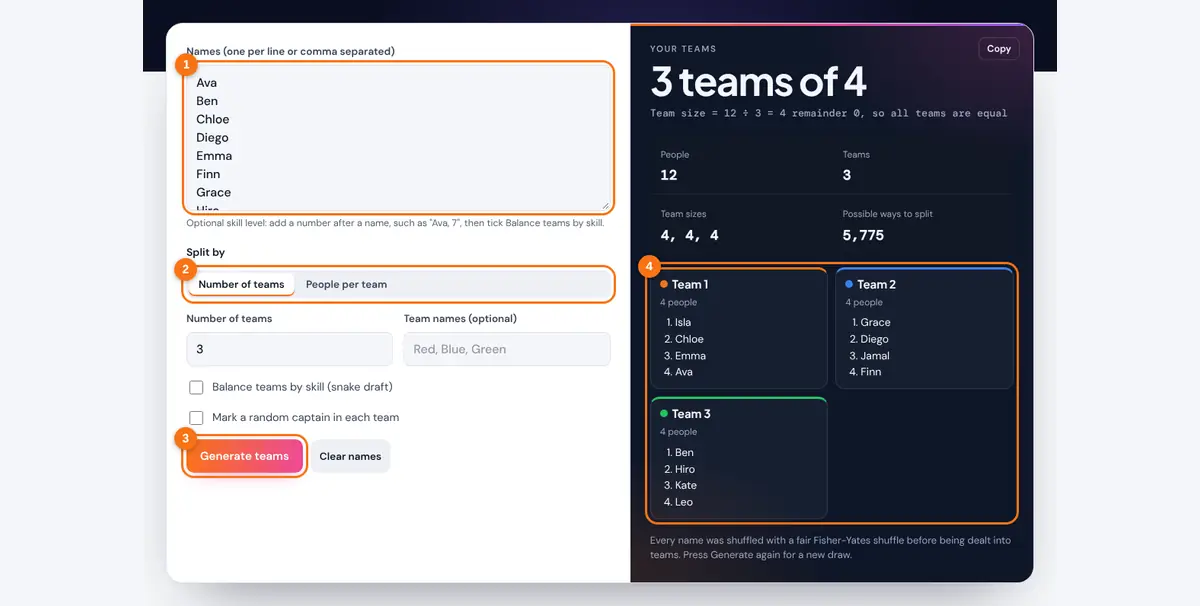
- Paste or type the names, one per line. A single line of names separated by commas also works.
- Choose Number of teams (for example 3 teams) or People per team (for example teams of 4), then enter the number.
- Optionally type team names separated by commas, such as Red, Blue, Green, and tick the box to mark a random captain in each team.
- Press Generate teams. Each team appears in its own colored card with its size. Press Generate again for a fresh draw, or Copy to paste the teams into a chat or email.
Names are processed only in your browser. Nothing is uploaded or saved, which makes the tool safe to use with a class list.
How Are Team Sizes Worked Out?
Team size is the number of people divided by the number of teams, rounded down, and the remainder is shared out one person at a time. That way no two teams ever differ by more than one person.
Remainder r = n − k × base size
r teams get base size + 1, the rest get base size
Teams needed for size s = ceil(n ÷ s)
Worked example: 14 people in 3 teams gives 14 ÷ 3 = 4 remainder 2, so two teams have 5 people and one team has 4. If you choose teams of 4 instead, you need ceil(14 ÷ 4) = 4 teams, and the 14 people split 4, 4, 3 and 3 so the sizes stay even.
| People | Teams | Team sizes | Possible ways to split |
|---|---|---|---|
| 7 | 2 | 4, 3 | 35 |
| 10 | 2 | 5, 5 | 126 |
| 9 | 3 | 3, 3, 3 | 280 |
| 12 | 3 | 4, 4, 4 | 5,775 |
| 14 | 3 | 5, 5, 4 | 126,126 |
| 30 | 6 | 5 each | about 1.23 × 10^17 |
The last column counts the different ways to divide the group when teams have no names, using n! ÷ (s1! × s2! × ... × sk!), then dividing again for teams of equal size that could swap labels. Even a class of 30 has so many possible line-ups that the same split is very unlikely to come up twice.
How Do You Balance Teams by Skill?
To balance teams by skill, rank everyone from strongest to weakest and let teams pick in a snake order: 1, 2, 3, then 3, 2, 1, and so on. The team that picks first in one round picks last in the next, which evens out the total strength.
Add a skill number after each name (for example "Ava, 7" or "Ben (5)") and tick Balance teams by skill. People with equal scores are shuffled first, and the first pick goes to a random team, so balanced teams still change on every draw. The result shows the gap between the strongest and weakest team's total skill. The Carnegie Mellon Eberly Center advice on composing student groups notes that students who choose their own teammates often form groups that are very alike, which is a good reason to let a neutral tool make the first split. For two-way decisions such as who kicks off, use the coin flip.
Related Tools
Need a fair pick for a group? See our guide to fair ways to pick teams, players and turns at random.
Frequently asked questions
Is the random team generator truly fair?
Yes. It uses a Fisher-Yates shuffle with your browser's cryptographic random number generator, so every possible arrangement of names is equally likely before they are dealt into teams.
What happens if the names do not divide evenly?
The leftover people are spread one per team, so team sizes never differ by more than one. For example, 11 people in 3 teams makes teams of 4, 4 and 3.
Can I make balanced teams by skill level?
Yes. Add a number after each name, such as "Ava, 7", and tick Balance teams by skill. The tool ranks players and uses a snake draft, so each team gets a similar total.
How many names can I enter?
Up to 1,000 names and up to 100 teams. Blank lines are ignored, and duplicate names are kept, so add an initial if two people share a name.
Are the names I enter saved anywhere?
No. The teams are made in your browser, and nothing is sent to a server or stored after you close the page.