How to Use the Privacy Policy Generator
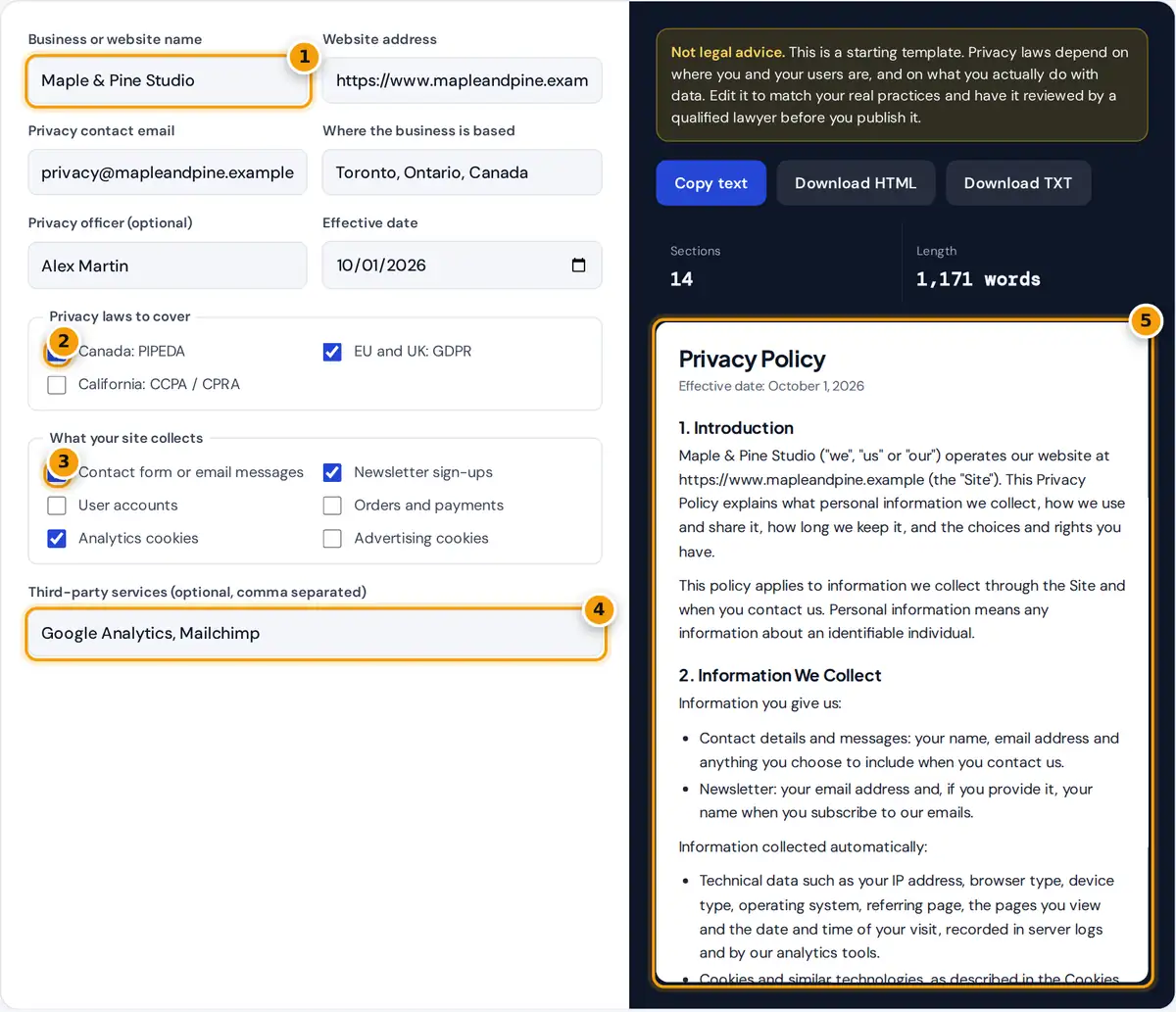
- Enter your business or website name, then your web address and privacy email.
- Tick the privacy laws to cover: PIPEDA for Canada, GDPR, CCPA.
- Tick what your site collects, such as contact forms, orders or analytics cookies.
- List the third-party services you use, such as Google Analytics or Mailchimp.
- Review the generated policy, then copy it or download HTML or TXT.
Enter your business name, web address, privacy contact email and where your business is based. You can also name a privacy officer and set an effective date, which appears at the top of the policy.
Tick the privacy laws you want covered and what your site collects: contact messages, newsletter sign-ups, accounts, orders, analytics cookies or advertising cookies. List any third-party services, separated by commas, and the policy updates instantly.
When the wording fits, use Copy text to paste it into your website builder, or download HTML or a plain-text file. The privacy policy generator runs in your browser, so nothing you type is stored.
Does My Website Need a Privacy Policy?
If your site collects personal information, even just email addresses or analytics data, you almost certainly need one. Almost every site with a contact form or with visitor statistics is legally required to publish one.
Third-party tools also add their own rules. Google Analytics and Google AdSense both require sites that use them to disclose that use, because they collect identifiers such as IP addresses and cookie data from visitors.
A clear policy also builds trust. Visitors are more willing to share an email address when they can see exactly what you collect and why, so transparency helps sign-ups as well as keeping you compliant.
The Privacy Laws Covered
In Canada, PIPEDA requires private-sector organizations to be open about how they manage personal information and to name a person accountable for compliance. If problems arise, individuals can complain to the Privacy Commissioner of Canada.
| Law | Where it applies | Key rights covered in the template |
|---|---|---|
| PIPEDA | Private-sector organizations in Canada (with similar provincial laws in Quebec, Alberta and British Columbia) | Access, correction, withdrawal of consent, complaint to the Privacy Commissioner of Canada |
| GDPR and UK GDPR | Organizations offering goods or services to, or monitoring, people in the EEA or UK | Access, rectification, erasure, restriction, portability, objection, complaint to a supervisory authority |
| CCPA as amended by the CPRA | For-profit businesses that meet California's thresholds and handle California residents' data | Know, delete, correct, opt out of sale or sharing, limit sensitive data, non-discrimination |
The GDPR and UK GDPR apply if you offer goods or services to people in the EEA or UK or monitor their behavior. People may complain to a supervisory authority when their rights are ignored.
The CCPA, as amended by the CPRA, applies only to businesses above certain thresholds that handle data from California residents. Separately, CalOPPA requires commercial websites collecting personal information from Californians to post a privacy policy.
What the Generated Policy Includes
The template is built from your answers, so it only describes the practices you select. With the default answers it produces 14 sections, and the counter under the policy shows the section count and length.
- Who you are and what the policy covers.
- The information collected, split into what people give you and what is collected automatically.
- How you use it, matched to the features you ticked.
- Cookies, including analytics and advertising cookies when selected.
- Legal bases for processing, when GDPR is selected.
- Who you share information with, including third-party services.
- International transfers, retention and security.
- Privacy rights for Canada, the EEA and UK, and California.
- Children's privacy, links to other sites, changes and contact details.
Turning off GDPR removes the legal bases section, and the privacy rights section grows or shrinks with the laws you choose. Retention and security sections are always included, because every privacy law expects them covered.
Children's privacy is covered with a standard statement that the site is not directed to children under 13. If your site does target young users, you need extra protections that a general template cannot provide.
Cookies, Consent and Opting Out
Analytics cookies measure how visitors use your site, while advertising cookies track people across sites to show targeted ads. Both are described only when you tick them, so the policy stays accurate for your setup.
If you use non-essential cookies for visitors in the EU or UK, a policy by itself is not enough. You also need a consent banner that blocks those cookies until people actively agree to them.
Under the CCPA, people can opt out of the sale or sharing of their data. If you run advertising cookies for California visitors, give them a clear way to opt out and describe it accurately.
Where to Publish Your Privacy Policy
Publish the policy on its own page and link to it from the footer of every page. That link is the first place most visitors and regulators look, and some third-party services check for it.
Also link it from every form that collects personal information, such as sign-up forms, contact forms and checkout pages. If you have a mobile app, add the same link to your app store listing too.
Review the policy whenever you add a new tool, plugin or service that touches personal data. Update the effective date each time, so that returning visitors can easily see exactly when the policy last changed.
Privacy Policy vs Terms and Conditions
A privacy policy explains how you handle personal data and protects your users. Terms and conditions set the rules for using your site and protect you. A disclaimer limits liability for the content you publish.
Only the privacy policy is commonly required by law itself, though most businesses publish all three. A policy generator speeds up the first draft, but each document still needs to match how you actually operate.
Never copy someone else's privacy policy. Policies are copyrighted, and a copied one describes another company's practices, not yours. A generated template that you edit carefully is both safer and more accurate for your visitors.
Limits and Legal Review
This generator produces a general template, not legal advice. Privacy obligations depend on your location, your users' locations, your industry and how you really handle data, so read every sentence carefully before you publish it.
Delete anything that does not apply and add anything the template misses, such as live chat or user file uploads. It is your responsibility to make sure the final policy is true for your business.
Have the final policy reviewed by a qualified lawyer, especially for health information, financial data or children. Then update it whenever your data practices change, so it stays accurate for every visitor who reads it.
Frequently asked questions
Is this privacy policy generator free?
Yes. The generator is free, needs no sign-up, and runs in your browser. Nothing you type is sent to or stored by toolvasta, and you can copy the text or download HTML or plain text.
Is a generated privacy policy legally binding?
A template is a starting point, not legal advice. It is only accurate if it matches what you really do with data, so edit it and have a qualified lawyer review it before publishing.
Do I need a privacy policy if I only use Google Analytics?
Yes. Analytics tools collect personal information such as IP addresses and device identifiers, and Google's terms require sites that use Google Analytics to have a privacy policy that discloses it.
What is PIPEDA?
PIPEDA is Canada's federal privacy law for private-sector organizations. It sets rules for collecting, using and disclosing personal information in commercial activities and gives people the right to access and correct their information.
Does the GDPR apply to a Canadian website?
It can. The GDPR applies to organizations outside the EU when they offer goods or services to people in the EU or monitor their behavior, for example with tracking cookies.
Can I copy another website's privacy policy?
No. Privacy policies are copyrighted, and a copied policy describes someone else's data practices rather than yours. Generate a template, then edit it so every statement is true for your site.