How to Use the Time Clock Calculator
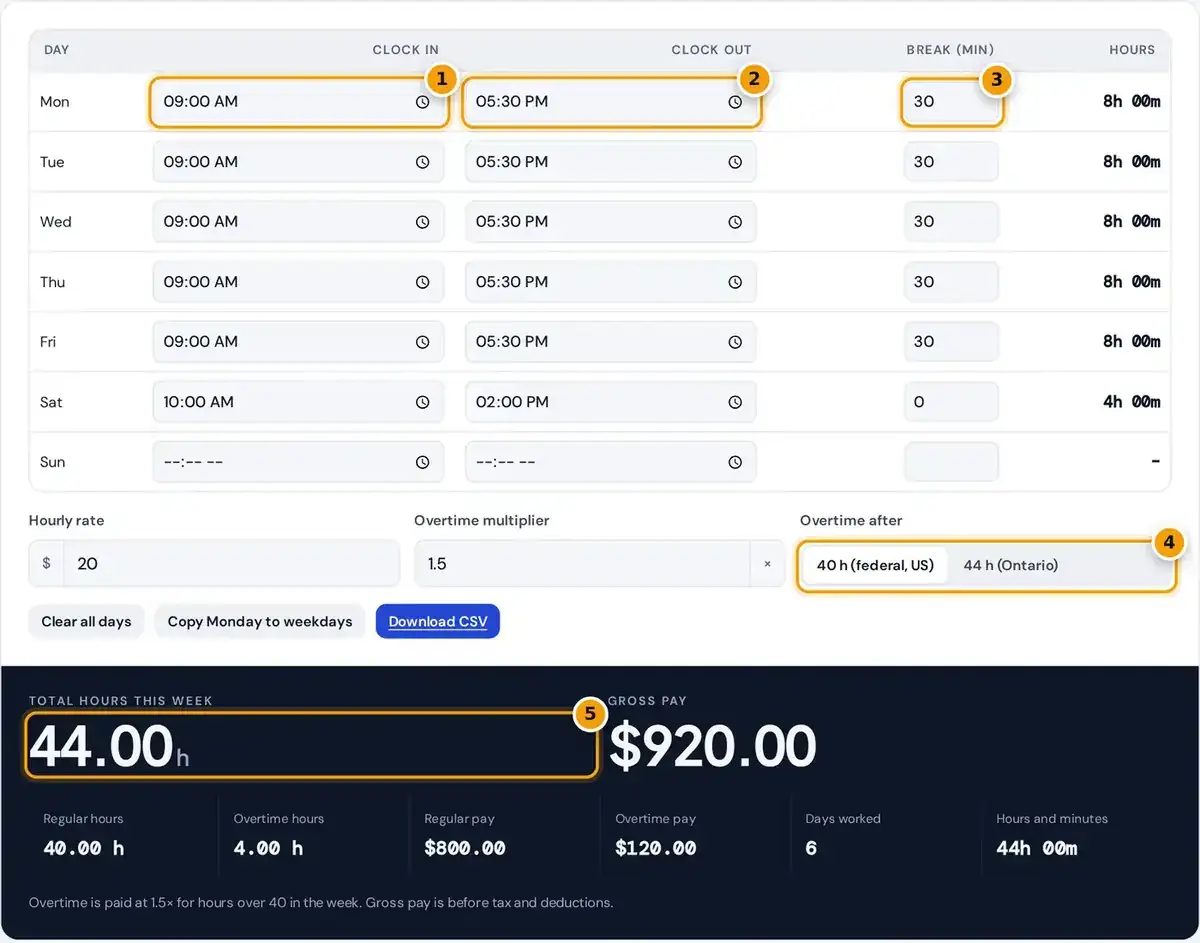
- Enter the clock-in time for each day you worked.
- Enter the clock-out time. Overnight shifts past midnight are handled.
- Enter unpaid break minutes for the day.
- Set your hourly rate, overtime multiplier and the 40 h or 44 h (Ontario) threshold.
- Read total weekly hours, overtime hours and gross pay, then download the CSV.
For each day you worked, enter the clock in time, the clock out time and the unpaid break in minutes. Leave any days off blank, and the row shows the hours for each shift immediately.
Add your hourly rate, the overtime multiplier and the weekly threshold: 40 hours for federal and US rules or 44 hours for Ontario. The calculator totals the weekly hours and splits regular hours from overtime.
Copy Monday to weekdays fills a repeating schedule in one click, and Clear all days starts a fresh week. Download CSV saves the whole timesheet for a spreadsheet, your manager or your own payroll records.
How Hours and Pay Are Calculated
Each day's hours are simply clock out minus clock in, minus the unpaid break taken. The week's regular hours stop at your threshold, and every hour above it counts as overtime hours at the multiplier.
overtime hours = max(0, weekly hours − threshold)
gross pay = regular hours × rate + overtime hours × rate × 1.5
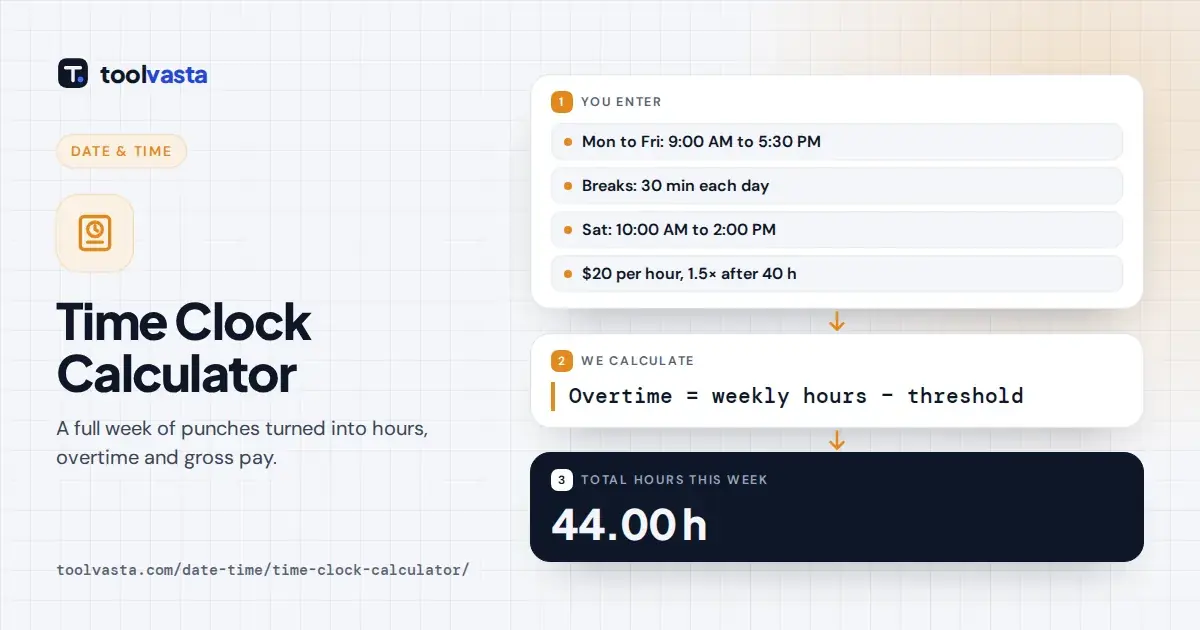
Worked example: Monday to Friday from 9:00 to 17:30 with a 30 minute lunch is 8 daily hours, or 40 in total. A Saturday shift from 10:00 to 14:00 brings the week to 44 hours.
At $20 with a 40 hour threshold, 40 regular hours pay $800.00 and 4 overtime hours at time and a half pay $120.00; gross pay is $920.00. Under Ontario's 44 hour threshold, it is $880.00.
Converting Hours and Minutes to Decimal Hours
Payroll systems usually want decimal hours rather than plain hours and minutes. To convert, take the minutes, divide by 60 and add the result to whole hours, so 7 hours 30 minutes becomes 7.50 hours.
| Minutes | Decimal hours |
|---|---|
| 6 | 0.10 |
| 15 | 0.25 |
| 20 | 0.33 |
| 30 | 0.50 |
| 40 | 0.67 |
| 45 | 0.75 |
| 50 | 0.83 |
The results show both forms. The total appears in decimal hours, such as 44.00, while the Hours and minutes box shows 44h 00m, so you can copy whichever format your timesheet or employer asks for.
A common mistake is writing 7:45 as 7.45 hours. It is really 7.75 hours, because 45 divided by 60 is 0.75, and that small error quietly costs you pay on every single shift you record.
Overtime Rules in Canada and the US
Overtime rules depend mainly on where you work and who regulates your employer. Most employees fall under provincial law, while banks, airlines, telecoms and other federally regulated workplaces follow the federal Canada Labour Code instead.
| Jurisdiction | Overtime starts after | Rate |
|---|---|---|
| Federal (Canada Labour Code) | 8 hours a day or 40 hours a week | 1.5× |
| Ontario (ESA) | 44 hours a week | 1.5× |
| British Columbia | 8 hours a day or 40 hours a week, double time after 12 hours a day | 1.5× or 2× |
| Alberta | 8 hours a day or 44 hours a week | 1.5× |
| United States (FLSA) | 40 hours a week | 1.5× |
Under Ontario's Employment Standards Act, most employees earn 1.5 times their regular rate of pay after 44 hours a week. An averaging agreement can spread that threshold across several weeks, and some jobs are exempt.
Federally regulated staff reach overtime after 8 hours a day or 40 hours a week, as the federal hours of work rules explain. This tool applies a weekly threshold only, so check daily limits yourself.
Overnight and Split Shifts
When the clock out time is earlier than the clock in time, the calculator treats the shift as ending the next day. Nothing extra needs to be entered for an overnight shift that crosses midnight.
For example, a shift from 22:00 to 06:00 with a 30 minute break counts as 7 hours 30 minutes. It is recorded on the day the shift started, which matches how most payroll systems work.
The time fields use your device's clock format, often the 24-hour clock. For a split shift with a long unpaid gap, enter the gap as the break so only the hours actually worked are counted.
Timesheet CSV and Rounding
The CSV lists each day with its clock times, break, hours in h:mm and decimal hours, then weekly totals, regular and overtime hours and gross pay. It opens directly in Excel, Google Sheets and Numbers.
Keep each week's file with your pay stubs. If a paycheque looks short, the saved timesheet gives you exact daily records to compare with what your employer paid, which makes any follow-up conversation much simpler.
Some employers round each punch, for example with the 7 minute rule, rounding to the nearest quarter hour. This calculator uses exact minutes with no rounding, so small differences from a work clock are normal.
Limits of This Calculator
Gross pay is before income tax, CPP, EI and any other deductions, so your actual take-home pay will be lower. Use a separate payroll calculator to estimate the deductions your employer takes from each paycheque.
Statutory holiday pay, vacation pay, shift premiums and daily overtime are not included here. If your province or contract pays overtime after 8 hours in a day, overtime may start earlier than the calculator shows.
Times are clock readings and do not adjust for daylight saving changes, so an overnight shift on those two nights can be off by an hour. Treat results as an estimate and confirm with payroll.
Frequently asked questions
How do I calculate my weekly hours?
Work out each day's hours as clock out minus clock in minus unpaid breaks, then add the days together. The calculator does this for all seven days at once and shows the total in decimal hours.
When does overtime start in Ontario?
Under Ontario's Employment Standards Act, overtime pay of 1.5 times the regular rate starts after 44 hours of work in a week for most employees. Select the 44 hour option to apply that rule.
How is overtime pay calculated?
Multiply the overtime hours by your hourly rate and by the overtime multiplier, usually 1.5. With a $20 rate, each overtime hour pays $30, so 4 overtime hours add $120 to gross pay.
How do I convert minutes to decimal hours?
Divide the minutes by 60. For example, 15 minutes is 0.25 hours, 30 minutes is 0.50 and 45 minutes is 0.75, so 7 hours 45 minutes is 7.75 hours, not 7.45.
Can I export my timesheet?
Yes. Click Download CSV to save the timesheet with each day's clock times, breaks, hours in h:mm and decimal hours, plus weekly totals and gross pay, ready for Excel or Google Sheets.
Does it handle night shifts?
Yes. If you clock out earlier than you clocked in, the shift is treated as ending the next day. A shift from 22:00 to 06:00 with a 30 minute break counts as 7.5 hours.