How to Use the Day Counter
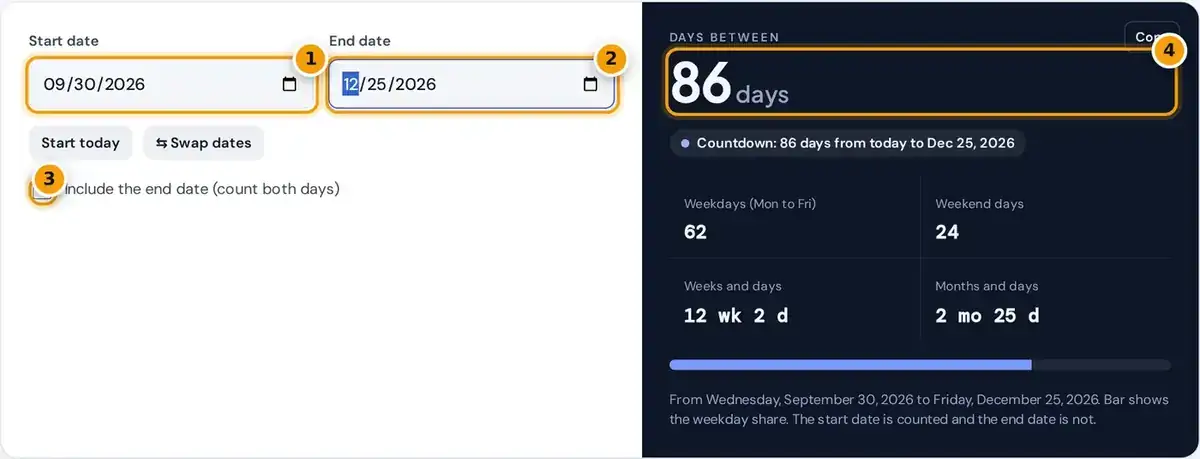
- Enter the start date, or tap Start today for a countdown.
- Enter the end date.
- Tick the box to include the end date and count both days.
- Read the days between, plus weekdays, weekend days, weeks and months.
Choose a start date and an end date. The counter shows the total days between two dates, plus the same span in weeks and days, in months and days, and as weekdays and weekend days.
Press Start today to set the start date to today, or Swap dates to reverse the pair. Tick Include the end date when both the first and last days should count, for example a festival.
A countdown badge under the result shows how far the end date is from today. Copy grabs a summary of every figure, which is handy for emails, schedules or planning notes shared with other people.
How the Day Count Is Calculated
weekdays = 5 × full weeks + weekdays in the remaining days
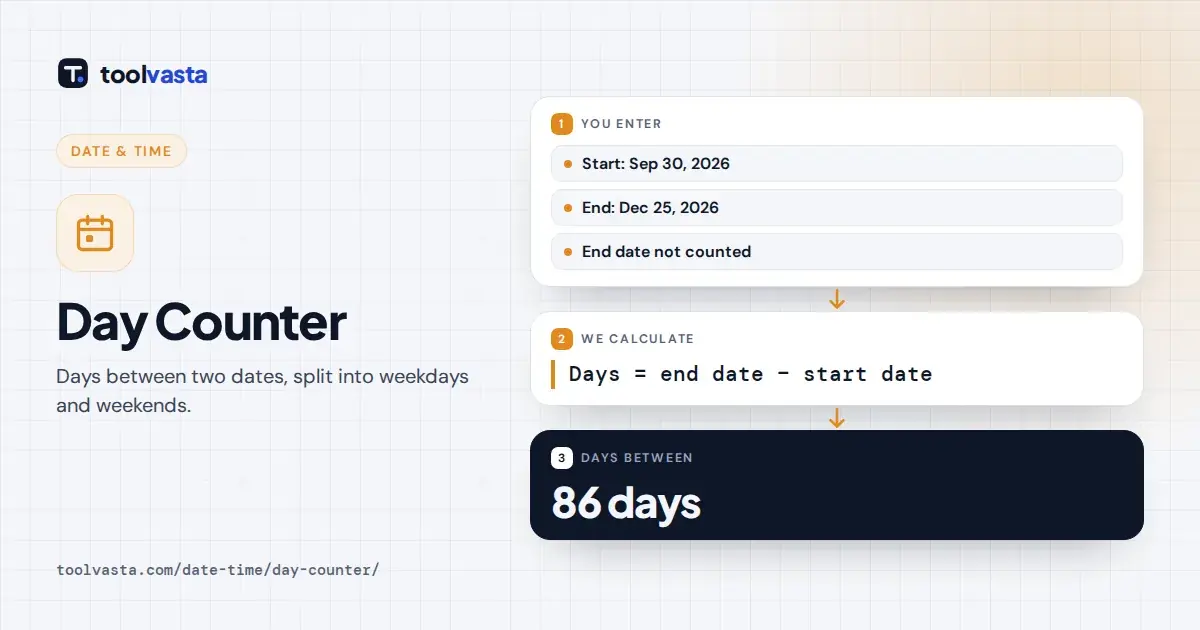
By default the counter works like subtracting calendar dates: the start day counts and the end day does not. This exclusive count means two consecutive days, such as Monday to Tuesday, are 1 day apart.
Ticking the box makes the count inclusive, so an event from the 1st to the 5th counts as 5 days. The formula simply adds one day to the difference whenever the end date is included.
From Wednesday, September 30, 2026 to Friday, December 25, 2026 there are 86 days: 1 left in September, 31 in October, 30 in November and 24 before Christmas Day. Including the end date gives 87.
Weekdays, Weekend Days and Business Days
The split counts Monday to Friday as weekdays and Saturday and Sunday as weekend days over the same range. The example above contains 62 weekdays and 24 weekend days, or 12 weeks and 2 days.
Weekdays are not always business days, because this counter does not remove any statutory holidays. To skip holidays when counting working days, use the business day mode of the date calculator elsewhere on this site.
Spreadsheet users can reproduce the totals in Excel with =B1-A1 for calendar days and the NETWORKDAYS function for weekdays. The subtraction is exclusive like this counter, while NETWORKDAYS counts both the start and end dates.
When to Include the End Date
- Exclude it for durations, such as how long ago something happened or the nights in a hotel stay.
- Include it for counting calendar days of an event, a medication course or a leave period.
Leave the end date out for durations and ages. A hotel stay from Friday to Sunday is 2 nights, and a baby born on the 1st is 9 days old on the 10th, not 10.
Include it when every day in the range is used. An event, a medication course or a leave period from the 1st to the 5th covers 5 full days, so the inclusive count is correct.
When a contract or form states a number of days, check whether it counts inclusively. Legal and payment deadlines usually define this very precisely, and a one-day difference can really matter for notices and refunds.
Countdown to a Date
The badge under the result counts days from today to the end date. Set the end date to a birthday, exam, wedding or trip, then bookmark the page to check the countdown whenever you like.
If the date has passed, the badge shows how many days ago it was. That turns the tool into a days since counter for anniversaries, a new job, a habit streak or a fitness goal.
For days until Christmas, set the end date to December 25 and press Start today. The same approach works for vacations, retirement, school holidays or any other event with a fixed date on the calendar.
Leap Years and Month Lengths
Every date is placed on the Gregorian calendar, so February 29 counts in each leap year. All of 2024 has 366 days, of which 262 are weekdays, while 2026 has 365 days and 261 weekdays.
A year is a leap year when divisible by 4, except century years, which must be divisible by 400. So 2000 was a leap year and 1900 was not, as National Research Council Canada explains.
Months have 28 to 31 days, so the months and days value counts whole months first. September 30 to December 25 is 2 months to November 30, then 25 days, or 2 mo 25 d.
Everyday Uses
- How many days until a trip, exam, due date or retirement.
- How many days since a start date, such as a new job or a purchase.
- Counting weekdays for school terms, notice periods or project plans.
- Checking the length of a lease, subscription or warranty in days.
Net 30 invoices are due 30 calendar days after the invoice date. Enter the invoice date as the start and the payment date as the end to confirm the payment falls within the 30 days.
A notice period, lease or subscription is easier to track in days than in months, because months vary in length. The weekday count also helps with project plans and school terms built around five-day weeks.
Warranty and return windows are usually counted in calendar days from the purchase date. Counting the days carefully before the deadline avoids disputes about whether a warranty claim or return request actually arrived in time.
Limits
Dates use the Gregorian calendar and whole days only. Time of day, time zones and daylight saving changes are ignored, so a span that crosses a clock change still counts only as whole calendar days.
If the end date is before the start date, the counter swaps them and says so. From March 10 to March 1 is reported as 9 days, with a note that the dates were swapped.
Dates before the Gregorian reform of 1582 still use modern rules, although the US Naval Observatory calendar guide explains how the older Julian calendar differed. For everyday planning, travel and deadlines this makes no difference.
Frequently asked questions
How many days are between two dates?
Subtract the start date from the end date. The counter shows the total instantly, along with weeks, months and weekdays, and you can tick Include the end date to add one day.
Does the day counter include the end date?
Not by default. The start day counts and the end day does not, like subtracting dates on a calendar. Tick the checkbox to count both the start and end dates.
How many weekdays are between two dates?
The result panel shows weekdays, Monday to Friday, and weekend days separately for the same range. Statutory holidays are not removed, so use the date calculator for true business days.
How many days until Christmas?
Set the end date to December 25 and press Start today. The countdown badge shows the days remaining, and the result also shows the span in weeks and weekdays.
Does the day counter account for leap years?
Yes. It uses the Gregorian calendar, so February 29 is counted in leap years. For example, all of 2024 has 366 days, while 2026 has 365 days.
How do I calculate days between dates in Excel?
Subtract the earlier date cell from the later one, such as =B1-A1, and format the result as a number. For weekdays only, use the NETWORKDAYS function instead.