How to Use the Family Tree Maker
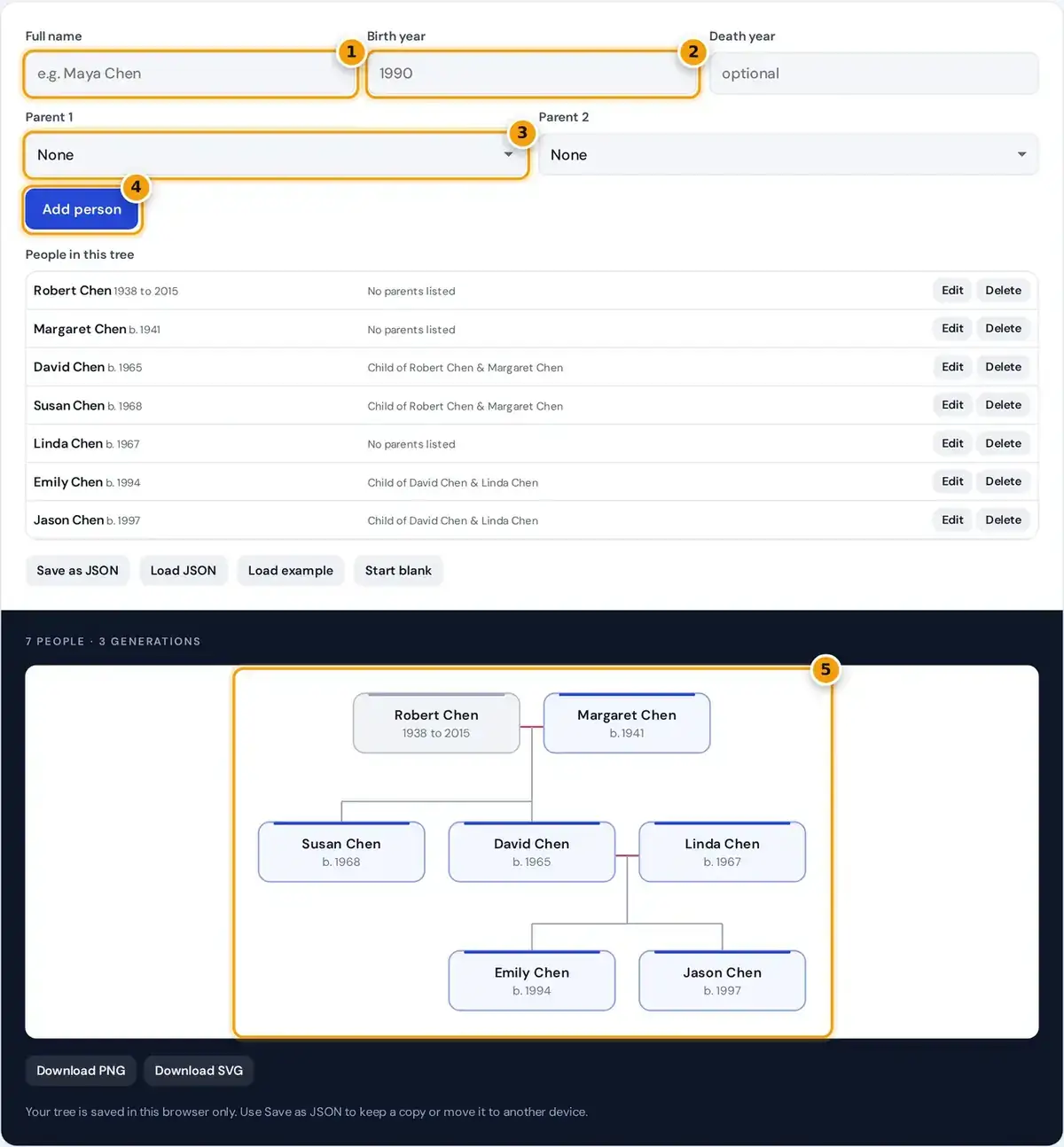
- Type the person's full name.
- Add a birth year, and a death year if it applies.
- Choose up to two parents from people already in the tree.
- Press Add person. Edit or delete anyone from the list below.
- See the tree arranged by generation, then download it as PNG or SVG, or save it as JSON.
Start with the oldest generation you know. Type a full name, add a birth year and a death year if you have them, then press add person to place that relative on the chart immediately.
For each child, choose their parents from the Parent 1 and Parent 2 menus, which list everyone already in the tree. Partners who married into the family can be added with no parents at all.
Use Edit to fix a name, year or parent, and Delete to remove someone. The example shows three generations of one family, and pressing start blank clears it so you can begin your own tree.
How the Generations Are Arranged
This family tree maker works out each generation from the parent links alone. People with no parents in the tree start at generation 1, and everyone else sits one row below their lowest listed parent.
partners with a shared child: both take the larger generation
Once two people share a child, they become a couple and are drawn side by side. A partner who married into the family moves to the same row as their spouse, even without parents listed.
Within a row, children are centred under the midpoint of their parents and siblings stay together. Connecting lines run from each couple down to their children, so the oldest generation always sits at the top.
Worked Example: Three Generations
In the example, Robert and Margaret have no parents listed, so they are generation 1. Their children David and Susan list them as parents, which places both of them one row lower, in generation 2.
Linda has no parents listed, but she shares children with David, so she moves to generation 2 beside her spouse. She is the in-law, and the tree places her next to David not beside Susan.
Emily and Jason have David and Linda as parents, making them generation 3 and the grandchildren of Robert and Margaret. The chart holds 7 people in 3 generations, and adding Emily's daughter creates a fourth.
Types of Family Tree Charts
A descendant chart starts with one couple and runs downward through their children and grandchildren. That is the layout this tool draws, which suits family reunion handouts and showing how cousins connect to shared grandparents.
An ancestor chart, also called a pedigree chart, starts from one focal person and branches upward through parents, grandparents and then great grandparents. Genealogists often use it to track which direct lines still need research.
An hourglass chart combines both styles, with ancestors above the focal person and descendants below. You can build a similar view here by entering one person's parents, grandparents, children and grandchildren around that central person.
Where to Find Family Information
Begin with older relatives. Ask for names, dates and places, and note who told you what, because memories differ. Family bibles, letters, photos with notes on the back and each old birth certificate help too.
For Canadian genealogy, Library and Archives Canada genealogy and family history offers census returns from 1825 onward and many other collections that are free to search online. Its guides explain where each record is kept.
Provincial vital statistics offices issue official birth, marriage and death records, while older ones are often held in provincial archives. Newspaper obituaries and a DNA test can confirm family links that paper records cannot show.
Downloading, Printing and Sharing
Download the chart as a PNG or an SVG file. The PNG is rendered at twice the screen resolution, so it stays sharp when you print it on letter paper or share it by message.
The SVG is a vector file, so it scales to any size without blurring. Open it in a design program to add photos or colours, or send it to a print shop for a poster.
A clean, high resolution chart works well for a school project, a family reunion handout or a memorial display. Adding birth and death years gives relatives useful context without cluttering the page with extra text.
Saving, JSON Files and Privacy
Everything you type stays on your own device. The tree is kept in your browser's local storage, which is private to this browser and cleared if you clear site data or use a private window.
To keep a permanent copy, press Save as JSON. The JSON file holds names, years and parent links in a simple readable format, and Load JSON opens it again on another device or browser later.
The tool does not import or export GEDCOM, the format most genealogy programs use. Think carefully before sharing charts that list living relatives with full names and birth years, because that information can identify them.
Limits of This Tool
Each person can have up to two parents, and a tree holds up to 150 people. That suits family charts, school assignments and reunion handouts, while the chart grows wider and taller with each generation.
A remarriage is supported through a different parent pair for each set of children. The chart does not record marriage dates, places, adoption notes or photos, so keep those details in a separate research file.
Very large trees with many intermarried branches may need dedicated genealogy software. For research methods and record types, the US National Archives genealogy starter guide is a useful next step once your chart is complete.
Frequently asked questions
How do I add a husband or wife to the family tree?
Add the partner as a person with no parents, then select both partners as Parent 1 and Parent 2 for their child. They are then drawn side by side as a couple in the same generation.
Can I save my family tree and edit it later?
Yes. It is kept in this browser automatically, and Save as JSON downloads a file you can open again with Load JSON on any device, so your edits are never locked to one computer.
How many generations can the family tree show?
There is no fixed limit on generations. The tree holds up to 150 people, and the chart grows taller and wider as you add them, with each generation drawn on its own row.
Can I print my family tree?
Yes. Download the PNG, which is rendered at twice the screen resolution, and print it from any image viewer, or download the SVG for sharp printing at poster size.
What should I include in a family tree?
At minimum, include each person's name and their parents. Birth and death years add useful context. Start with yourself or your oldest known ancestors, then add siblings, partners and children generation by generation.
Is my family information uploaded anywhere?
No. The tree is built in your browser and stored only on your device, unless you choose to share the downloaded PNG, SVG or JSON files with other people yourself.