Quick answer: A reverse text generator writes your text backwards. Paste text, choose what to reverse (letters, word order, each word, lines or sentences) and copy the result. "Hello world" becomes "dlrow olleH" with letters reversed, "world Hello" with word order reversed, and "olleH dlrow" with each word reversed.

What Is a Reverse Text Generator?
A reverse text generator is a tool that rewrites text in the opposite order, so the last character comes first and the first comes last. People use it for puzzles, secret messages, social media bios, testing software and checking palindromes, and it saves you from writing a sentence backwards by hand, which is slow and easy to get wrong.
Unlike a single-mode tool, this reverse text generator offers five modes: reverse every letter, reverse the order of words, spell each word backwards in place, flip the order of lines, or flip the order of sentences. It also tells you whether your text is a palindrome. If you want letters that look rotated as well as reversed, use the upside down text generator, which swaps each letter for an upside-down look-alike.
How Do You Write Text Backwards?
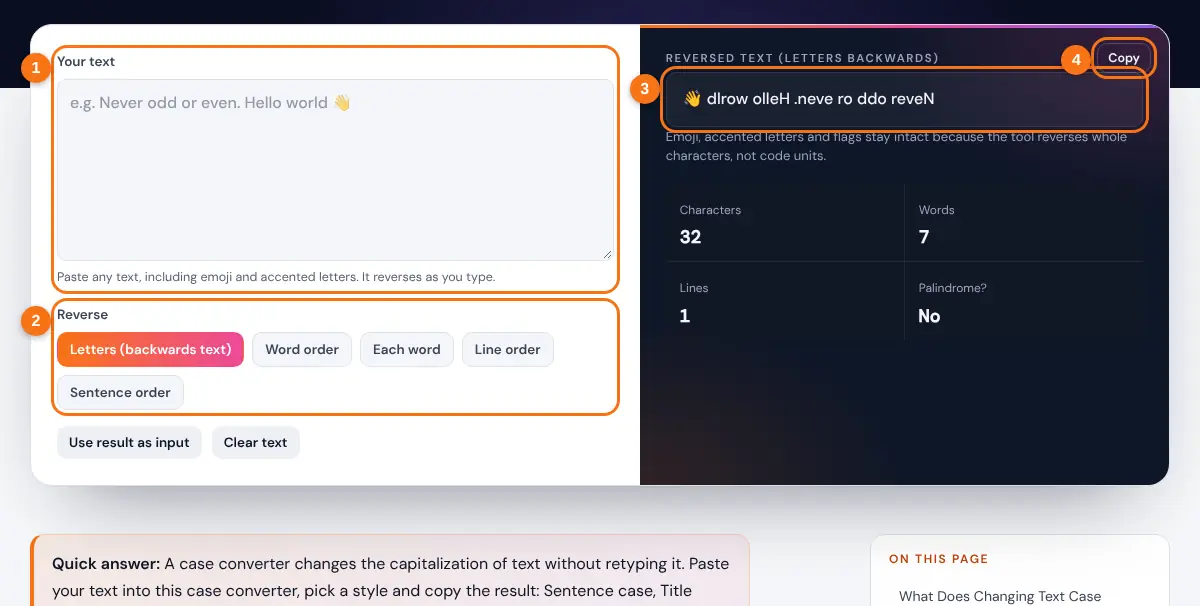
- Type or paste your text into the box. Several lines are fine.
- Choose a mode: Letters, Word order, Each word, Line order or Sentence order.
- Read the result on the right. The palindrome check updates as you type.
- Press Copy, or press Use result as input to reverse it again with a different mode.
Reversing text twice in the same mode always gives back the original, which is a handy way to decode a backwards message someone sent you.
What Is the Difference Between the Reverse Modes?
Each mode reverses a different unit of text: characters, words, lines or sentences. Formally, letter reversal takes a string of n characters and returns them in the opposite order.
Word order: w1 w2 ... wk → wk ... w2 w1 (spelling unchanged)
Worked example: "Stressed desserts" has 17 characters. Reversing c1 to c17 gives "stressed dessertS", because "desserts" is "stressed" spelled backwards. Word order mode gives "desserts Stressed", and each word mode gives "dessertS stressed".

| Mode | "Hello world. See you soon." | Best for |
|---|---|---|
| Letters | .noos uoy eeS .dlrow olleH | Backwards messages, puzzles, palindromes |
| Word order | soon. you See world. Hello | Word games, testing word-level code |
| Each word | olleH dlrow. eeS uoy noos. | Secret notes that keep word positions |
| Line order | Last line first (for multi-line text) | Flipping lists, logs and chat exports |
| Sentence order | See you soon. Hello world. | Reordering paragraphs, writing exercises |
Each word mode keeps punctuation at the end of a word where it was, so "Hello," becomes "olleH," rather than ",olleH". Letter mode reverses everything, punctuation included, which is what a true mirror of the text looks like.
Why Do Some Backwards Text Tools Break Emoji?
Simple tools reverse text one code unit at a time, which splits characters that are built from several pieces. A thumbs up with a skin tone, a family emoji or a flag such as 🇺🇸 is stored as two or more code points, and reversing them separately turns a US flag into a different flag or a broken symbol.
This generator splits text into grapheme clusters, the user-perceived characters defined in Unicode Standard Annex #29, before reversing. Accented letters, emoji with skin tones and flags therefore stay whole, and "café 🇺🇸" correctly becomes "🇺🇸 éfac". Need to check how long your reversed bio is? The character counter counts the same way.
Related Tools
- Upside Down Text Generator
- Text Repeater
- Case Converter
- Remove Line Breaks
- Glitch Text Generator
- Atbash Cipher
Frequently asked questions
How do I type backwards text?
Paste your text into the box with Letters mode selected and copy the result. "Good morning" becomes "gninrom dooG".
Is backwards text the same as mirror text?
Not quite. Backwards text reverses the order of normal letters. Mirror text also flips each letter's shape, which needs special Unicode look-alikes; the upside down text generator offers a mirror option.
What is a palindrome?
A palindrome reads the same forwards and backwards once spaces, punctuation and capitals are ignored, such as "Never odd or even" or "A man, a plan, a canal: Panama". The tool checks this automatically.
Can I reverse a list of lines?
Yes. Choose Line order and the last line moves to the top while each line's text stays readable. It is useful for flipping chat logs or sorted lists.
Does reversing text work in other languages?
Yes. Any script reverses by character, including accented Latin, Cyrillic, Greek and Chinese. Right-to-left scripts such as Arabic and Hebrew may display in surprising ways because your device applies its own text direction rules.
Is reversed text a secure way to hide a message?
No. Anyone can read it by reversing it again. It is fine for fun or puzzles, but use real encryption for anything private.