Quick answer: To remove line breaks, paste your text, choose Keep paragraphs to join broken lines while keeping blank-line paragraph gaps, or Remove all line breaks to make one block, then copy. A 4-line sentence copied from a PDF becomes one clean line, with a space where each line break was.

What Does a Line Break Remover Do?
A line break remover deletes the hard returns inside a block of text and replaces each one with a space, so broken lines flow back into normal sentences. It fixes text copied from PDFs, emails, old documents and terminal output, where every visual line ends with a real line break that ruins formatting when you paste it elsewhere.
This tool has three modes. Keep paragraphs joins lines inside each paragraph but keeps the blank line between paragraphs. Remove all line breaks turns everything into one continuous block. Replace with lets you put a comma, semicolon, tab or any string where each break was, which turns a column of values into a list in one step. Optional cleanup collapses double spaces, trims stray spaces and rejoins words that were split with a hyphen at the end of a line. To clear repeated rows after that, use remove duplicate lines.
How Do You Remove Line Breaks from Text?
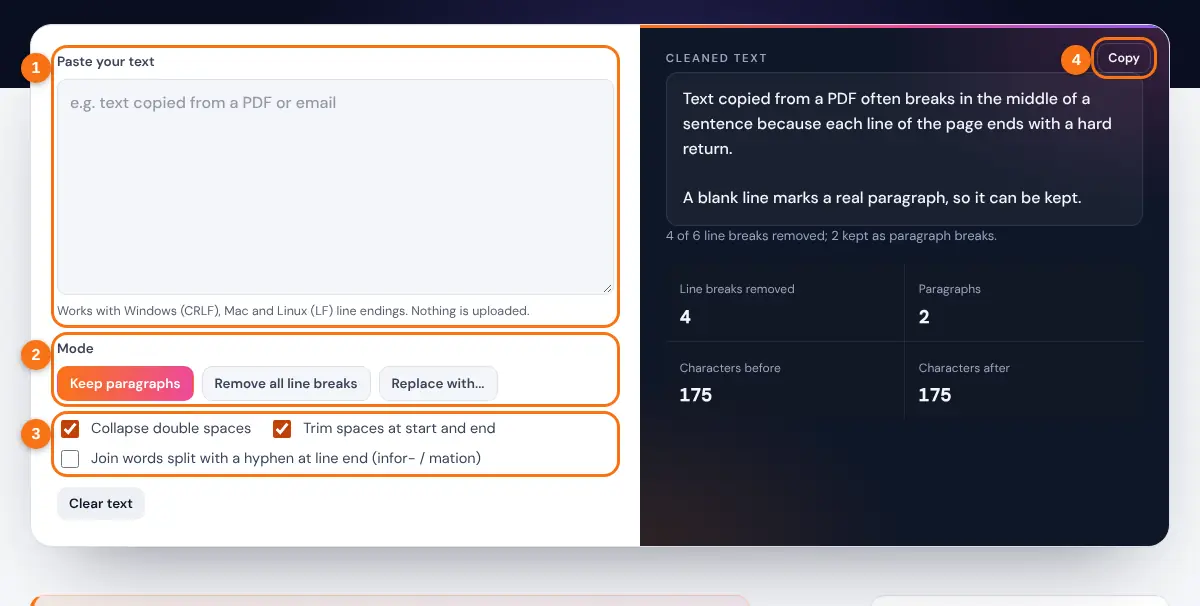
- Paste the text with unwanted line breaks into the box.
- Choose Keep paragraphs, Remove all line breaks, or Replace with.
- For Replace with, type the replacement, such as a comma and a space.
- Leave Collapse double spaces and Trim on, and tick the hyphen option for text from books or PDFs.
- Copy the cleaned text and paste it where you need it.
The stats show how many line breaks were removed, how many paragraphs remain and the character count before and after, so you can confirm nothing else changed.
What Kinds of Line Breaks Are There?
A line break is an invisible control character, and different systems use different ones. Windows writes a carriage return followed by a line feed (CRLF), while macOS, Linux and the web use a line feed (LF) alone. Older Mac files used a carriage return (CR) alone, and Unicode adds dedicated line and paragraph separators.
Keep paragraphs: kept = one blank line (2 breaks) between each pair of paragraphs
Worked example: the sample text has 4 lines in the first paragraph (3 breaks), a blank line (2 breaks) and 2 lines in the second paragraph (1 break), so 6 line breaks in total. Keep paragraphs removes 4 and keeps 2, leaving 2 clean paragraphs. Remove all line breaks removes all 6.
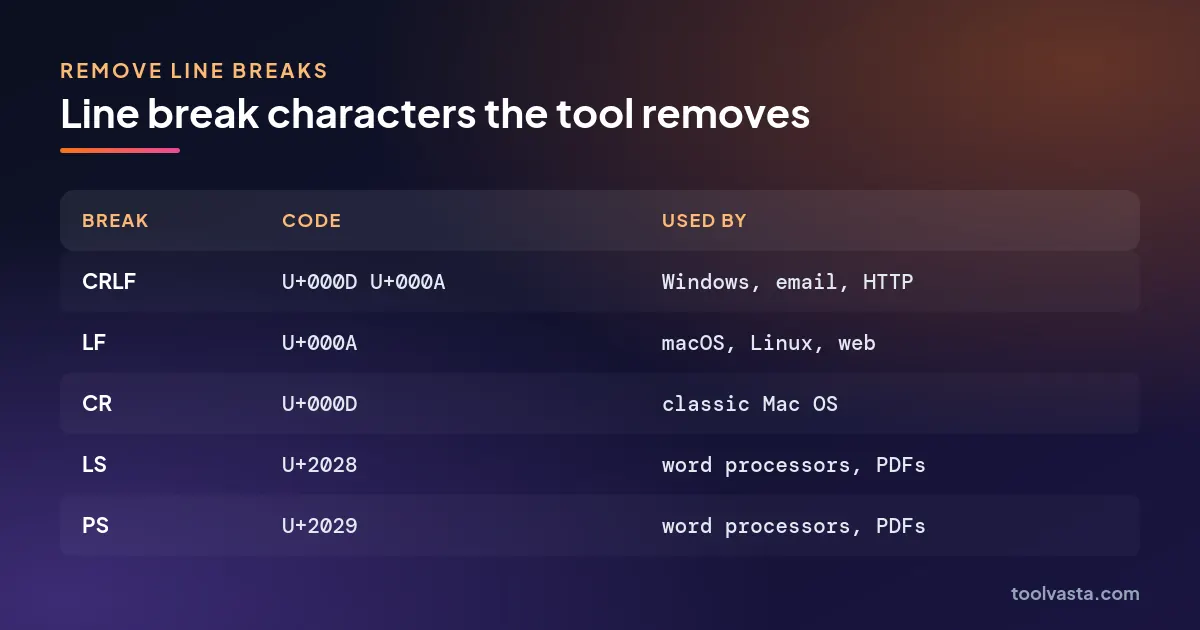
| Line break | Code | Written as | Where you see it |
|---|---|---|---|
| CRLF | U+000D U+000A | \r\n | Windows text files, email (SMTP), HTTP headers |
| LF | U+000A | \n | macOS, Linux, web forms, most code |
| CR | U+000D | \r | Classic Mac OS files (before 2001) |
| Line separator | U+2028 | LS | Some word processors and PDFs |
| Paragraph separator | U+2029 | PS | Some word processors and PDFs |
The Unicode line breaking algorithm (UAX #14) lists all of these as mandatory breaks. Because the tool treats each CRLF pair as one break, Windows text does not end up with double spaces.
Why Does Text Copied from a PDF Have Line Breaks?
PDF files store text as positioned lines rather than flowing paragraphs, so when you copy a passage, most viewers insert a line break at the end of every visual line. Emails formatted as plain text do the same thing at about 72 to 78 characters, and code editors keep whatever breaks were typed.
Choose Keep paragraphs for PDF and email text, because a blank line usually marks a real paragraph. Tick the hyphen option only when words were split across lines, such as "infor-" and "mation"; leave it off for normal text, because it will also join genuine hyphenated words that happen to fall at a line end, such as "well-known". When the paragraphs are clean, check their length with the word counter or fix the capitals with the case converter.
Related Tools
- Remove Duplicate Lines
- Case Converter
- Word Counter
- Character Counter
- Text Repeater
- Reverse Text Generator
Cleaning up copied text? Our guide shows how to remove line breaks and clean up pasted text, step by step.
Frequently asked questions
How do I remove line breaks but keep paragraphs?
Choose Keep paragraphs. Single line breaks become spaces, and any blank line between paragraphs is kept as a single paragraph break.
How do I turn a list into comma separated values?
Choose Replace with and type a comma followed by a space. A column of names pasted from a spreadsheet becomes one line such as "Anna, Ben, Carla".
How do I remove line breaks in Word?
In Microsoft Word, open Replace, search for ^p (paragraph mark) or ^l (manual line break) and replace it with a space. Pasting the text here is quicker when you want to keep real paragraphs.
How do I remove line breaks in Excel cells?
Use =SUBSTITUTE(A1,CHAR(10)," ") in Excel, or Find and Replace with Ctrl+J in the Find box. For a single block of text, this tool is faster.
Why did words get stuck together?
That happens when the hyphen option joins a real hyphenated word that fell at a line end. Untick it and the tool always puts a space where each line break was.
Is my text uploaded?
No. All cleaning runs in your browser, so confidential documents never leave your device.