You copy a paragraph from a PDF, paste it into an email or a CMS, and it arrives as a ragged column of short lines. Every line ends where the original page ended, a few words are split with hyphens, and there are double spaces in odd places. The fastest fix is to paste the text into a remove line breaks tool, choose Keep paragraphs, and copy the result back. This guide explains why pasted text breaks in the first place, how to clean it without destroying real paragraphs, and which extra steps turn messy copied text into something you can publish.
Why Does Pasted Text Come Out Broken?
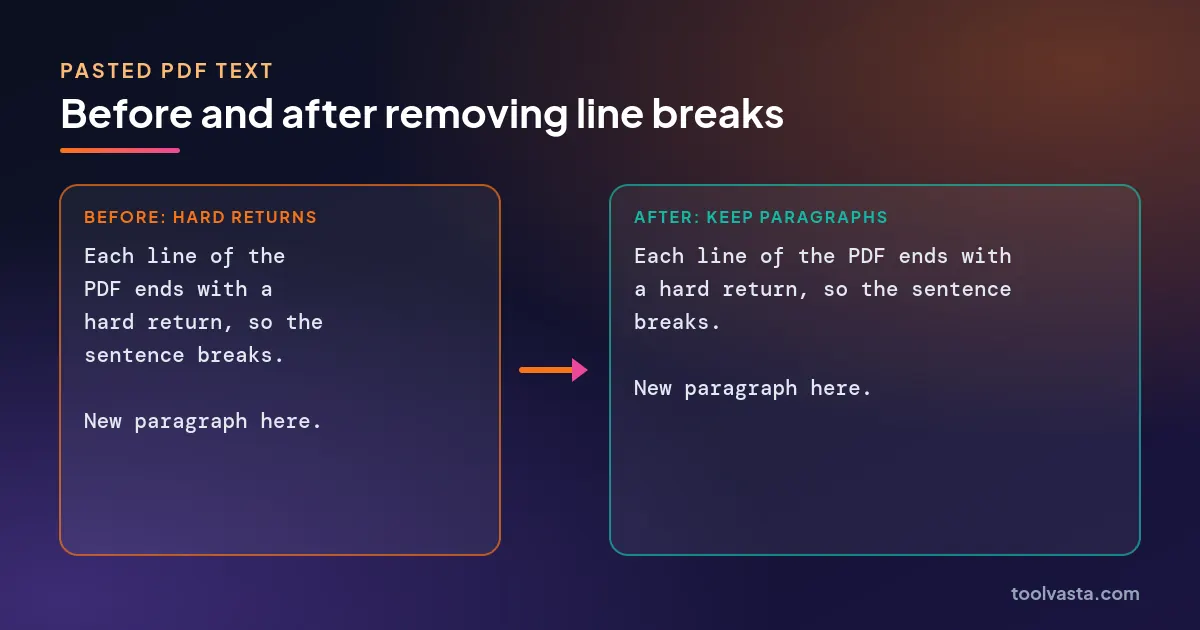
Pasted text breaks because the source stored each visual line as a separate piece of text and ended it with a hard line break. Your clipboard copies those breaks faithfully, so the new app shows them even though the lines no longer need to end there.
PDFs store lines, not paragraphs
A PDF is a page description format. It records where each line of text sits on the page, not which lines belong to the same paragraph. When you select and copy, most PDF viewers rebuild the text line by line and insert a break at the end of each one. Justified text and multi-column layouts make it worse, because the viewer may also add hyphens and read columns in the wrong order.
Plain-text email wraps at about 72 characters
Many email clients send plain-text messages with lines wrapped at around 72 to 78 characters. Copy a quoted reply or a newsletter from one of those messages and each wrapped line keeps its own break. Code editors, terminals and log files behave the same way because they keep whatever the author typed.
Windows, Mac and Linux use different line endings
There is no single line break character. Windows uses a carriage return followed by a line feed (CRLF), while macOS, Linux and the web use a line feed (LF) on its own. Internet standards such as RFC 5198 on Unicode text for network interchange specify CRLF for text sent between systems, which is why email often arrives with Windows-style endings. Some word processors also use the Unicode line separator (U+2028). A good cleaner treats all of these as one break each, so a CRLF pair never turns into two spaces.
How Do You Remove Line Breaks Without Losing Paragraphs?
You remove line breaks without losing paragraphs by deleting single breaks and keeping double breaks. In most copied text, a single break is a wrapped line and a blank line is a real paragraph boundary, so the rule works for PDFs, emails and documents alike.
- Paste your text into the remove line breaks tool.
- Choose Keep paragraphs. Each single break becomes a space; each blank line stays as a paragraph break.
- Leave Collapse double spaces and Trim switched on to tidy the joins.
- Check the stats: the count of breaks removed and the number of paragraphs should match what you expect.
- Copy the clean text into your document, email or CMS.
If the source had no blank lines between paragraphs, the tool cannot know where one paragraph ends, so you get one long block. In that case look for sentences that end with a full stop at the end of a short line, and add a blank line there before you clean. For copy that must be one single line, such as a meta description or a spreadsheet cell, choose Remove all line breaks instead.
Turn a column into a comma separated list
The same idea works in reverse when you want a list on one line. Paste a column of names, emails or tags copied from a spreadsheet, choose Replace with, and type a comma and a space. "Anna", "Ben" and "Carla" on three lines become "Anna, Ben, Carla", ready for an email To field, a SQL IN clause or a tag box.
How Do You Fix Hyphens, Double Spaces and Stray Characters?
Fix them after the line breaks are gone, because the joins are where most of the mess appears. Three problems cover nearly every case.
- Split words: justified PDFs often break a word across two lines with a hyphen, such as "infor-" and "mation". Turn on the hyphen option to rejoin them. Leave it off for ordinary text, because it will also join real compounds such as "well-known" if they fall at a line end, so scan the result.
- Double spaces: a space at the end of a line plus the space that replaces the break gives two spaces. Collapse double spaces fixes this in one pass, including non-breaking spaces from web pages.
- Odd quotes and symbols: curly quotes, ligatures such as "fi" and bullet characters may come across from PDFs. Search for them in your editor after cleaning, or retype the few that matter.
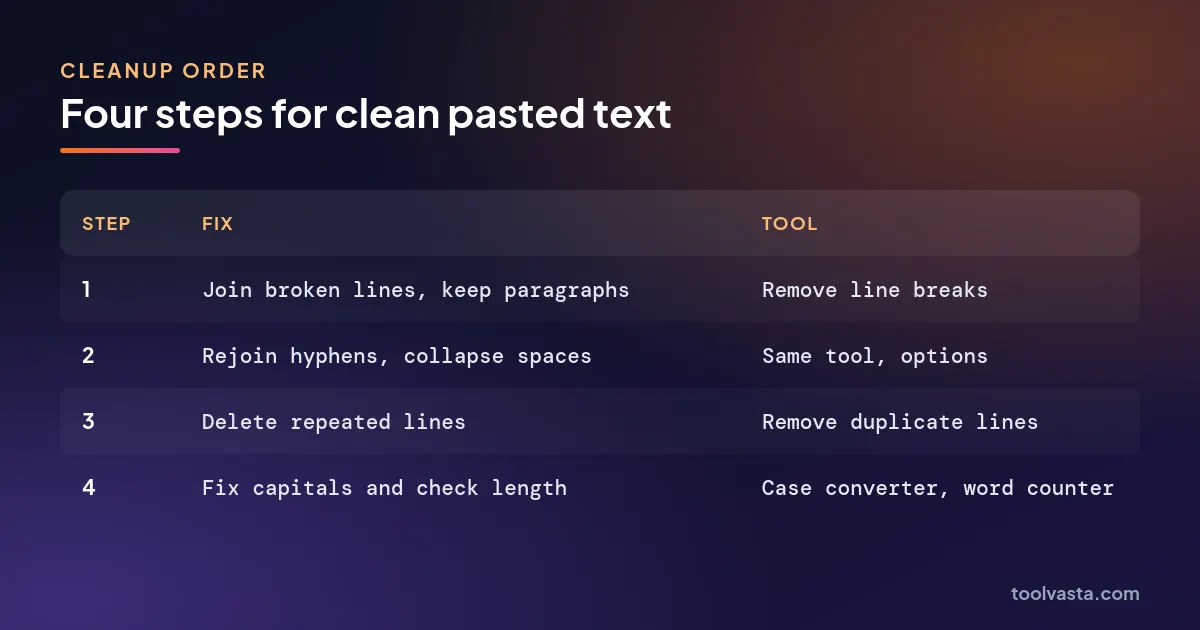
Capital letters are the last common problem. Headings copied from a PDF are often in full capitals, and pasting them into a page that uses sentence case looks wrong. The case converter switches them to sentence case or title case without retyping.
How Do You Remove Duplicate Lines After Cleaning?
Paste the cleaned list into a remove duplicate lines tool and keep the first copy of each value. Lists copied from several sources almost always contain repeats: the same email in two exports, a keyword that appears in three reports, or a URL listed in both a sitemap and a crawl.
Two settings matter most. Ignore uppercase and lowercase, so that "Anna@Example.com" and "anna@example.com" count as one entry. Trim spaces, so that an invisible trailing space does not make two identical lines look different. With both switched on, a 7-line sample list with 3 hidden repeats shrinks to 4 unique lines, and the tool shows which values were repeated so you can trace where they came from.
Order matters here. Remove line breaks first only when your items are split across lines; for a normal one-item-per-line list, go straight to deduplication, because joining the lines would merge the items into one.
What Other Quick Text Fixes Are Worth Knowing?
A few small tools save time once your text is clean, especially if you test forms, write for social media or prepare content in bulk.
- Fill a field with test text: the text repeater copies a word or sentence up to 10,000 times with any separator, so you can check where a form or layout cuts off long input.
- Flip text for puzzles or checks: the reverse text generator writes text backwards by letter, word, line or sentence, and tells you if a phrase is a palindrome. Line order mode is handy for flipping a chat export so the oldest message comes first.
- Check the length: once the text is final, the word counter confirms word count and reading time before you submit an essay or publish a post.
How Do You Remove Line Breaks in Word, Excel and Google Sheets?
Every major app can remove line breaks with find and replace, though the codes differ and none of them keeps paragraphs automatically. Use these when the text must stay inside the app; otherwise an online cleaner is quicker.
| App | Find | Replace with | Notes |
|---|---|---|---|
| Microsoft Word | ^p (paragraph mark) or ^l (manual line break) | A space | Replace ^p^p with a placeholder first to keep paragraphs |
| Excel | Ctrl+J in the Find box | A space | Or use =SUBSTITUTE(A1,CHAR(10)," ") |
| Google Sheets | =SUBSTITUTE(A1,CHAR(10)," ") | Formula result | Also works with REGEXREPLACE |
| VS Code or Notepad++ | \r?\n in regex mode | A space | Covers both Windows and Unix endings |
The placeholder trick in Word is worth learning: replace every double paragraph mark with a rare string such as ###, replace the remaining single marks with a space, then replace ### with a single paragraph mark. That is exactly what the Keep paragraphs mode does in one click. If you are curious why text editors and the web treat breaks this way, the W3C introduction to character encodings is a clear starting point.
Frequently asked questions
Why does copying from a PDF add line breaks?
PDFs store text as positioned lines, not flowing paragraphs, so viewers add a break at the end of each visual line when you copy. Joining single breaks and keeping blank lines restores the paragraphs.
What is the difference between a line break and a paragraph break?
A line break ends a line; a paragraph break separates blocks of text. In plain text a paragraph break is usually a blank line, which means two line breaks in a row.
How do I remove line breaks but keep paragraphs?
Use a tool with a Keep paragraphs mode, or in Word replace double paragraph marks with a placeholder, replace single marks with spaces, then restore the placeholders as paragraph marks.
Should I remove duplicates before or after removing line breaks?
For a list with one item per line, remove duplicates without removing line breaks. Remove line breaks first only when the items themselves are split across several lines.
Is it safe to paste private text into an online tool?
Use tools that run in your browser. The ToolVasta text tools process everything on your device, so nothing you paste is uploaded or stored.