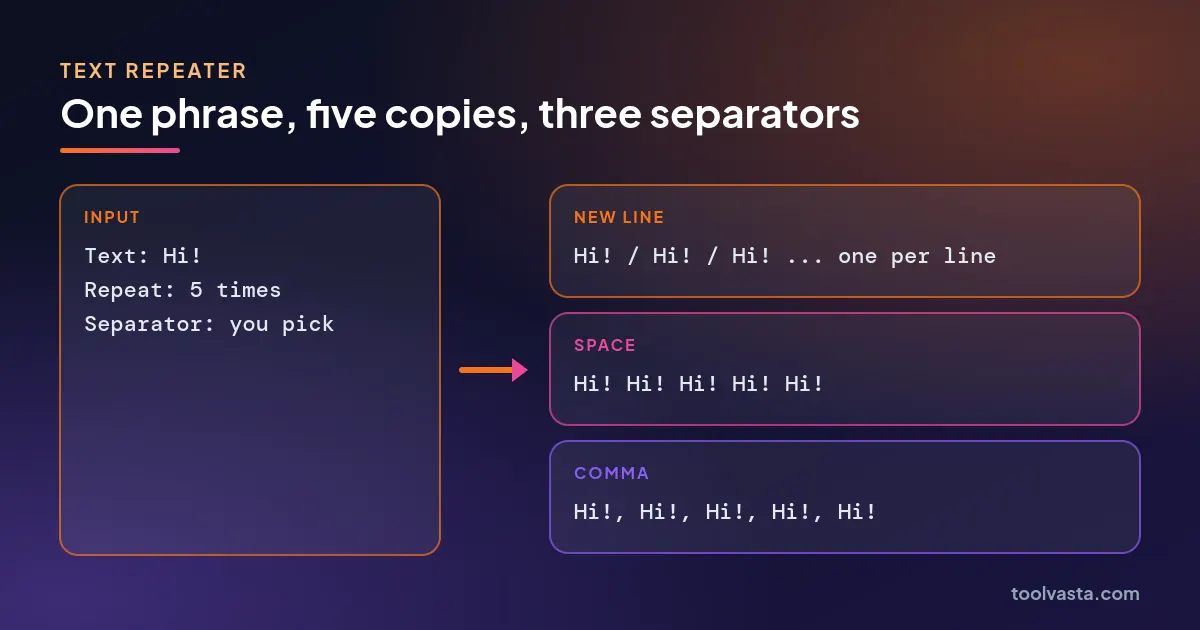
Quick answer: A text repeater copies a word, sentence or emoji as many times as you choose and joins the copies with a separator. Type your text, enter a count up to 10,000, pick new line, space, comma or a custom separator, then copy. For example, "Hi!" repeated 5 times with spaces gives 19 characters.
What Is a Text Repeater?
A text repeater is a tool that duplicates a piece of text a set number of times in one step, so you do not have to paste the same thing over and over. It works with single words, whole sentences, emoji and even multi-line blocks, and it keeps every character exactly as you typed it.
This text repeater goes up to 10,000 copies and lets you choose what goes between them: a new line, a space, nothing at all, a comma, a blank line or any custom string such as " | ". You can number each copy, add a trailing separator for code or CSV work, and download the output as a .txt file when it is too long to paste comfortably. Before you post a long result anywhere with a limit, run it through the character counter to see how it fits.
How Do You Use the Text Repeater?
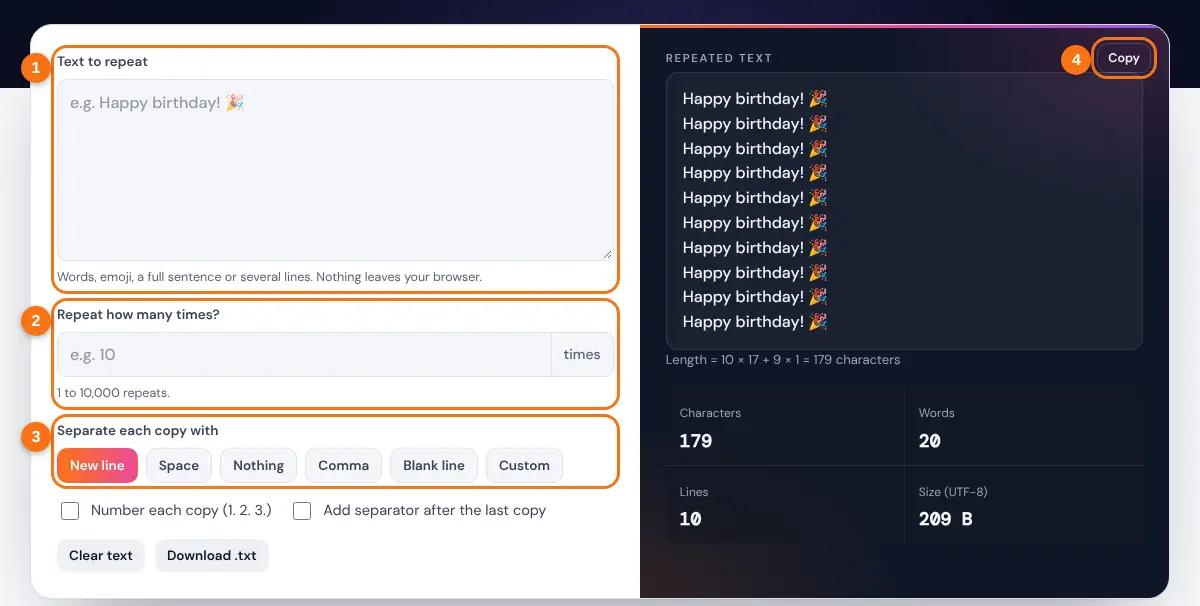
- Type or paste the text you want to repeat. Emoji and line breaks are fine.
- Enter how many times to repeat it, from 1 to 10,000.
- Choose a separator: new line, space, nothing, comma, blank line or custom.
- Optionally number each copy or add a separator after the last copy.
- Press Copy to put the result on your clipboard, or Download .txt to save it.
The output updates as you type, and the stats panel shows the character count, word count, line count and file size so you know what you are about to paste.
How Long Will the Repeated Text Be?
The total length equals the number of copies times the length of your text, plus one separator for every gap between copies. There is always one gap fewer than there are copies, unless you add a trailing separator.
n = number of repeats, L = characters in your text, S = characters in the separator
Worked example: repeat "Hi!" (3 characters) 5 times with a space (1 character) between copies. Total = 5 × 3 + 4 × 1 = 19 characters, which is exactly "Hi! Hi! Hi! Hi! Hi!". Switch the separator to ", " (2 characters) and the total becomes 5 × 3 + 4 × 2 = 23.

| Text (length) | Repeats | Separator | Total characters |
|---|---|---|---|
| Hi! (3) | 5 | Space (1) | 19 |
| I love you (10) | 100 | New line (1) | 1,099 |
| lol (3) | 1,000 | Nothing (0) | 3,000 |
| keyword (7) | 500 | Comma and space (2) | 4,498 |
| Happy birthday! (15) | 10,000 | New line (1) | 159,999 |
Emoji count as one character each in the tool, because it counts what you see rather than the hidden code units. File size is a different measure: in UTF-8 most emoji take 4 bytes, while plain English letters take 1 byte each, as the W3C guide to character encodings explains. That is why 1,000 hearts weigh far more than 1,000 letters.
What Can You Use Repeated Text For?
Most people use a text repeater for messages, testing and formatting work where typing the same thing by hand would be slow and error prone.
- Messages and fun: a birthday wish 100 times, a wall of hearts, or "I miss you" stacked line by line.
- Testing forms and layouts: paste 5,000 characters into a field to check where it cuts off, or fill a design with repeated words before real copy arrives.
- Data and code: build a comma separated list of placeholders, repeat a SQL value row, or create numbered lines for a template.
- Practice and teaching: make handwriting or spelling sheets where one word repeats across the page.
Please do not use repeated text to spam people or flood comment sections. Most chat apps and social platforms rate limit or filter repeated messages, and long walls of identical text are often removed. To style the result before you send it, try the bold text generator or flip it with the reverse text generator.
Related Tools
- Reverse Text Generator
- Remove Duplicate Lines
- Remove Line Breaks
- Character Counter
- Word Counter
- Fancy Text Generator
Frequently asked questions
How many times can I repeat text?
Up to 10,000 times per run, with a total output limit of 5 million characters so your browser stays responsive. For more, repeat the result itself: 10,000 copies of a 10-line block gives 100,000 lines.
How do I repeat text on a new line each time?
Choose the New line separator. Each copy then starts on its own line. Choose Blank line if you want an empty line between copies.
Can I repeat emoji?
Yes. Emoji, flags and skin tone variants repeat exactly as typed, and each one counts as a single character in the stats.
Why is the separator count one less than the repeats?
Separators sit between copies, so 5 copies have 4 gaps. Tick "Add separator after the last copy" if you need one at the end, for example when appending rows to a file.
Is my text saved or uploaded?
No. The text repeater runs entirely in your browser. Nothing you type is sent to a server or stored.
Will WhatsApp or Instagram accept very long repeated text?
Apps set their own message and caption limits and may block repeated content as spam. Keep messages short and check the length with a character counter before sending.