How to use the fancy text generator
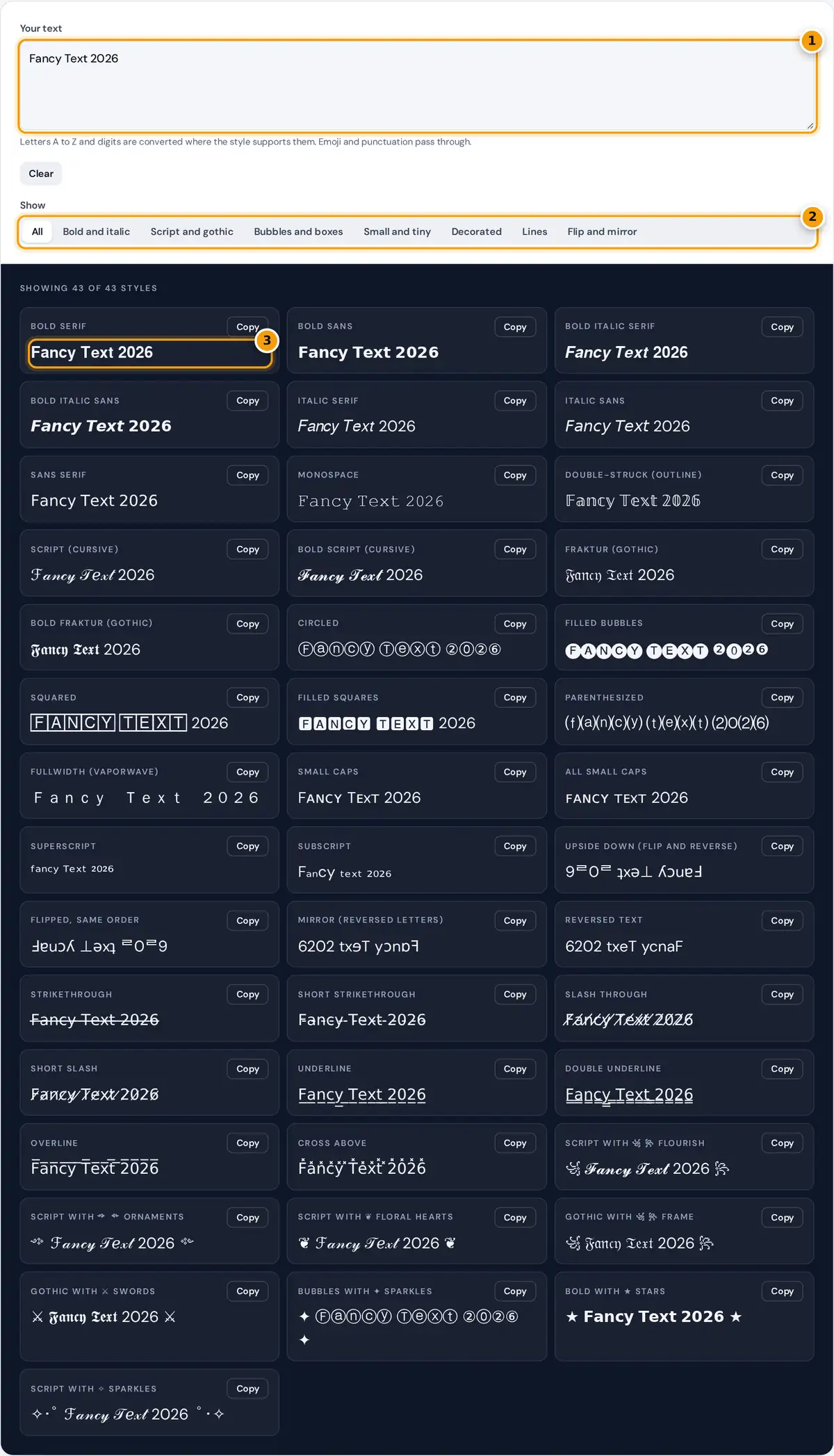
- Type or paste your text. Emoji and punctuation pass through unchanged.
- Filter styles: bold and italic, script and gothic, bubbles, small, decorated, lines or flip.
- Click Copy next to any style and paste it into your bio, post or chat.
Type or paste your text. All 43 styles update as you type. Use the category buttons to narrow the list, for example to Script and gothic for elegant names or Bubbles and boxes for playful text. Press Copy on any card and paste the result into a bio, caption, comment, message or game name.
How fancy text works
Most apps do not let you change fonts, so a fancy text generator swaps each normal letter for a different Unicode character that looks styled. Because the characters are part of the Unicode standard, they keep their look when copied. The styles come from five sources:
| Source | Styles | Sample |
|---|---|---|
| Mathematical Alphanumeric Symbols (U+1D400 to U+1D7FF) | Bold, italic, script, gothic, double-struck, sans, monospace | 𝐅𝐚𝐧𝐜𝐲 𝓕𝓪𝓷𝓬𝔂 |
| Enclosed Alphanumerics | Bubbles, filled bubbles, squares, parenthesized | Ⓕⓐⓝⓒⓨ 🄵🄰🄽🄲🅈 |
| Phonetic and modifier letters | Small caps, superscript, subscript | ꜰᴀɴᴄʏ ᶠᵃⁿᶜʸ |
| Look-alike letters | Upside down, mirror | ʎɔuɐɟ |
| Combining marks | Strikethrough, underline, slash, overline | F̶a̶n̶c̶y̶ |
line styles: each character + one combining mark, e.g. a + U+0336 = a̶
Example
In bold serif, capital letters start at U+1D400. F is the 6th letter, so it becomes U+1D400 + 5 = U+1D405 (𝐅). Small letters start at U+1D41A, so a becomes U+1D41A (𝐚) and n, the 14th letter, becomes U+1D41A + 13 = U+1D427 (𝐧). "Fancy" in bold is 𝐅𝐚𝐧𝐜𝐲. Digits have their own bold block at U+1D7CE, so 2026 becomes 𝟐𝟎𝟐𝟔.
Choosing a style
- Names and bios: bold script, bold sans and small caps are the easiest to read at small sizes.
- Headlines in captions: bold serif or bold sans make a line stand out without looking messy.
- Gaming and Discord names: gothic, decorated frames and filled squares look distinctive.
- Jokes and puzzles: upside down, mirror and reversed text.
- Prices and edits: strikethrough shows an old price or a crossed out word.
Limits
Only the basic Latin letters A to Z have styled versions in most sets, so accented letters such as é stay normal. Some sets are incomplete: there is no superscript q, no small capital x, and filled bubbles exist only as capitals. Filled squares for A, B, O and P can appear as emoji on phones.
Where these characters work
Because the result is plain Unicode text, it pastes into most places that accept emoji. In practice it usually works in:
- Instagram: bio, display name, captions and comments. Usernames only allow basic letters, numbers, periods and underscores.
- TikTok: profile bio, display name, captions and comments.
- Discord: messages, nicknames, channel topics and server descriptions.
- X, Facebook, YouTube and WhatsApp: posts, bios and messages.
Apps can change what they accept at any time, and some strip or replace unusual characters in names. Older phones and computers may show empty boxes when a font on the device does not include a symbol, so preview your text on a second device before using it somewhere important.
Accessibility and search caveats
Screen readers do not treat these symbols as ordinary letters. Depending on the reader and platform, a styled word may be read out one character at a time with names such as "mathematical bold capital H", or skipped completely. People who rely on assistive technology can miss your message entirely.
- Use styled text for short decorative accents, not for whole posts, names people need to find or important details like dates, prices and links.
- Do not style hashtags or keywords. Search features match normal letters, so styled words are usually not found in search.
- Where the platform offers real formatting, such as bold in Discord Markdown or in a document editor, use that instead because it stays accessible.
Frequently asked questions
How many fancy text styles are there?
The generator shows 43 styles in eight categories, including bold, italic, script, gothic, bubbles, small caps, superscript, line styles, flipped text and decorated frames.
Is fancy text safe to use?
Yes. The characters are standard Unicode text with no code or links. The main drawbacks are accessibility and search, since screen readers and search features do not read them as normal letters.
Why do some fancy letters show as boxes?
The device viewing the text lacks a font with that character. Mathematical styles are supported on current phones and computers, while some decorative symbols are less widely supported.
Can I use fancy text in my Instagram or TikTok username?
Usernames only accept standard letters, numbers, periods and underscores. You can use fancy text in the display name, bio, captions and comments.
Does the fancy text generator store my text?
No. All styles are created in your browser and nothing is sent to a server.