How to Use the Redacted Text Generator
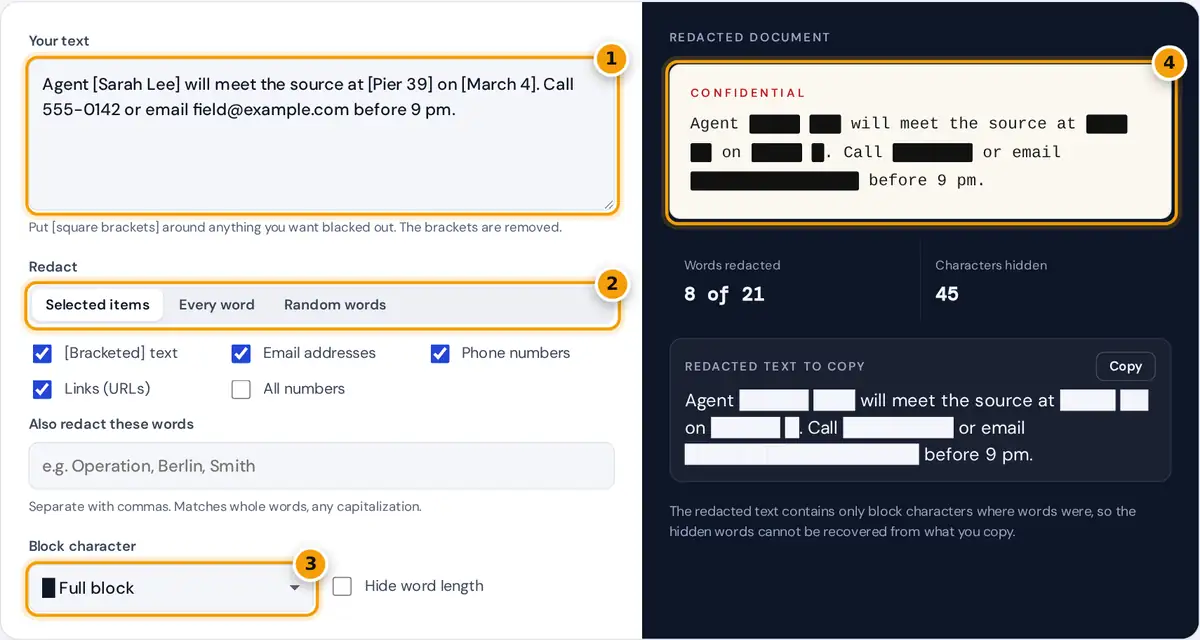
- Paste your text and put [square brackets] around anything to hide.
- Choose Selected items, Every word or Random words.
- Pick the block character and whether to hide word length.
- Read the redacted document, then copy the █ text below.
Paste your text and choose what to black out. In Selected items mode, anything inside [square brackets] is redacted and the brackets disappear, and you can also hide email addresses, phone numbers, links, all numbers or a list of words you type. Every word blacks out the whole text but keeps punctuation and spacing, which is perfect for a dramatic classified look. Random words hides a share of words you choose, and Shuffle picks a different set. The redacted document preview and the copyable text update instantly.
How the Redaction Works
The generator first removes the square brackets and remembers which characters were inside them. It then scans the text with patterns for emails, links and phone numbers, plus any words you listed, and marks every matching character. Finally, each run of marked characters is replaced by the same number of block characters, unless you choose to hide word length, in which case every redacted word becomes exactly six blocks. Spaces and line breaks are kept, so the layout of the original text survives.
hide word length on: redacted word = block character × 6
words redacted = words containing at least one marked character
Worked Example
The default text marks [Sarah Lee], [Pier 39] and [March 4] and also contains a phone number and an email address. The result is:
Agent █████ ███ will meet the source at ████ ██ on █████ █. Call ████████ or email █████████████████ before 9 pm.
"Sarah" has 5 characters, so it becomes five blocks, and the email field@example.com becomes 17. In total 8 of 21 words are redacted and 45 characters are hidden. The time "9 pm" stays visible because only phone-length numbers are matched unless you tick All numbers.
What Each Option Catches
| Option | Matches | Example |
|---|---|---|
| [Bracketed] text | Anything between [ and ] on one line | [Project Falcon] |
| Email addresses | name@domain.tld | field@example.com |
| Phone numbers | 7 or more digits with spaces, dots, dashes or brackets | +1 (555) 014-2000 |
| Links | Text starting with http://, https:// or www. | https://example.org/file |
| All numbers | Any digit sequence, including decimals | 39, 4, 1,250.75 |
| Word list | Whole words, any capitalization | Berlin, berlin, BERLIN |
Good Uses for Redacted Text
- Escape rooms, games and fiction: classified dossiers, mission briefings and puzzle clues.
- Screenshots and examples: hide names, emails and phone numbers before you share a message or a support ticket.
- Memes and social posts: the blacked-out format makes a joke or a teaser.
- Teaching: cloze exercises where students fill in the hidden words.
Is This Secure Redaction?
The text you copy contains only block characters in place of hidden words, so the originals are not in it. That is very different from drawing black boxes over a PDF or an image, where the words can remain underneath and be copied out. Still, this is a text tool, not a records system. For legal, medical or official documents, use the redaction feature of a dedicated PDF editor that permanently removes content, and check the result by searching it for a hidden word. Your text is processed only in your browser and is never uploaded.
Tips
- Turn on Hide word length when the number of letters could give away a name.
- Pattern matching can miss unusual formats, so read the result before sharing it.
- Use the X or asterisk option where block characters do not display, such as some older terminals.
- For a cloze worksheet, use Random words at 20 or 30 percent, then press Shuffle until the hidden words are the ones worth testing.
The redacted document preview mimics a typewritten case file, with each hidden run drawn as a solid bar. Take a screenshot of it for a dramatic image, or copy the plain text version to paste anywhere text is accepted.
Frequently asked questions
How do I make redacted text?
Paste your text, put square brackets around the words you want hidden, and copy the result. You can also redact emails, phone numbers, links, numbers or a list of words automatically, or black out every word.
Can someone recover the words from redacted text?
Not from the copied text, because the hidden words are replaced by block characters before you copy. With word length kept, the number of blocks shows how long each word was, so turn on Hide word length for extra safety.
Can I use this to redact legal documents?
It is fine for screenshots, examples and creative work. For legal, medical or official records, use a PDF editor with true redaction that removes content permanently, and follow the rules that apply to your organization.
What character is used for the black bars?
The default is the full block, U+2588. You can switch to a seven-eighths block, a dark shade, a square, the letter X or an asterisk if a platform does not show full blocks well.
Why was a number not redacted?
Phone number detection only matches runs of at least seven digits with common separators. Short numbers such as times and dates stay visible unless you tick All numbers or put them in brackets.
Is my text uploaded anywhere?
No. All matching and replacing happens in your browser with JavaScript. Nothing you paste is sent to a server or saved, so you can safely work with private messages.