How to Use the Serif Font Generator
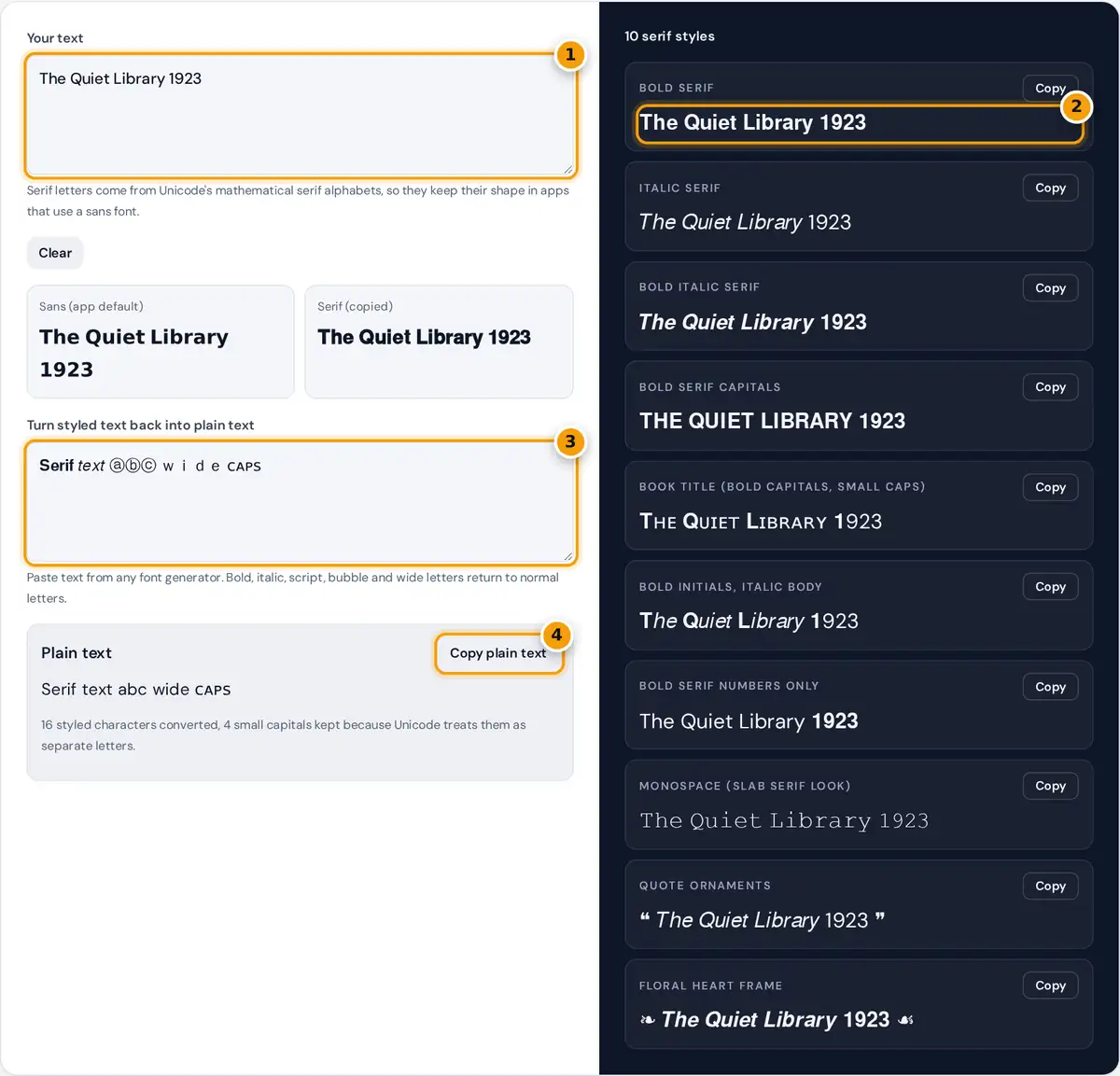
- Type a title, name or short line.
- Copy bold, italic or book title serif text.
- Paste styled text here to turn it back into plain letters.
- Copy the plain text result.
Type a title, a name or a short line into the first box. Ten serif styles update as you type, and the two small previews show the difference between the sans letters most apps use and the bold serif letters you will paste. Press Copy on any card. The second box works the other way round: paste text made with any font generator and get plain, searchable letters back.
Serif and Sans Serif in One Minute
Serifs are the small strokes at the ends of letters, the feet on a T or an I in a book typeface. Serif type feels classic, literary and formal, which is why books, newspapers and wedding invitations use it. Sans serif type has no feet and looks clean and modern, which is why nearly every app interface uses it. Because social apps show your text in their own sans font, the only way to get serif letters into a bio or caption is to use Unicode characters that already have serifs drawn in.
italic serif small = U+1D44E + (position − 1), except h = U+210E bold digit = U+1D7CE + digit
Worked Example
In "The Quiet Library 1923", T is the 20th letter, so its bold serif form is U+1D400 + 19 = U+1D413 (𝐓). The small h is the 8th letter: U+1D41A + 7 = U+1D421 (𝐡). The digit 1 becomes U+1D7CE + 1 = U+1D7CF (𝟏). The whole line in bold serif reads 𝐓𝐡𝐞 𝐐𝐮𝐢𝐞𝐭 𝐋𝐢𝐛𝐫𝐚𝐫𝐲 𝟏𝟗𝟐𝟑. In italic serif the small h is special: Unicode had already encoded it as the Planck constant, U+210E, so it is taken from there, which is why "The" becomes 𝑇ℎ𝑒. The book title style capitalizes each first letter in bold and sets the rest in small caps: 𝐓ʜᴇ 𝐐ᴜɪᴇᴛ 𝐋ɪʙʀᴀʀʏ 𝟏923.
The 10 Serif Styles
| Style | Sample | Good for |
|---|---|---|
| Bold serif | 𝐂𝐡𝐚𝐩𝐭𝐞𝐫 𝐎𝐧𝐞 | Headlines, names, quotes |
| Italic serif | 𝐶ℎ𝑎𝑝𝑡𝑒𝑟 𝑂𝑛𝑒 | Book and film titles, soft emphasis |
| Bold italic serif | 𝑪𝒉𝒂𝒑𝒕𝒆𝒓 𝑶𝒏𝒆 | One standout phrase |
| Book title | 𝐂ʜᴀᴘᴛᴇʀ 𝐎ɴᴇ | Bios, shop names, headers |
| Bold numbers only | Est. 𝟏𝟗𝟐𝟑 | Dates, prices, years |
| Quote ornaments | ❝ 𝑟𝑒𝑎𝑑 𝑚𝑜𝑟𝑒 ❞ | Quotes and testimonials |
Turning Styled Text Back into Plain Text
Styled letters are hard to search, edit and read aloud, so the converter normalizes them with Unicode compatibility normalization (NFKC). That rule maps each mathematical bold, italic or script letter, every circled letter and every full-width character back to the ordinary letter it was based on. Small capitals such as ᴀ and ʙ are real phonetic letters, not styled copies, so NFKC leaves them as they are and the tool tells you how many remain. The sample text in the box turns 𝐒𝐞𝐫𝐢𝐟 𝑡𝑒𝑥𝑡 ⓐⓑⓒ wide ᴄᴀᴘꜱ into Serif text abc wide ᴄᴀᴘꜱ.
Tips for Elegant Serif Text
- Pair one serif line with plain text. A bold serif name above a normal bio looks refined and stays readable.
- Italic serif is the natural choice for titles of books, films and albums.
- Use bold numbers only when you want dates or prices to stand out without restyling the words.
- Screen readers may spell out styled letters, so keep important details such as links, prices and dates readable in plain text too.
Where Serif Text Works Best
Serif letters suit places where you want a calm, literary or premium feel: a bookstagram bio, a boutique or bakery profile, a wedding announcement, a poetry caption or a quote card. Bold serif works for names and short headings, italic serif for titles and quotations, and the book title style for shop names. In a busy feed, a single serif line above plain text looks more polished than a whole caption in a styled font, and it keeps the rest of the post searchable.
Limits
Unicode has no plain upright serif alphabet separate from normal text, because ordinary letters already take whatever font the app uses. That is why the styles here are bold, italic or decorated. Only A to Z and the digits are covered, so accented letters stay in the app's font. Everything runs in your browser and nothing is stored.
Frequently asked questions
How do I get a serif font on Instagram or TikTok?
Type your text here and copy the Bold serif, Italic serif or Book title card. The letters are Unicode characters with serifs built in, so they keep their look when pasted into a bio, caption or comment.
What is the difference between serif and sans serif?
Serif letters have small finishing strokes, or feet, at the ends of their lines, like Times New Roman. Sans serif letters have none, like the fonts most apps use. Serif reads as classic and formal, sans as modern.
Is there a regular serif style without bold or italic?
No. Unicode only adds separate letters for styles that differ in meaning, such as bold and italic math symbols. Plain upright letters already use the app's own font, so a regular serif copy does not exist.
How do I turn fancy text back into normal text?
Paste it into the second box. The tool applies Unicode NFKC normalization, which turns bold, italic, script, bubble and full-width letters back into ordinary letters you can search, edit and copy.
Why are small caps not converted back?
Small capitals such as ᴀ and ʙ are separate phonetic letters in Unicode, not styled copies of A and B, so normalization keeps them. The tool counts them so you know which ones to retype.
Do serif Unicode letters work on every phone?
Bold and italic serif letters are supported on current iPhone, Android, Windows and Mac devices. Very old systems may show boxes. Ornaments such as ❧ are widely available but can look slightly different by font.