Quick answer: An Instagram font generator turns your text into Unicode letter styles such as 𝗯𝗼𝗹𝗱, 𝓈𝒸𝓇𝒾𝓅𝓉 and 𝕠𝕦𝕥𝕝𝕚𝕟𝕖 that you can paste into a bio, caption or comment. Type your text, choose where it goes, then copy a style. Bios allow 150 characters, so each style shows its own length.

What Is an Instagram Font Generator?
An Instagram font generator is a tool that converts normal letters into special Unicode characters that look like different fonts, so the style survives when you paste it into the app. Instagram itself only uses the system font, but it displays any Unicode character, and the Mathematical Alphanumeric Symbols block contains complete bold, italic, script, gothic and outline alphabets.
The Unicode Mathematical Alphanumeric Symbols chart shows those alphabets. They were added for mathematics, and Unicode Technical Report #25 states they are not intended for use in non-technical text, which is why screen readers and search can treat them differently from ordinary letters. That is the main reason to style a few words rather than your whole profile. If you want the same styles for other platforms, the fancy text generator has a larger set, and the Facebook font generator checks Facebook's own limits.
How Do You Use the Instagram Font Generator?
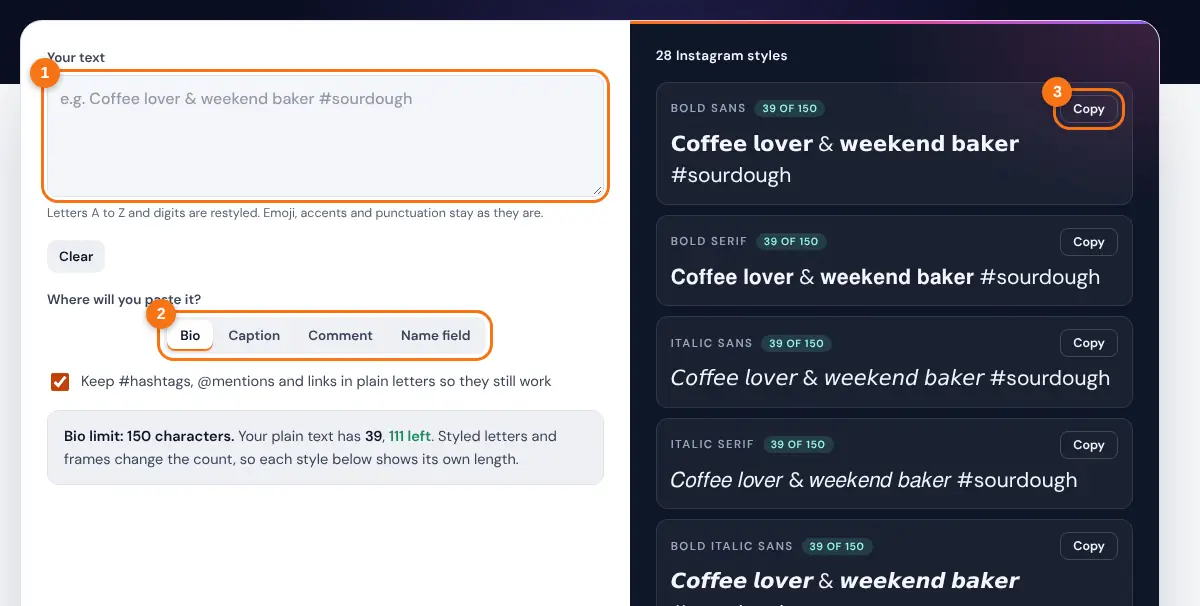
- Type or paste your text. Emoji and punctuation are kept as they are.
- Choose where you will paste it: Bio, Caption, Comment or Name field.
- Leave "Keep #hashtags, @mentions and links in plain letters" ticked so tags still work.
- Scroll the styles and check the length badge next to each one in Bio mode.
- Press Copy on a style, open Instagram and paste it into the field.
The tips box changes with your choice. In Caption mode it counts your hashtags against the current limit of 5, and in Name mode it explains why a plain name is easier to find.
How Many Characters Can You Use on Instagram?
An Instagram bio allows 150 characters, a caption allows 2,200 characters, and a post or reel can carry up to 5 hashtags. Usernames allow 30 characters and can only use plain letters, numbers, periods and underscores, so styled fonts are not possible there.
Styled letters count as 1 character each, but each one is 2 UTF-16 units
Worked example: "Coffee lover & weekend baker" is 29 characters. In bold sans it is still 29 visible characters, so it fits a bio easily. Add the ꧁ ꧂ frame with its two spaces and it becomes 33. The UTF-16 length of the bold version is 53, because each styled letter is stored as two units. If an app counts units rather than characters, the tool's badge warns you with a "may count as" figure.
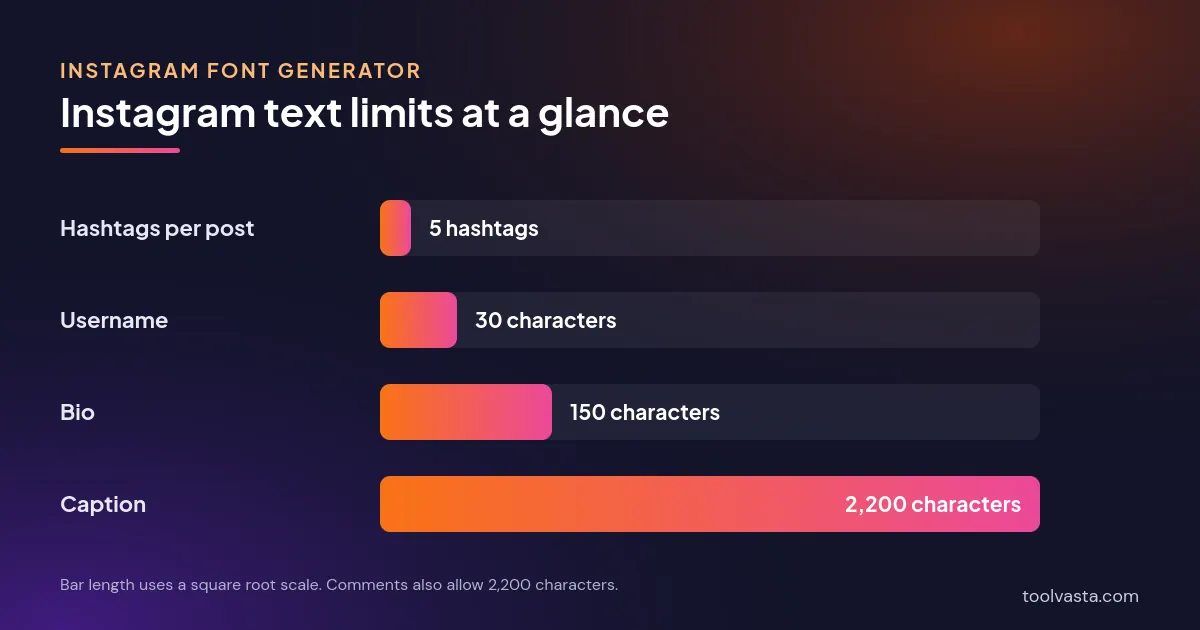
| Where | Limit | Styled fonts? |
|---|---|---|
| Username (@handle) | 30 characters | No: plain letters, numbers, periods and underscores only |
| Name field | Short display name | Displays, but keep it plain so people can search for you |
| Bio | 150 characters | Yes, best for one heading line |
| Caption | 2,200 characters | Yes, best for the first line |
| Hashtags | 5 per post or reel | Keep plain so the tag links |
| Comments | 2,200 characters | Yes, a word or two |
Which Instagram Fonts Work Best?
Bold sans and plain italic are the safest choices because they read clearly at small sizes on every phone. Script and gothic look striking in one short line, while bubble, boxed and strikethrough styles are best kept for a single word.
- Use one styled line: a bold or script heading in your bio, then plain text for the details people need to read.
- Keep tags plain: a styled #hashtag or @mention is a different string of characters, so it will not link. The tool keeps them plain for you.
- Think about accessibility: screen readers may read styled letters one by one or skip them, so never put key information such as a booking link or price only in a styled font.
- Test on two devices: a few rare characters show as empty boxes on older phones. Bold, italic and script have the widest support.
Need a blank line between bio sections? Copy the Braille blank from the invisible character tool, and check a long caption with the character counter before you post.
Related Tools
- Fancy Text Generator
- Bold Text Generator
- Cursive Text Generator
- Facebook Font Generator
- LinkedIn Font Generator
- Invisible Character
Frequently asked questions
How do I change the font in my Instagram bio?
Type your bio here, copy a style, then go to Edit profile in Instagram and paste it into the Bio field. The app has no built-in font option for bios, so Unicode styles are the way to do it.
Are Instagram fonts safe to use?
Yes. They are ordinary Unicode characters, not an app or a hack, and nothing is installed. The tool runs in your browser and does not send your text anywhere.
Why do some fonts show as boxes?
The phone viewing your profile lacks a glyph for that character. Bold, italic and script styles have the widest support, so use those for anything important.
Can I use a fancy font in my Instagram name?
The Name field usually displays styled letters, but people search with normal letters, so a styled name is harder to find. Keep the name plain and put the style in your bio.
Do styled hashtags work?
No. A hashtag in styled letters is a different string from the plain tag, so it does not link to the hashtag page. Keep hashtags plain, and remember Instagram now allows up to 5 per post.
Do Instagram fonts count against the 150 character limit?
Yes. Every styled letter counts, and frames or decorations add extra characters. Bio mode shows the length of each style so you can see what fits.