Quick answer: An invisible character is a Unicode character that takes up a slot in text but shows nothing, such as the Hangul Filler (U+3164) or the zero width space (U+200B). Pick one above and press Copy to paste a blank name or message. Switch modes to find and remove hidden characters from pasted text.

What Is an Invisible Character?
An invisible character is any character that has a code point in Unicode but draws no visible mark, so it looks like empty space while still counting as text. Some are spaces of different widths, some have zero width, and a few are blank letters, such as the Hangul Filler, that fonts render as empty.
That last group matters most for blank names and messages. Many apps strip ordinary spaces from the start and end of a field, then reject what is left as empty. A blank letter is not a space, so the field accepts it. The Unicode chart for Hangul Compatibility Jamo lists U+3164 as a filler with no visible shape, which is why it became the go-to blank character for games and chat apps.
How Do You Copy an Invisible Character?
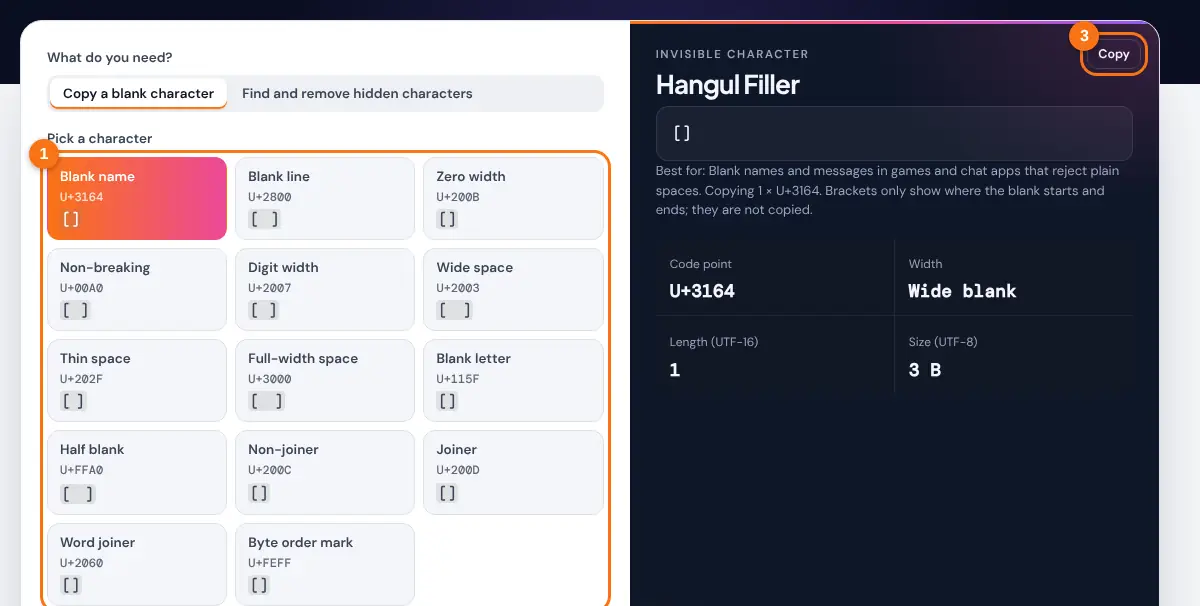
- Keep "Copy a blank character" selected.
- Pick a character from the grid. Blank name is the Hangul Filler and works in the most places.
- Set how many copies you need, from 1 to 1,000.
- Press Copy, then paste into the name, message or bio field.
- If the app rejects it, come back and try Blank line (U+2800) or Zero width (U+200B).
The result panel shows the code point, how wide the character looks, its length in UTF-16 units and its size in bytes. Some apps count length in UTF-16 units, so a character limit can fill up faster than you expect.
Which Invisible Character Should You Use?
Use the Hangul Filler for blank names and messages, the Braille Pattern Blank for empty lines, and the zero width space when you need something with no width at all. The table compares the characters in the tool.

| Character | Code point | Width | Best for |
|---|---|---|---|
| Hangul Filler | U+3164 | Varies by app | Blank names in games and chat apps |
| Braille Pattern Blank | U+2800 | Letter width | Empty lines in bios and captions |
| Zero Width Space | U+200B | None | Hidden line break points, empty-looking text |
| No-Break Space | U+00A0 | Normal space | Keeping "10 kg" on one line |
| Figure Space | U+2007 | One digit | Aligning numbers in plain text |
| Em Space | U+2003 | Letter M | Indents and wide gaps |
| Halfwidth Hangul Filler | U+FFA0 | Varies by app | A narrower blank letter |
Results vary by app, device and font. Browsers often draw the Hangul fillers with no width at all, while many phone apps show them as a full blank letter. A platform can add a filter for a character at any time, so test the blank in a draft or a private chat before you rely on it. For a blank line in an Instagram bio, the Braille blank pairs well with the styles in the Instagram font generator.
How Do You Find Hidden Characters in Text?
Switch to "Find and remove hidden characters", paste your text, and the tool lists every invisible character it finds with its name, code point and count. You can remove them, turn odd spaces into normal spaces, or show each one as a code such as [U+200B] so you can see exactly where it sits.
Hidden characters cause real problems: a password that will not match, a spreadsheet lookup that fails, code that will not compile, or a duplicate that the remove duplicate lines tool cannot spot because two lines only look identical. Text copied from PDFs, websites and chat tools often carries no-break spaces and zero width characters. Unicode tag characters are a special case: they can spell out whole hidden sentences, and the tool decodes them for you. The Unicode security considerations report explains how invisible and look-alike characters are used to disguise text.
The emoji option keeps the zero width joiners and variation selectors that hold emoji such as family groups, flags and red hearts together, so cleaning a message does not break them.
Related Tools
- Instagram Font Generator
- Character Counter
- Remove Line Breaks
- Remove Duplicate Lines
- Text Repeater
- Fancy Text Generator
Frequently asked questions
How do I send a blank message?
Copy the Hangul Filler (U+3164) with this tool and send it on its own. The message arrives with no visible text. If the app blocks it, try the Braille blank (U+2800) instead.
Why does a normal space not work for a blank name?
Most apps trim spaces from the start and end of a name, which leaves nothing, so the field is rejected as empty. An invisible letter is not trimmed, so the name is accepted but still looks blank.
Is the zero width space really invisible?
Yes. U+200B has no width and no visible shape, but it still counts as a character and can allow a line break where it sits. That is why it can quietly break searches and passwords.
Can invisible characters be used to hide text?
Yes. Unicode tag characters from U+E0020 to U+E007E mirror the ASCII letters but display as nothing, so they can carry hidden messages. Paste text into the finder and it decodes any tag text it finds.
Will an invisible name work in every game or app?
No. Each platform decides which characters it allows, and some filter blank characters to stop impersonation. Test in a draft or a private chat first.
Does removing hidden characters change my visible text?
Only where spaces are involved. Zero width characters vanish without a trace, while no-break and other wide spaces disappear too unless you choose "Spaces to normal spaces", which keeps the gap.