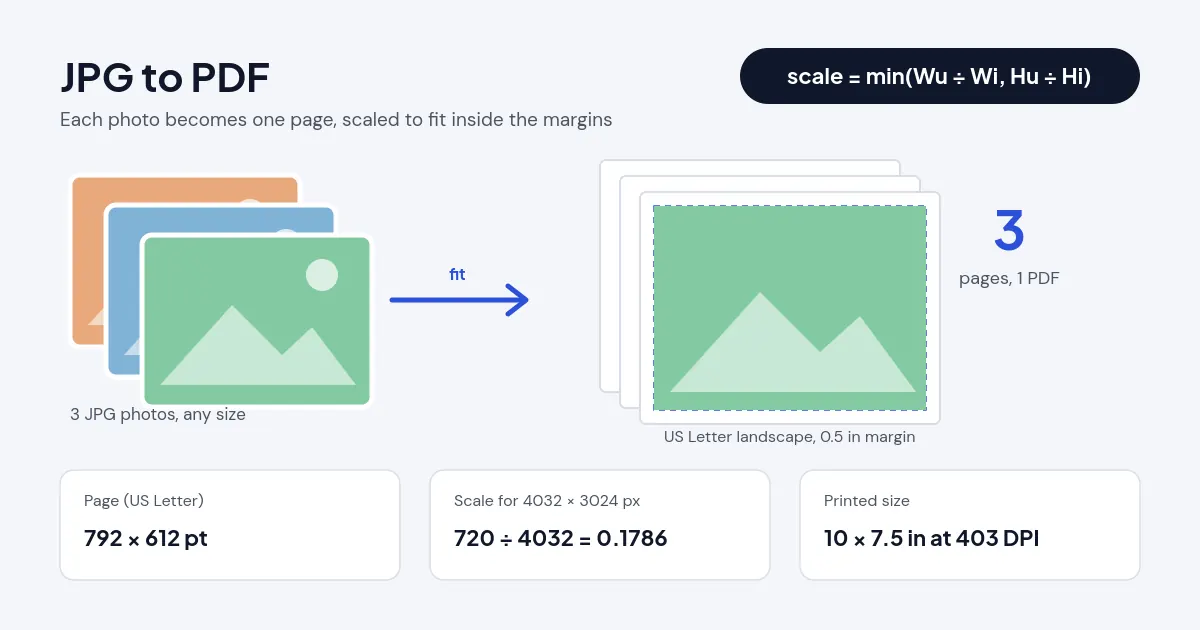
Quick answer: To convert JPG to PDF, add your photos above, pick a page size such as US Letter, set the margin and click Create PDF. Each image becomes one page, scaled by the smaller of usable width ÷ image width and usable height ÷ image height. A 4032 × 3024 photo on Letter with 0.5 in margins prints 10 × 7.5 in at 403 DPI.
Why Do Upload Portals Ask for PDFs?
A JPG to PDF converter takes one or more photos and packs them into a single PDF document, one image per page. That is the format most portals ask for when you upload a signed form, a receipt, an ID scan or a set of homework pages, because a PDF keeps the pages in order, prints at a fixed paper size and opens the same way on every device. This converter runs entirely in your browser. The images are read from your device, the PDF is assembled in memory and nothing is sent to a server, which matters when the pages show bank details or a driver's license.
The JPG data is copied into the PDF unchanged when you leave quality on Original, so the pages look exactly like your photos. PDF has supported JPEG compression natively for decades; the Library of Congress format description for PDF lists it as one of the standard image filters, which is why no quality is lost in the copy.
How Do You Combine Photos into One PDF?
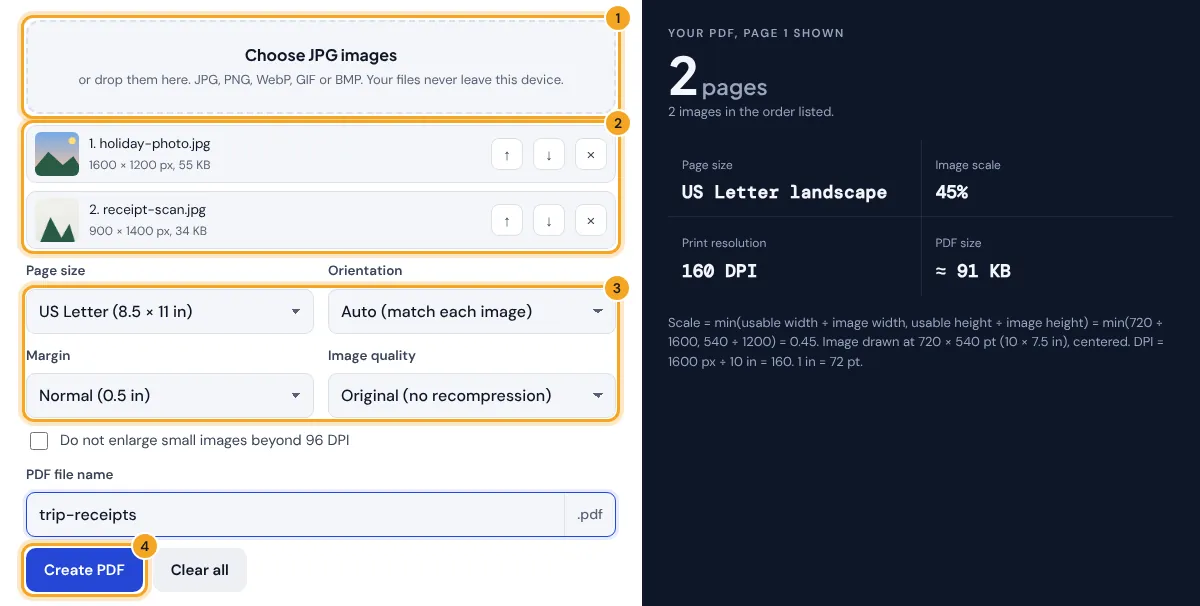
- Click Choose JPG images or drag your files onto the box. You can add several at once and add more later.
- Put the pages in order with the up and down arrows, and remove any you do not need with the cross.
- Pick a page size, orientation and margin. Auto orientation turns landscape photos sideways so they fill the page.
- Click Create PDF. The file downloads straight away, and the Download PDF button lets you save it again.
The result panel shows the page size, the scale applied to the first image, the print resolution in dots per inch and the final file size, so you can check that a scan will print sharply before you send it.
How Is Each Image Fitted to the Page?
Each image is scaled by the largest factor that still fits inside the page margins, keeping its shape, and then centered. PDF pages are measured in points, and one inch is exactly 72 points, so US Letter is 612 × 792 pt and A4 is 595.28 × 841.89 pt.
drawn size = image pixels × scale (in points)
print DPI = image width in pixels ÷ (drawn width ÷ 72)
Worked example. A 12 megapixel phone photo is 4032 × 3024 pixels. It is wider than it is tall, so Auto orientation uses Letter landscape: 792 × 612 pt. With 0.5 in (36 pt) margins the usable area is 720 × 540 pt. The scale is min(720 ÷ 4032, 540 ÷ 3024) = min(0.1786, 0.1786) = 0.1786, so the photo is drawn 720 × 540 pt, which is 10 × 7.5 in. Its print resolution is 4032 ÷ 10 = 403 DPI, well above the 300 DPI usually quoted for sharp photo prints.
If you choose Fit page to image instead, the page takes the size of the photo at 96 pixels per inch (one pixel = 0.75 pt), so there is no white border apart from the margin you choose.
What Resolution Will Your Photo Print At?
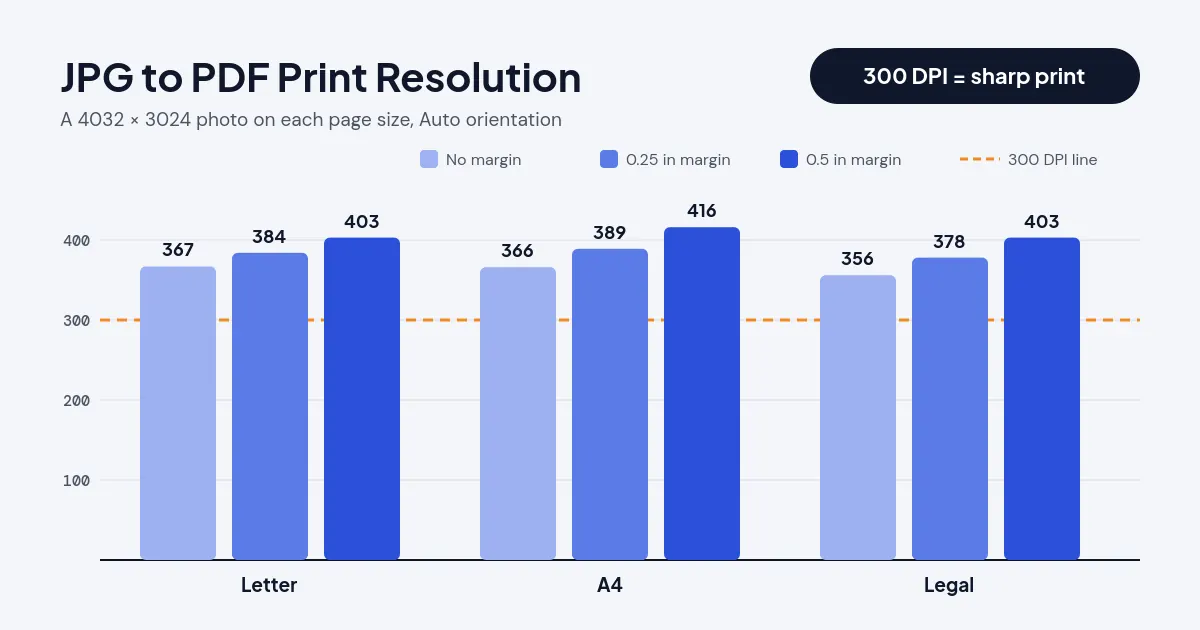
The table shows how a 4032 × 3024 photo lands on each page size with Auto orientation. Anything above about 300 DPI looks sharp on paper, and 150 DPI is fine for documents read on screen.
| Page size | Margin | Printed image size | Print resolution |
|---|---|---|---|
| US Letter | None | 11.00 × 8.25 in | 367 DPI |
| US Letter | 0.25 in | 10.50 × 7.88 in | 384 DPI |
| US Letter | 0.5 in | 10.00 × 7.50 in | 403 DPI |
| A4 | None | 11.02 × 8.27 in | 366 DPI |
| A4 | 0.5 in | 9.69 × 7.27 in | 416 DPI |
| US Legal | None | 11.33 × 8.50 in | 356 DPI |
| US Legal | 0.5 in | 10.00 × 7.50 in | 403 DPI |
Smaller images behave differently. A 640 × 480 picture stretched across Letter with 0.5 in margins prints at only 64 DPI and looks soft. Tick Do not enlarge small images and it stays at 96 DPI, 6.67 × 5 in, centered on the page.
How Do You Keep the PDF Small and Sharp?
- Leave quality on Original for photos. The JPG bytes go straight into the PDF, so the file is barely larger than your images added together.
- Use Medium or Small file for upload limits. Many forms cap uploads at 2 MB or 5 MB. Recompressing at 75% usually cuts a phone photo by more than half with little visible change.
- Convert PNG screenshots too. PNG, WebP, GIF and BMP files are turned into JPG pages on a white background. If you need a transparent PNG first, the PNG maker handles that.
- Combine several photos on one page with the photo collage maker before converting, which halves the page count for receipts or ID front and back.
- Check rotated phone photos. Photos taken sideways carry a rotation tag. The converter redraws those images upright so the PDF page matches what you see on screen.
JPG is a lossy format, as the Library of Congress notes in its JPEG encoding summary, so each extra round of recompression trims a little detail. Recompress once, at the end, rather than saving the same photo again and again.
Related Tools
On a phone or without extra software? See how to turn any image or photo into a PDF on phone and desktop.
Frequently asked questions
How do I convert a JPG to PDF for free?
Add the JPG above, choose a page size and click Create PDF. The PDF downloads to your device immediately. There is no sign-up, watermark or page limit, and the file is never uploaded.
Can I combine several JPG files into one PDF?
Yes. Select or drop as many images as you like, put them in order with the arrows and create the PDF. Each image becomes one page in the order shown.
Will converting JPG to PDF reduce the quality?
Not on the Original setting, which copies the JPG data into the PDF unchanged. Only the High, Medium and Small file settings recompress the image. PNG, WebP, GIF and BMP files, and JPGs with a rotation tag or CMYK colors, are redrawn once at 95% quality.
Which page size should I choose?
Use US Letter for documents printed or filed in the US and Canada, A4 for most other countries, and US Legal for long forms. Choose Fit page to image when the PDF will only be read on screen.
Does it work on iPhone and Android?
Yes. Tap Choose JPG images to pick photos from your camera roll. iPhones may save photos as HEIC; most browsers apart from Safari cannot open HEIC, so set the camera to Most Compatible or share the photo as JPG first.
Are my images uploaded anywhere?
No. The converter reads the files and builds the PDF with JavaScript inside your browser, so the images stay on your device.