How to Use the Silhouette Maker
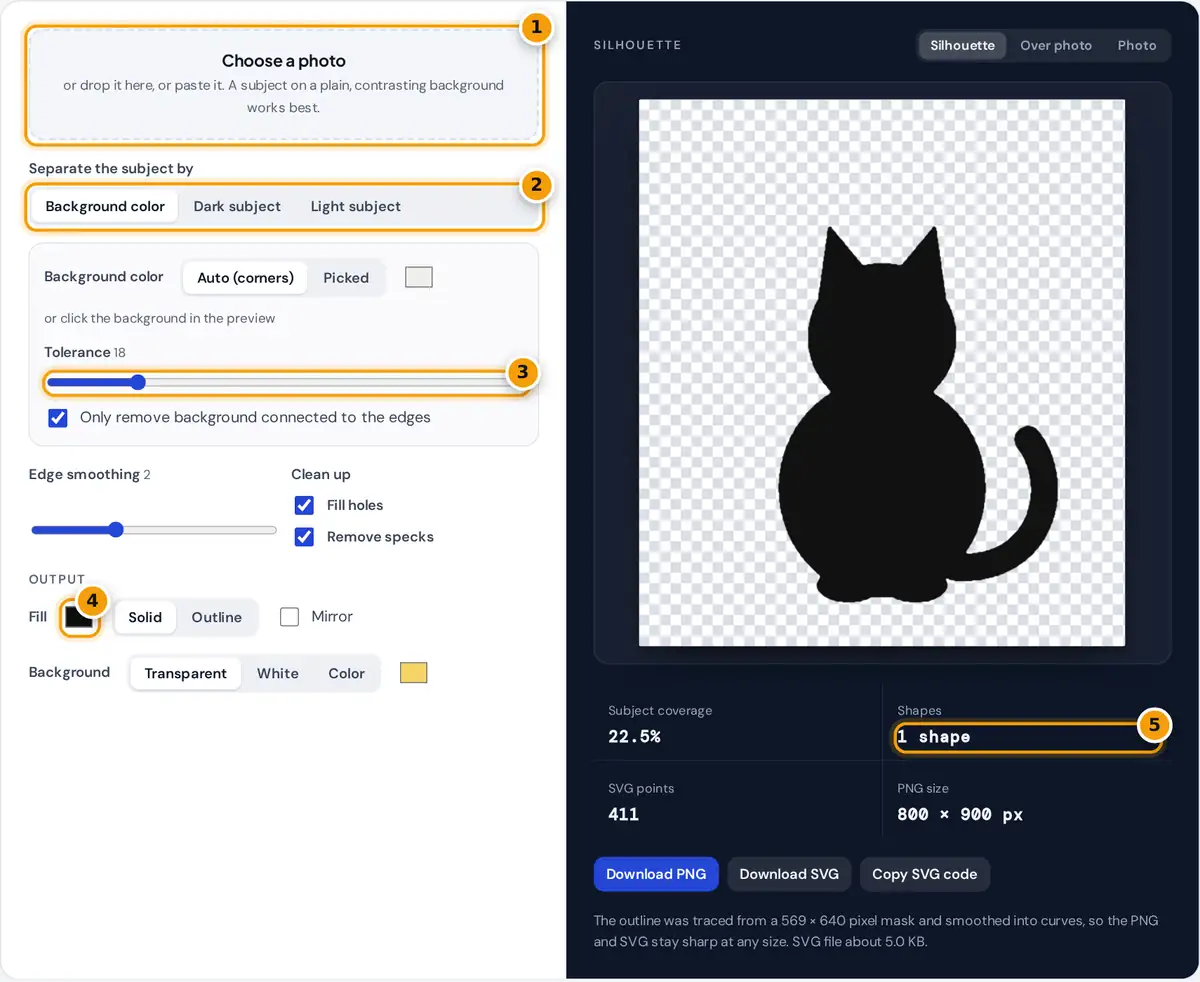
- Choose or drop a photo with a plain or contrasting background.
- Separate the subject by background color or by brightness.
- Adjust the tolerance until the background disappears completely.
- Pick the silhouette color and solid or outline style.
- Check the shape count, then download a PNG or SVG.
- Choose, drop or paste a photo. The example is a cat on a plain background.
- Pick how to separate the subject. Background color removes a plain backdrop, while Dark subject and Light subject split the picture by brightness, which suits backlit photos and sunsets.
- For background removal, keep Auto to use the average corner color, or click the background in the preview to pick it. Raise the tolerance until the backdrop disappears but the subject stays whole.
- Use edge smoothing, Fill holes and Remove specks to tidy the shape.
- Choose a fill color, solid or outline style, mirror if needed, and a transparent, white or colored background.
- Download a PNG, download an SVG, or copy the SVG code.
How the Silhouette Is Made
The tool first builds a mask, a grid of yes or no values that says which pixels belong to the subject. With the background color method, each pixel's distance from the background color is measured in RGB space:
background if distance ≤ tolerance% × 441.7
brightness = 0.299 R + 0.587 G + 0.114 B
441.7 is the largest possible distance, from black to white (√(3 × 255²)). With "only remove background connected to the edges" on, removal spreads inward from the border like a paint bucket, so light areas inside the subject are kept. The brightness methods compare each pixel with the threshold using the standard luma weights.
Next the mask is blurred and thresholded again to smooth jagged edges, small specks are dropped and enclosed holes are filled. Finally the outline is traced with the marching squares algorithm, rounded with two passes of Chaikin corner cutting and simplified with the Ramer-Douglas-Peucker algorithm. The result is a vector path, which is why the PNG is drawn from curves and stays smooth at full size.
Worked Example
The sample background fades from rgb(232, 238, 246) at the top to rgb(245, 239, 229) at the bottom, and Auto averages the four corners to about rgb(239, 239, 238). At the default tolerance of 18, anything within 0.18 × 441.7 = 79.5 of that color is background. The cat's fur, rgb(74, 59, 49), is √(165² + 180² + 189²) = 309 away, so it is kept, and the soft floor shadow, which is only about 40 away, is removed. The cat's green eyes are enclosed by fur, so the edge-connected removal never reaches them and the silhouette stays solid.
Which Method to Choose
| Photo | Method | Tip |
|---|---|---|
| Product or pet on a plain wall | Background color | Click the wall to pick its exact color |
| Person against a bright sky or window | Dark subject | Raise the threshold until the outline is complete |
| White object on a dark backdrop | Light subject | Turn Fill holes on to close shadows |
| Busy background | Edit first | Paint the background a flat color in a photo editor, then return here |
Using Your Silhouette
- Cutting machines: the SVG uses a single path with the even-odd fill rule, which imports cleanly into vinyl and paper cutting software.
- Wall art and decals: choose Outline style for a line-art look, or a solid fill on a colored background.
- Logos and icons: the PNG has a transparent background and is up to 2,400 pixels on its longest side.
- Profile portraits: a side profile photo against a light wall gives the classic cameo silhouette. Use Mirror to face it the other way.
For the cleanest SVG, start from the largest photo you have and keep Edge smoothing at 2 or 3. More smoothing rounds corners and removes small bumps, which suits cutting, while 0 keeps sharp detail for illustrations. Everything runs in your browser. Your photo is never uploaded.
Frequently asked questions
How do I make a silhouette from a photo?
Upload the photo, choose Background color if the backdrop is plain or Dark subject if it is backlit, adjust the tolerance or threshold until the shape is clean, then download the silhouette as PNG or SVG.
Can I get the silhouette as an SVG for Cricut or Silhouette Studio?
Yes. Download SVG gives a single smooth vector path with the even-odd fill rule, which cutting machine software imports as one cut shape. Remove specks and Fill holes keep the cut clean.
Why is part of my subject missing?
The subject contains colors close to the background. Lower the tolerance, click the background to pick its exact color, keep edge-connected removal on, or try the Dark subject method with a higher threshold.
How do I make a silhouette with a transparent background?
Keep Background set to Transparent and download the PNG. The area around the silhouette has no pixels, so it sits cleanly on any color or photo.
What photos make the best silhouettes?
Side profiles and clear shapes against a plain, contrasting background work best. Backlit photos against a bright sky also work well with the Dark subject method.
Is my photo uploaded?
No. The mask, the tracing and both downloads are created in your browser on your device, and nothing is sent to a server at any point.