How to Use the Wanted Poster Maker
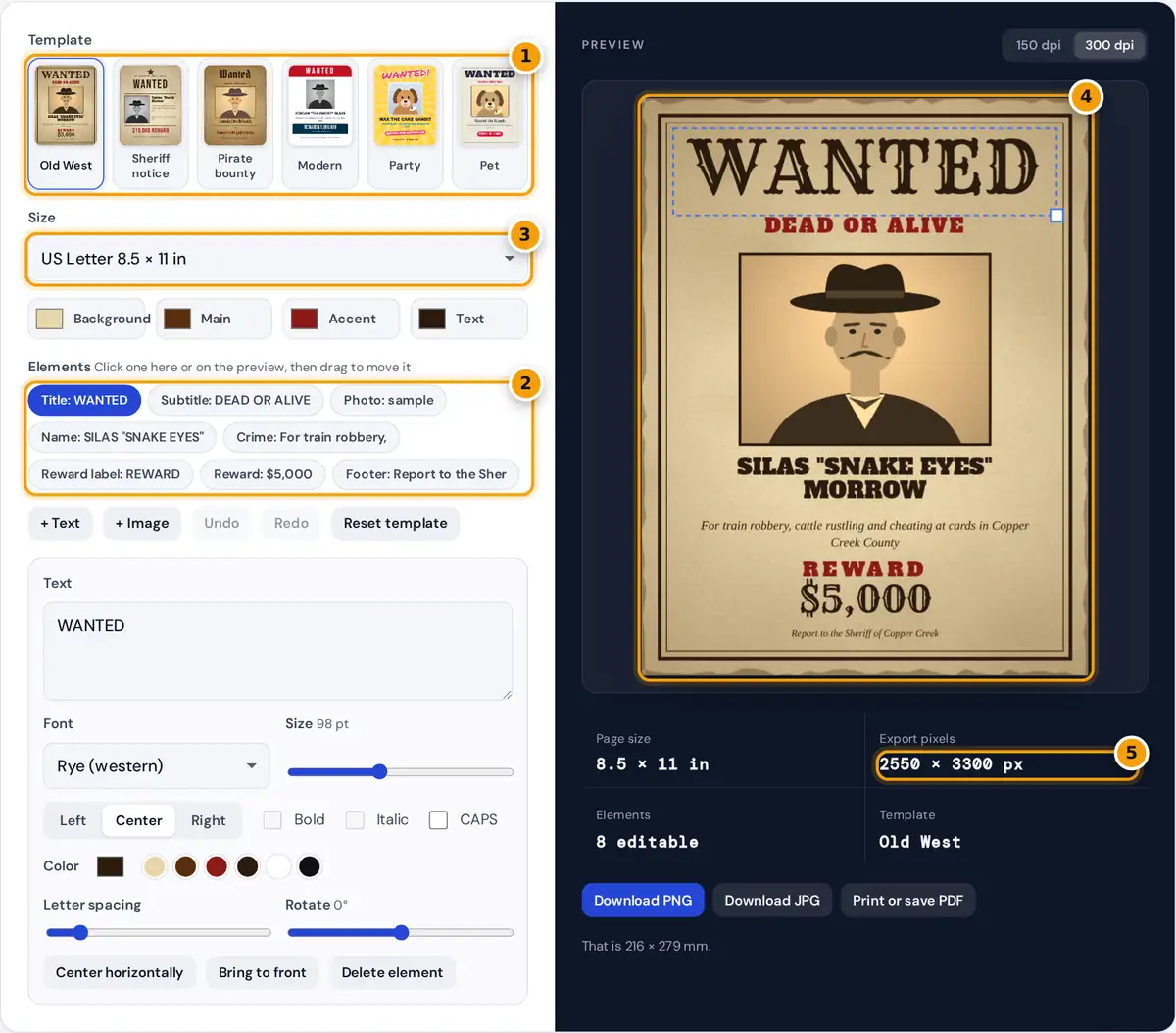
- Pick a style: Old West, sheriff notice, pirate bounty, modern, party or pet.
- Select the Photo, Name, Crime or Reward element to edit it.
- Choose Letter, A4, Tabloid, A3 or a social post size.
- Drag elements on the preview to rearrange the poster.
- Check the export size, then download or print your wanted poster.
- Pick a template. Old West and Sheriff notice use aged parchment and wood type lettering, Pirate bounty uses an old blackletter style, and Modern, Party and Pet are made for jokes, birthdays and gifts.
- Select Photo and choose, drop or paste a picture. Faces work best when they fill most of the frame. Use Zoom and Pan to frame the face.
- Keep the template's photo effect or change it. Sepia and faded vintage suit the western and pirate designs, and black and white suits the sheriff and modern ones.
- Click the name, crime, reward and footer and type your own words. Every font, size, color, letter spacing and rotation can be changed.
- Drag elements on the preview to rearrange them, or drag the corner handle to resize.
- Download a PNG or JPG, or print it at Letter, A4, Tabloid or A3 size.
What Real Wanted Posters Looked Like
Printed reward notices were common in the United States in the 1800s. Most were simple text bills set in large wooden type, often with a name, a description, the crime and a reward amount, issued by a sheriff, a railroad or an express company. Photographs only appeared on posters later in the century, once printing photos became practical. The familiar "Dead or Alive" headline is far more common in western films and novels than on surviving original posters. This maker leans into that movie version: bold slab and western lettering, parchment paper, a sepia portrait and a big reward line.
How the Aged Paper Effect Works
The parchment background is generated in your browser, not loaded from a stock photo. It starts from your background color and layers several effects:
The noise uses a fixed seed, so the same poster always looks the same when you export it again. Changing the Background color recolors the paper while keeping the texture. The sepia filter converts each pixel to brightness with the standard weights 0.299 red, 0.587 green and 0.114 blue, raises the contrast slightly and tints the result warm brown.
Worked example: a mid-gray pixel with red, green and blue all at 128 has a brightness of 0.299 × 128 + 0.587 × 128 + 0.114 × 128 = 128. The contrast step leaves 128 unchanged, and the tint turns it into red 155, green 127 and blue 88, a typical sepia brown.
The Six Templates
| Template | Style | Good for |
|---|---|---|
| Old West | Parchment, double border, western type, sepia photo | Western parties, cowboy birthdays, props |
| Sheriff notice | Star badge, tall caps, photo beside the details | Escape rooms, murder mystery games |
| Pirate bounty | Dark parchment, blackletter style, vintage photo | Pirate parties, treasure hunts |
| Modern | Clean red header, black and white photo | Office jokes, farewell cards |
| Party | Sunburst, marker lettering, fun reward | Kids' birthdays, invitations |
| Pet | Dashed border, sepia pet photo | Pet humor, gifts, social posts |
Tips for a Convincing Poster
- Use a front-facing photo with even light. Strong shadows look muddy after the sepia effect.
- Give a nickname. Western names usually include one in quotes, such as Silas "Snake Eyes" Morrow.
- Keep the crime short and funny. Two lines read best at a glance.
- Print on cream or kraft paper for a more authentic look, then crumple and flatten it, or tea-stain the edges.
- For a party, print several posters with different guests and use them as decorations or place cards.
Use It Responsibly
This tool is meant for fun, props, games and gifts. Only use photos of people who have agreed to it, and never make a poster that could be mistaken for a real police or government notice. The templates contain no agency names or badges for that reason. Your photo is processed only in your browser and is never uploaded.
Frequently asked questions
How do I make a wanted poster with my own photo?
Choose a template, select the Photo element and upload, drop or paste your picture. Adjust Zoom and Pan to frame the face, then edit the name, crime and reward and download or print the poster.
How do I make the photo look old?
Select the photo and choose Sepia or Faded vintage in Photo effect. Sepia converts the picture to brightness and tints it brown, and the Old West and pirate templates use these effects by default.
What size should a wanted poster be?
US Letter or A4 is the most common size for printing at home. For a bigger wall decoration choose 11 by 17 inches or A3, and use 1080 by 1350 pixels for a social media post.
What font do old western wanted posters use?
Originals used large wooden slab and display typefaces. This maker includes Rye, a western display font, and Alfa Slab One, a heavy slab serif, which give the same feel.
Can I make a wanted poster for my pet?
Yes. The Pet and Party templates are designed for pets and kids. Upload your pet's photo, describe the crime, such as stealing socks, and set a reward like belly rubs.
Is my photo uploaded anywhere?
No. The poster, the photo effects and the downloads are all created in your browser on your device. Nothing is sent to a server, so private photos stay private.