How to make a photo collage
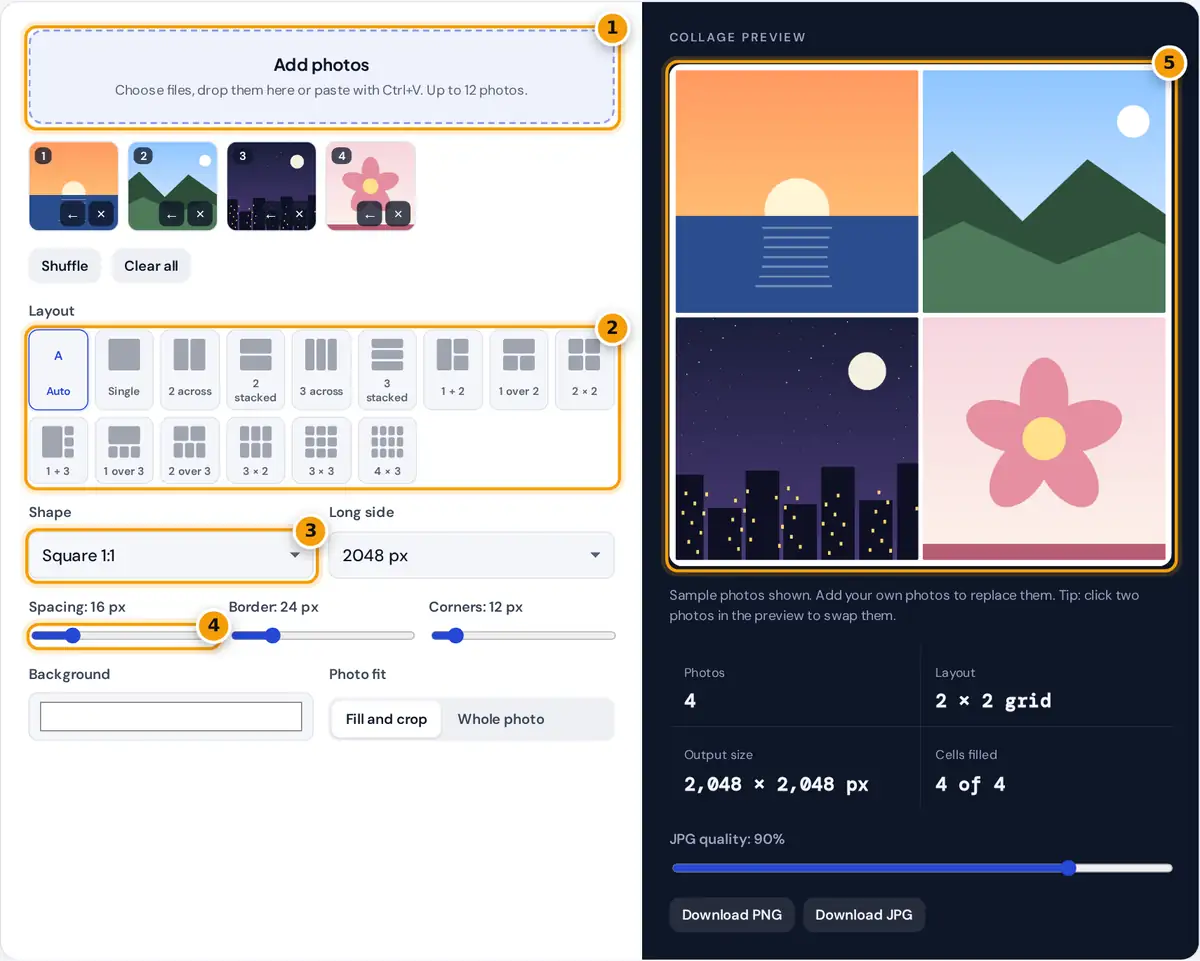
- Add photos: choose files, drop them here or paste. Up to 12 photos.
- Pick a layout, from a single photo to a 4 × 3 grid, or keep Auto.
- Choose the shape and size, such as square, Instagram portrait or story.
- Adjust spacing, border, corners and background colour to taste.
- Check the preview, click two photos to swap them, then download PNG or JPG.
- Press Add photos to choose pictures, drag them onto the drop area or the preview, or copy an image and press Ctrl+V (Cmd+V on a Mac). The sample photos disappear as soon as you add your own.
- Pick a layout, or leave it on Auto to match the number of photos: 2 photos side by side, 3 as one large and two small, 4 in a 2 × 2 grid, and so on up to a 4 × 3 grid for 12.
- Choose the shape: square for Instagram posts, 4:5 portrait for the Instagram feed, 9:16 for stories and reels, or 16:9 for slides and YouTube.
- Adjust spacing between photos, the outer border, rounded corners and the background color.
- Click one photo in the preview and then another to swap them. Use the arrow on a thumbnail to move a photo earlier.
- Download a PNG for the best quality or a JPG for a smaller file.
Your photos stay on your device
This collage maker has no upload step. Photos are opened directly by your browser, arranged on a canvas and saved back to your device, so nothing is sent to a server, nothing is stored and there is no watermark.
How the size and grid are calculated
cell width = (width − 2 × border) × cell fraction − spacing shared with each neighbor
fill and crop: scale = max(cell width ÷ photo width, cell height ÷ photo height)
Worked example
A 4:5 portrait collage at 2048 px has a height of 2048 px and a width of 2048 × 4 ÷ 5 = 1,638.4, rounded to 1,638 px. With a 24 px border and 16 px spacing in a 2 × 2 grid, the inner area is 1,590 px wide, so each column is 1,590 ÷ 2 − 8 = 787 px wide, with exactly 16 px between the columns. The rows work the same way: (2,048 − 48) ÷ 2 − 8 = 992 px tall. A 4000 × 3000 photo placed in a 787 × 992 px cell is scaled by max(787 ÷ 4000, 992 ÷ 3000) = 0.331, then the sides are trimmed evenly so the center of the photo stays in view.
| Shape | At 1080 px | At 2048 px | Good for |
|---|---|---|---|
| 1:1 | 1,080 × 1,080 | 2,048 × 2,048 | Instagram and Facebook posts |
| 4:5 | 864 × 1,080 | 1,638 × 2,048 | Instagram portrait posts |
| 9:16 | 608 × 1,080 | 1,152 × 2,048 | Stories, reels, phone wallpapers |
| 16:9 | 1,080 × 608 | 2,048 × 1,152 | Slides, YouTube, desktop |
| 3:2 | 1,080 × 720 | 2,048 × 1,365 | Prints at 6 × 4 inches |
Fill and crop or whole photo?
Fill and crop scales each photo until it covers its cell and trims the edges, which gives a clean grid with no gaps. It works best when the subject is near the middle of the picture. Whole photo shows each picture in full and leaves the background visible around it, which is better for documents, screenshots or group shots where nothing can be cut off.
Tips for a better collage
- Put the strongest photo in the large cell of the 1 + 2, 1 + 3 or 1 over 3 layouts.
- Use a white or light background with a small spacing for a clean, modern look, or black with no spacing for a seamless grid.
- For printing, choose 4096 px. A 3:2 collage at 4096 px (4,096 × 2,731 px) prints sharply at about 13.7 × 9.1 inches at 300 pixels per inch.
- JPG at 85 to 90% quality is usually indistinguishable from PNG for photos and much smaller to share.
Frequently asked questions
Is this photo collage maker free?
Yes. It is free with no sign-up and no watermark, and you can download as many collages as you like.
Are my photos uploaded?
No. The photos are opened and combined by your browser, and the download is created on your device. Nothing is sent to a server.
How many photos can I use?
Up to 12 photos per collage. The automatic layout picks a grid that fits the number of photos you add.
What size should a collage for Instagram be?
Use Square 1:1 or Portrait 4:5 at 1080 px. Instagram displays feed posts at 1080 px wide.
How do I change the order of photos?
Click a photo in the preview and then another to swap them, or use the arrow on a thumbnail to move it earlier. Shuffle randomizes the order.