How to Use the Concept Map Maker
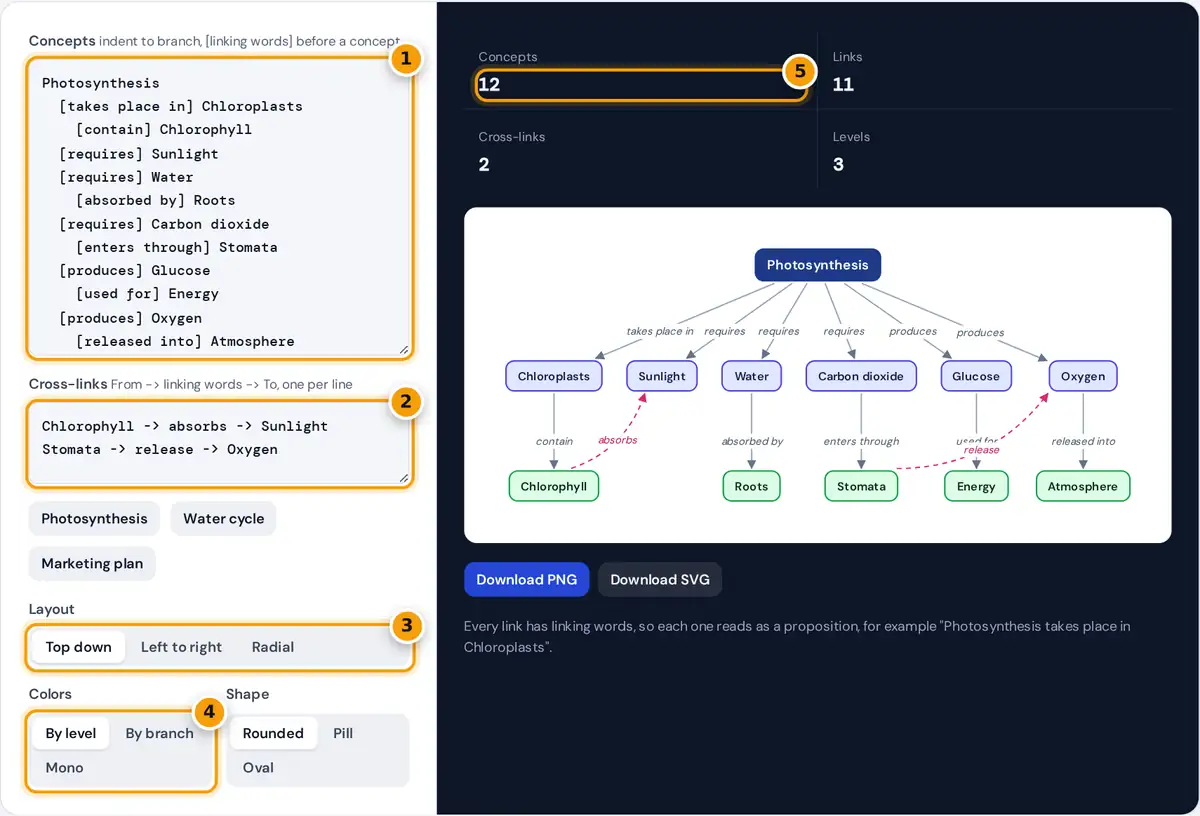
- Type the main concept, then indent related concepts with [linking words].
- Add cross-links between branches as From -> words -> To.
- Choose a top down, left to right or radial layout.
- Color nodes by level or by branch, or keep them mono.
- Check the counts, then download the map as PNG or SVG.
- Type the main concept on the first line. This is the focus question or topic of your map.
- Type related concepts on the next lines, indented with spaces or a tab. Indent further to branch from the line above.
- Put the linking words in square brackets before a concept, such as
[requires] Sunlight. They appear as labels on the arrow from the parent concept. - Add cross-links between branches in the second box, one per line, as
Chlorophyll -> absorbs -> Sunlight. They are drawn as dashed curved arrows. - Choose a top down, left to right or radial layout, color by level or by branch, and a node shape.
- Download the map as SVG for crisp printing or editing, or PNG for slides and documents.
Lines starting with # are ignored, so you can leave notes in the outline. Load one of the three examples to see the format.
What Makes a Concept Map Different
A concept map shows ideas as nodes and the relationships between them as labeled arrows. The approach was developed by Joseph Novak and colleagues at Cornell University in the 1970s, based on David Ausubel's theory that people learn by connecting new ideas to what they already know. The key feature is the linking words: each concept, linking phrase and concept forms a short statement called a proposition.
Photosynthesis + requires + Sunlight = "Photosynthesis requires sunlight"
A mind map, by contrast, radiates keywords from a central idea without naming the relationships. Concept maps are usually hierarchical, with general concepts at the top and specific ones below, and they use cross-links to connect ideas in different branches. Cross-links often show the deepest understanding, because they reveal how parts of a topic affect each other.
Worked Example
The Photosynthesis example has one main concept, five concepts on the second level and six on the third, so the map shows 12 concepts in 3 levels. Every concept except the main one has exactly one parent, so there are 12 − 1 = 11 links, and two cross-links connect separate branches: Chlorophyll absorbs Sunlight, and Stomata release Oxygen. Read the map aloud as propositions: "Photosynthesis takes place in chloroplasts", "Chloroplasts contain chlorophyll", "Water is absorbed by roots", and so on.
| Statistic | How it is counted | Example |
|---|---|---|
| Concepts | Non-empty lines in the outline | 12 |
| Links | Concepts minus main concepts | 11 |
| Cross-links | Valid lines in the cross-link box | 2 |
| Levels | Deepest indentation level plus one | 3 |
Choosing a Layout
- Top down is the classic concept map: general ideas at the top, specific ones below. Each subtree gets the width it needs, so branches never overlap.
- Left to right suits long concept names and wide slides.
- Radial places the main concept in the center and spreads branches around it, giving each branch an angle in proportion to its number of end concepts.
Tips for a Strong Concept Map
- Start with a focus question, such as "How do plants make food?", and keep every concept relevant to it.
- Use short noun phrases for concepts and verbs for linking words: causes, requires, is part of, leads to, measured by.
- Avoid repeating a concept. If two branches need it, add it once and connect the other branch with a cross-link.
- Limit the first level to about three to seven concepts so the map stays readable.
- Review the propositions. Read each arrow aloud. If it does not make a sensible sentence, change the linking words.
When the map is finished, download the SVG to keep it sharp in documents and slides, or the PNG for quick sharing. Everything is drawn in your browser, and your text is never uploaded.
Frequently asked questions
How do I make a concept map?
Write the main concept on the first line, indent related concepts under it, and put linking words in brackets before each one. Add cross-links in the second box, then pick a layout and download the map.
What are linking words in a concept map?
Linking words are short verb phrases on the arrows, such as requires, causes or is part of. Together with the two concepts they form a proposition, a meaningful statement you can read aloud.
What is a cross-link?
A cross-link connects concepts in different branches of the map. It shows how separate parts of a topic relate, and is drawn here as a dashed, curved arrow with its own linking words.
What is the difference between a concept map and a mind map?
A mind map branches keywords from one central idea without naming the connections. A concept map labels every connection with linking words and can join branches with cross-links.
Can I edit the concept map after downloading?
Yes. The SVG download is a vector file you can open in design tools such as Inkscape, Illustrator or Figma, or insert into documents and slides where it stays sharp at any size.
How many concepts can a map have?
There is no fixed limit. Maps of 10 to 30 concepts stay readable on one page. For larger topics, split the map into several maps, one per main branch.