How to Use the Normal Map Generator
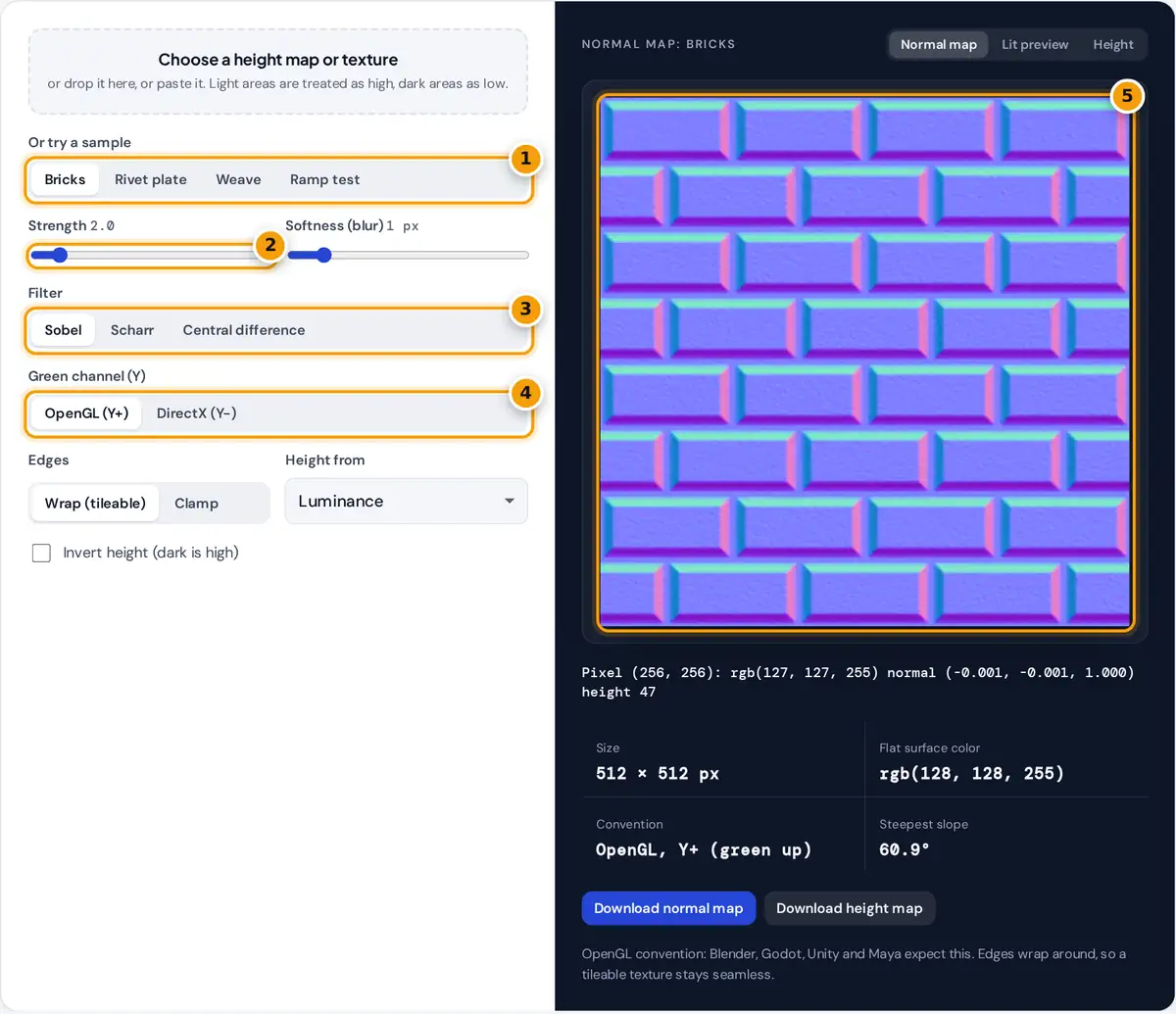
- Load a sample or upload your own height map or texture.
- Set the strength and softness of the bumps.
- Choose the Sobel, Scharr or central difference filter.
- Pick OpenGL or DirectX for the green channel.
- Check the normal map or lit preview, then download the PNG.
- Choose, drop or paste a grayscale height map or any texture, or start with the Bricks, Rivet plate, Weave or Ramp test sample.
- Set the strength. Higher values make bumps look deeper. Add a little softness to reduce noise from photos and JPEG artifacts.
- Pick the filter. Sobel is a good default, Scharr gives slightly more accurate diagonal edges, and central difference keeps the finest detail.
- Choose the green channel convention for your engine: OpenGL (Y+) or DirectX (Y−).
- Keep Wrap on for tileable textures so the seams stay invisible, or use Clamp for single images.
- Switch to Lit preview and move the pointer to sweep a light across the surface, then download the PNG.
What a Normal Map Stores
A tangent-space normal map stores, for every pixel, the direction a surface faces. The three parts of that direction, X, Y and Z, each range from −1 to 1 and are packed into the red, green and blue channels. A perfectly flat area points straight out of the surface, (0, 0, 1), which becomes the familiar light blue rgb(128, 128, 255). Renderers use these directions to light a flat polygon as if it had bumps, grooves and rivets, without adding geometry.
The Formula
The generator treats brightness as height from 0 to 1 and measures the slope with a 3 × 3 Sobel filter:
Gy = (BL + 2B + BR) − (TL + 2T + TR)
n = normalize(−s · Gx, s · Gy, 1)
RGB = round((n + 1) ÷ 2 × 255)
Here s is the strength and the letters are the neighboring heights (T for top, B for bottom, L for left, R for right). Scharr uses weights 3, 10, 3 instead of 1, 2, 1 and is scaled by 1/4 so the two give the same result on a smooth slope. For DirectX the Y component is negated, which is the same as inverting the green channel.
Worked Example with the Ramp Test
The Ramp test sample is 256 pixels wide and its brightness rises by exactly 1 step per pixel from left to right, so each height step is 1/255. At the center pixel, Gx = 4 × (2/255) = 0.03137 and Gy = 0. With strength 5:
- n before normalizing = (−5 × 0.03137, 0, 1) = (−0.1569, 0, 1), with length 1.0122
- normalized n = (−0.155, 0, 0.988)
- red = (−0.155 + 1) ÷ 2 × 255 = 107.7, so 108; green = 127.5, so 128; blue = 253.5, so 253
Hover the center of the ramp with strength 5.0 and the readout shows rgb(108, 128, 253). The surface tilts by arccos(0.988) = 8.9°, which the tool reports as the steepest slope when edges are clamped.
OpenGL vs DirectX Normal Maps
| Convention | Green means | Commonly used by |
|---|---|---|
| OpenGL (Y+) | Surface faces up | Blender, Godot, Unity, Maya, Substance default |
| DirectX (Y−) | Surface faces down | Unreal Engine, 3ds Max, CryEngine |
If bumps in your engine look like dents when lit from above, the green channel is the wrong way round. Switch the convention here and export again, or flip the green channel in the material settings.
Tips for Better Normal Maps
- Use a real height map when you have one. A color photo mixes color and shading with height, so a red brick and a shadow both read as dark. Pick the channel with the clearest shapes using Height from.
- Soften photo textures by 1 to 3 pixels to remove noise that would otherwise appear as fine grit.
- Invert height when your map uses dark for raised areas.
- Keep strength moderate. Extreme values flatten the blue channel and can look plastic. Check with the lit preview.
Images up to 2,048 pixels on a side are processed in your browser, and nothing is uploaded.
Frequently asked questions
How do I make a normal map from an image?
Load the image, set the strength and softness, choose OpenGL or DirectX for your engine and keep Wrap on for tileable textures. Check the lit preview, then download the normal map PNG.
What is the difference between OpenGL and DirectX normal maps?
They store the Y direction in the green channel with opposite signs. OpenGL treats green as up and DirectX treats it as down, so the same map looks inverted in the wrong engine.
Why is a normal map mostly blue?
Blue holds the Z component, which points straight out of the surface. Flat areas are (0, 0, 1), stored as rgb(128, 128, 255), so most of a typical map is light blue.
What does the strength setting do?
Strength multiplies the slopes measured from the height map before they are normalized. Higher strength tilts the normals more, which makes bumps and grooves look deeper under light.
Sobel or Scharr: which filter should I use?
Sobel is the common default and works well for most textures. Scharr treats diagonal edges more evenly. Central difference uses only direct neighbors and keeps the finest detail but also more noise.
Will the normal map tile seamlessly?
Yes, if the source texture tiles and Edges is set to Wrap. The filter then reads pixels from the opposite edge, so slopes across the seam match exactly.