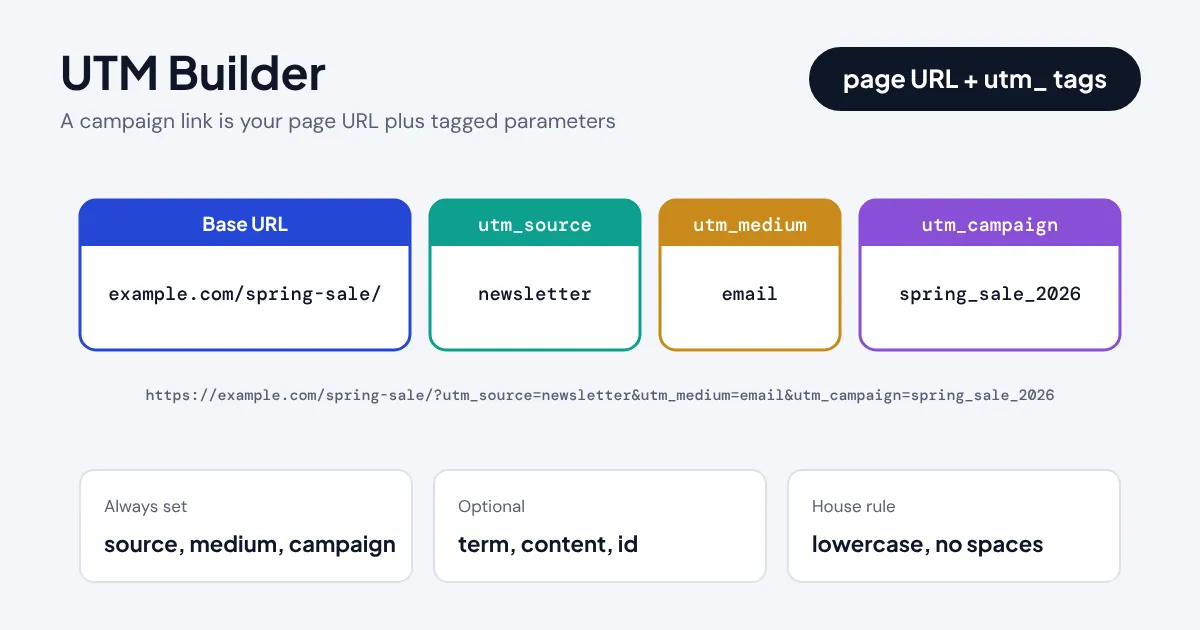
Quick answer: A UTM builder adds tracking tags to the end of a link so Google Analytics can tell which campaign sent each visitor. Enter your page URL, a source such as newsletter, a medium such as email and a campaign name, and the tool returns a ready link like example.com/?utm_source=newsletter&utm_medium=email&utm_campaign=spring_sale.
What Does a Tracked Campaign Link Do?
A UTM builder is a form that turns a plain web address into a tracked campaign link. UTM stands for Urchin Tracking Module, after the analytics company Google bought in 2005, and the five classic tags (source, medium, campaign, term and content) still drive campaign reporting in Google Analytics 4, Matomo, Plausible, HubSpot and most other analytics tools. Without them, a click from your newsletter and a click from a Facebook post can both arrive as vague "direct" or "referral" traffic, and you lose the link between spend and results.
This builder does more than glue strings together. It keeps any query string already on your URL, moves #anchors to the correct place, lowercases values so reports do not split, encodes awkward characters safely and predicts the GA4 default channel group your link will fall into, so you can spot an "Unassigned" mistake before the campaign goes out.
How Do You Tag a Link with Source, Medium and Campaign?
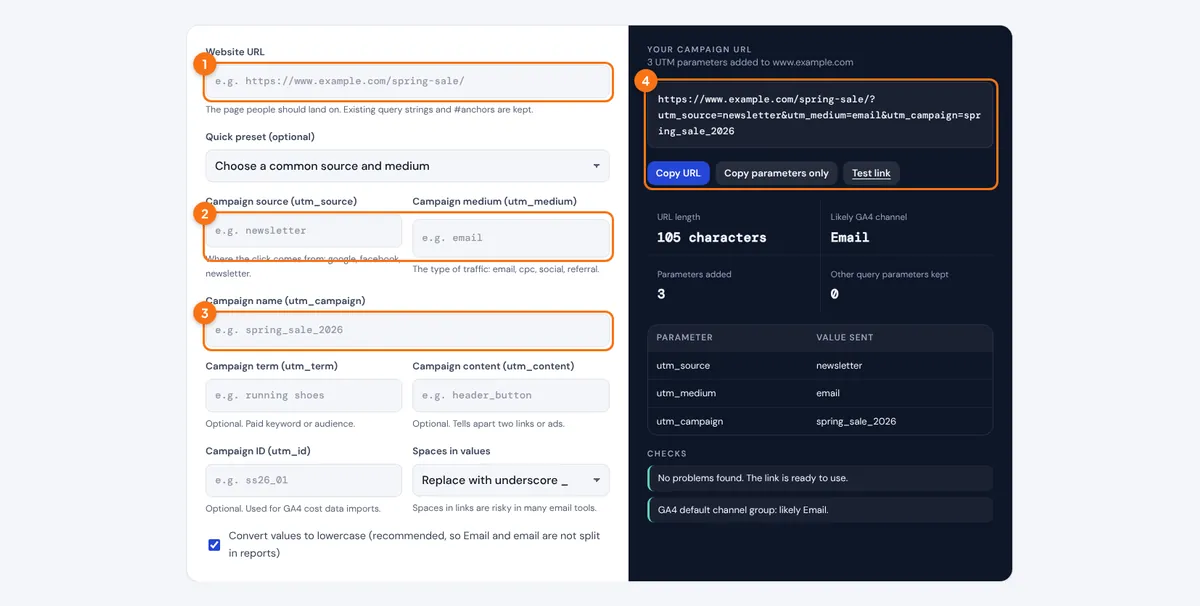
- Paste the page you want people to land on into Website URL, for example https://www.example.com/spring-sale/.
- Fill in the campaign source and medium, or pick a quick preset such as Email newsletter or Facebook ads.
- Give the campaign a short, lowercase name such as spring_sale_2026, and add term, content or ID only if you need them.
- Read the checks, then press Copy URL and paste the link into your email, ad or social post. Use Test link to make sure the page loads.
The table under the link shows exactly which value is sent for each parameter, and the Checks list warns you about empty required fields, mixed case, spaces or a URL that is getting too long for SMS and email tools.
How Is a UTM Link Put Together?
A UTM link is your normal URL followed by a query string. The first parameter starts with a question mark, every further parameter starts with an ampersand, and each value is percent-encoded following the rules in RFC 3986, the internet standard for URI syntax. If the page already has a query string, the UTM tags are added after it, and any #fragment goes last.
Google lists the supported parameters, including the newer utm_id, utm_source_platform and utm_creative_format, in its guide to collecting campaign data with custom URLs. Source, medium and campaign are the three you should set on every link.
| Parameter | Answers the question | Typical values |
|---|---|---|
| utm_source | Who sent the visit? | google, facebook, newsletter, partner_site |
| utm_medium | What type of channel? | email, cpc, social, paid_social, referral |
| utm_campaign | Which promotion? | spring_sale_2026, webinar_oct |
| utm_term | Which keyword or audience? | running_shoes, lookalike_1pct |
| utm_content | Which link or creative? | header_button, video_ad_b |
| utm_id | Which campaign ID for cost imports? | ss26_01 |
What Does a Finished Campaign Link Look Like?
Say a garden centre sends its October newsletter with two buttons pointing to the bulb sale page. Both links share utm_source=newsletter, utm_medium=email and utm_campaign=bulb_sale_oct, but the header button gets utm_content=header_button and the footer link gets utm_content=footer_link. The header link becomes:
In GA4 both clicks are grouped under the Email channel and the bulb_sale_oct campaign, and the content dimension shows which button earned more clicks. If the page address itself contains spaces or symbols, run it through the URL encoder and decoder first so you start from a clean address.
Which GA4 Channel Will Your UTM Link Land In?
GA4 sorts every tagged visit into a default channel group using rules based mainly on the source and medium you choose. A medium of email lands in Email, cpc with google lands in Paid Search, and a made-up medium such as print or flyer usually lands in Unassigned, which makes the campaign hard to find later. Google publishes the full rule set in its default channel group definitions, and the builder above applies the same order of checks.

| Campaign | utm_source | utm_medium | GA4 channel |
|---|---|---|---|
| Email newsletter | newsletter | ||
| Google Ads (manual tagging) | cpc | Paid Search | |
| Facebook or Instagram ads | paid_social | Paid Social | |
| Organic LinkedIn post | social | Organic Social | |
| Partner blog link | partner_site | referral | Referral |
| Affiliate network | awin | affiliate | Affiliates |
| Text message | sms | sms | SMS |
| QR code on a flyer | qr_code | Unassigned |
For printed QR codes, a medium such as referral or a custom channel group in GA4 keeps the traffic visible. You can turn the finished link into a scannable code with the QR code generator.
How Should You Name UTM Parameters?
Pick one naming convention and keep a shared sheet of approved values. GA4 is case sensitive, so Facebook, facebook and FB create three separate rows, and spaces turn into %20 or plus signs that some email tools break. These habits keep reports tidy:
- Lowercase everything. The lowercase option in the builder does this for you.
- Use underscores or hyphens, not spaces. Choose one separator and stick with it across the team.
- Keep medium generic. Use email, cpc, social, paid_social, referral, affiliate, display or sms so GA4 maps the channel correctly.
- Put the date in the campaign, not the source. spring_sale_2026 reads well years later; newsletter_march does not.
- Never tag internal links. A UTM link from one page of your site to another starts a new session and overwrites the visitor's real source.
Shorter values also keep the finished link compact, which matters for SMS, printed material and platforms that truncate long URLs. Once the campaign is live, check the GA4 Traffic acquisition report after a day or two to confirm the visits appear under the channel and campaign you expected.
Related Developer Tools
- URL Encoder and Decoder
- QR Code Generator
- Hyperlink Generator
- Hreflang Generator
- Robots.txt Generator
- Sitemap Generator
New to campaign tracking? Read UTM parameters explained to see how each tag is used.
Frequently asked questions
What are the five UTM parameters?
utm_source (who sent the visit), utm_medium (the type of channel), utm_campaign (the promotion), utm_term (a paid keyword or audience) and utm_content (which link or creative). GA4 also supports utm_id for cost data imports.
Which UTM parameters are required?
Technically none, but Google recommends always setting utm_source, utm_medium and utm_campaign. Without a medium, GA4 cannot place the visit in a sensible channel and it often appears as Unassigned.
Do UTM parameters affect SEO?
No, not when used on links from emails, ads and social posts. Google ignores them for ranking. Avoid them on internal links and in canonical tags, because they create duplicate URLs and break session attribution.
Do I need UTM tags on Google Ads links?
Not if Google Ads is linked to GA4 with auto-tagging on, because the gclid parameter already passes the campaign data. Use manual UTMs for Microsoft Ads, social ads, email and any platform without auto-tagging.
Are UTM parameters case sensitive?
Yes. GA4 treats Email and email as two different mediums, so keep every value lowercase. The builder converts values to lowercase by default.
Can visitors see or change UTM tags?
Yes, they are visible in the address bar and anyone can edit or remove them before sharing the link. They are a reporting aid, not a security feature, so never put personal data such as email addresses in a UTM value.