Quick answer: UTM parameters are five short tags (utm_source, utm_medium, utm_campaign, utm_term and utm_content) added to the end of a link so analytics tools know exactly where each visitor came from. Tag every email, ad and social link with at least source, medium and campaign, keep the values lowercase, and never tag links between your own pages.
Open the acquisition report in Google Analytics 4 after a busy month and you will often find a large lump of traffic labelled "direct" or "(not set)". Some of those visitors came from your newsletter, some from a partner's blog and some from a post you paid to boost, but the analytics tool had no way of telling them apart. UTM parameters fix that. They take seconds to add with a UTM builder, cost nothing and turn vague traffic into a clear answer to the question every marketer and business owner asks: which campaign actually worked?
This guide explains what each parameter does, how a tagged link is built, which values GA4 recognises, the naming habits that keep reports clean and the mistakes that quietly ruin attribution.
What Are UTM Parameters?
UTM parameters are name and value pairs added to a URL's query string. UTM stands for Urchin Tracking Module: Urchin was a web analytics company that Google bought in 2005 and turned into Google Analytics, and the tag format survived every version since. Today almost every analytics and marketing platform reads them, including GA4, Adobe Analytics, Matomo, Plausible, HubSpot and Mailchimp.
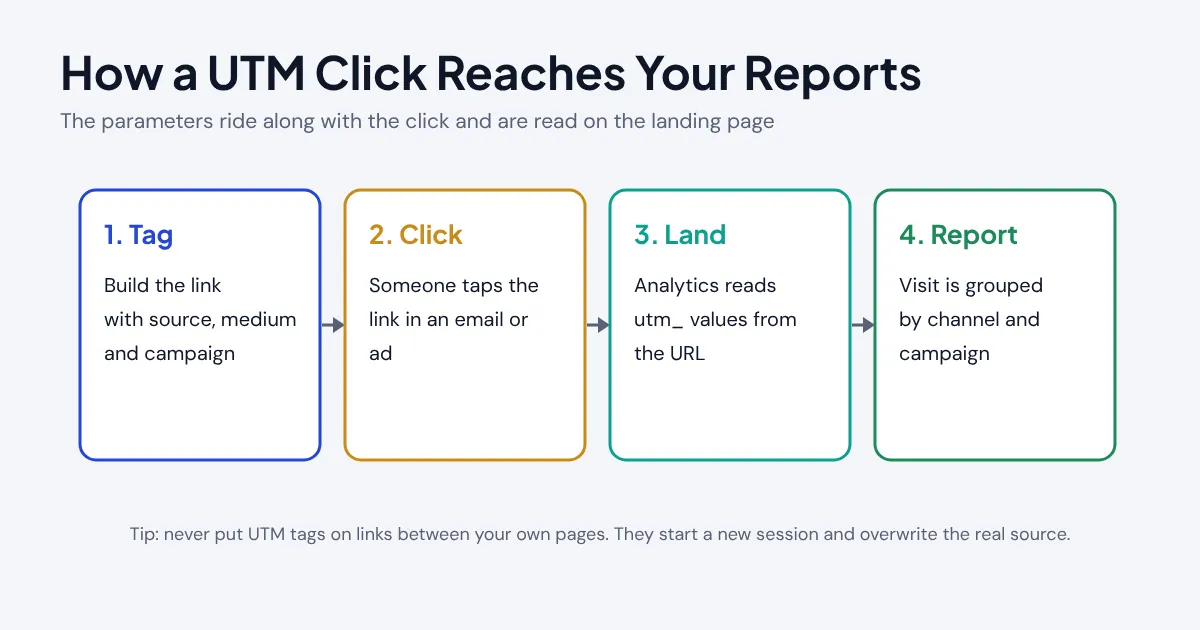
When someone clicks a tagged link, the parameters travel in the address bar to your landing page. The analytics script on that page reads them, stores them against the session and then reports the visit under the source, medium and campaign you chose. Nothing is sent anywhere else, and the visitor sees the same page they would have seen without the tags.
What Do the Five UTM Parameters Mean?
Each parameter answers one question about the click. Three of them should be on every tagged link; the other two are optional and add detail.
| Parameter | Question it answers | Example values | Needed? |
|---|---|---|---|
| utm_source | Who sent the visitor? | google, facebook, newsletter | Always |
| utm_medium | What kind of channel was it? | email, cpc, social, referral | Always |
| utm_campaign | Which promotion or project? | autumn_sale_2026 | Always |
| utm_term | Which paid keyword or audience? | running_shoes | Optional |
| utm_content | Which link, button or creative? | header_button, video_b | Optional |
GA4 also accepts utm_id, a campaign ID used when you import cost data from ad platforms that are not linked to Google, plus utm_source_platform, utm_creative_format and utm_marketing_tactic. Google documents all of them in its help page on collecting campaign data with custom URLs. For most small and medium campaigns, the first five are all you need.
How Do You Build a UTM Link?
A tagged link is your normal page address, then a question mark, then each parameter joined with an ampersand. Values cannot contain raw spaces or most symbols, so they are percent-encoded under the URI syntax rules in RFC 3986. Here is a newsletter link for an autumn sale:
Typing that by hand is where errors creep in: a missing ampersand, a capital letter in one email and not another, or tags placed after a #anchor where analytics cannot read them. The ToolVasta UTM builder assembles the link in the right order, keeps any existing query string, lowercases values, encodes awkward characters and warns you if GA4 would file the visit as Unassigned.
A practical example makes the value clear. A car dealership in Leeds launches a newsletter promoting a new electric model rated at 150 kW. Readers in the UK think in horsepower, so the email headline says 201 bhp, a figure the marketing team checked with a kW to hp converter. The email has two links to the model page: a large header image and a "Book a test drive" button. Both share source newsletter, medium email and campaign ev_launch_oct, but the image gets utm_content=hero_image and the button gets utm_content=test_drive_button. A week later GA4 shows not only how many visits the email produced, but which of the two links people preferred.
How Does GA4 Turn UTM Values into Channels?
GA4 groups every session into a default channel such as Email, Paid Search, Organic Social or Referral. The grouping is driven almost entirely by your utm_source and utm_medium values, following the rules in Google's default channel group definitions. A few examples show how literal those rules are:
- Medium email lands in Email. So do e-mail and e_mail, but newsletter as a medium does not.
- Medium cpc or ppc with source google or bing lands in Paid Search.
- A medium containing "paid" or "cp" with a social source such as facebook or linkedin lands in Paid Social.
- Medium social, sm or social-media, or a known social source with no paid medium, lands in Organic Social.
- Medium referral lands in Referral, and affiliate lands in Affiliates.
- An invented medium such as print, flyer or poster lands in Unassigned, where it is easy to overlook.
The lesson is to keep medium values boring and standard. Put your creativity into the campaign and content names, where GA4 does not apply any rules.
What Naming Convention Should You Use?
GA4 is case sensitive and treats every spelling as a different value. If one colleague writes Facebook, another writes facebook and a third writes fb, your social report splits into three rows and every total is wrong. A short written convention, shared in a spreadsheet the whole team uses, prevents this.
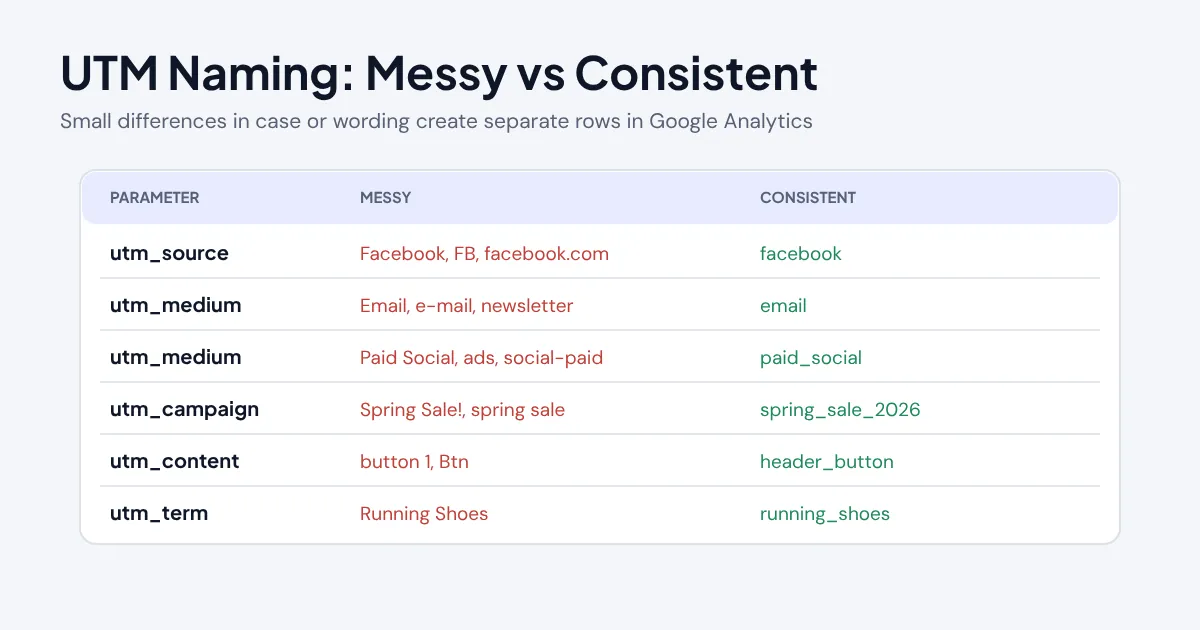
- Lowercase only. Decide this once and let your builder enforce it.
- One separator. Underscores or hyphens, never spaces, and never both.
- A fixed list of sources and mediums. For example newsletter, google, facebook, linkedin with email, cpc, paid_social, social, referral.
- Dates and themes in the campaign name. autumn_sale_2026 or webinar_2026_10 still make sense next year.
- Content values that describe the link. header_button, footer_link, video_15s, carousel_2.
Which UTM Mistakes Break Your Data?
Most attribution problems come from a handful of habits:
- Tagging internal links. A UTM link from your home page to a product page starts a new session and replaces the visitor's real source. Use UTMs only on links that point to your site from somewhere else.
- Tagging Google Ads links by hand when auto-tagging is on. The gclid parameter already passes campaign data, and manual tags can conflict with it.
- Putting personal data in values. Email addresses or names in utm_content break Google's terms and privacy law, because the parameters are stored and visible.
- Using UTMs in canonical tags or sitemaps. Search engines should only see clean URLs. When you build an XML file with a sitemap generator, list the plain page addresses and leave campaign tags out.
- Long links in SMS and print. Very long URLs break in some text apps. Shorten the values, or point a short redirect at the tagged link.
How Do You Check That Tracking Works?
Before a campaign goes out, open each tagged link in a private browser window and confirm the page loads with the parameters still in the address bar. Redirects that drop the query string are a common cause of missing data, especially on old http to https or non-www to www redirects. Then open GA4's Realtime report, filter by your campaign name and click the link yourself: the visit should appear within a minute or two.
If traffic shows up but with an unexpected source, look at the raw request in your server logs. Each line records the visitor's IP address, the requested URL and the referrer, and pasting an unfamiliar address into an IP address lookup shows whether it belongs to a real internet provider, a cloud host or a known crawler. Bots that follow links in emails, such as security scanners at large companies, often explain sudden spikes of clicks with zero engagement.
Frequently asked questions
Do UTM parameters hurt SEO?
No. Google ignores them for ranking when they are on links from emails, ads and social posts. Keep them out of internal links, canonical tags and sitemaps so search engines only see clean URLs.
Which UTM parameters are required?
None are technically required, but always set utm_source, utm_medium and utm_campaign. Without a medium, GA4 cannot assign a sensible channel and the visit often shows as Unassigned.
Are UTM tags case sensitive?
Yes. Facebook and facebook are recorded as two different sources in GA4. Use lowercase for every value to keep reports together.
Do I need UTMs for Google Ads?
Not if your Google Ads account is linked to GA4 with auto-tagging turned on. Use manual UTMs for Microsoft Ads, Meta, LinkedIn, TikTok, email and any platform without automatic tagging.
Can I use UTM parameters on a QR code?
Yes. Build the tagged link first, then turn it into a QR code. Use a standard medium such as referral or a custom channel group so the visits do not land in Unassigned.