Quick answer: A sitemap generator turns a list of your page URLs into a sitemap.xml file that search engines can read. Paste paths such as /about/ or full URLs, choose whether to add lastmod dates, and the tool writes valid XML following the sitemaps.org protocol, removes duplicates and off-site links, and lets you download the file ready to upload.
Which Sites Need a Hand-Built XML Sitemap?
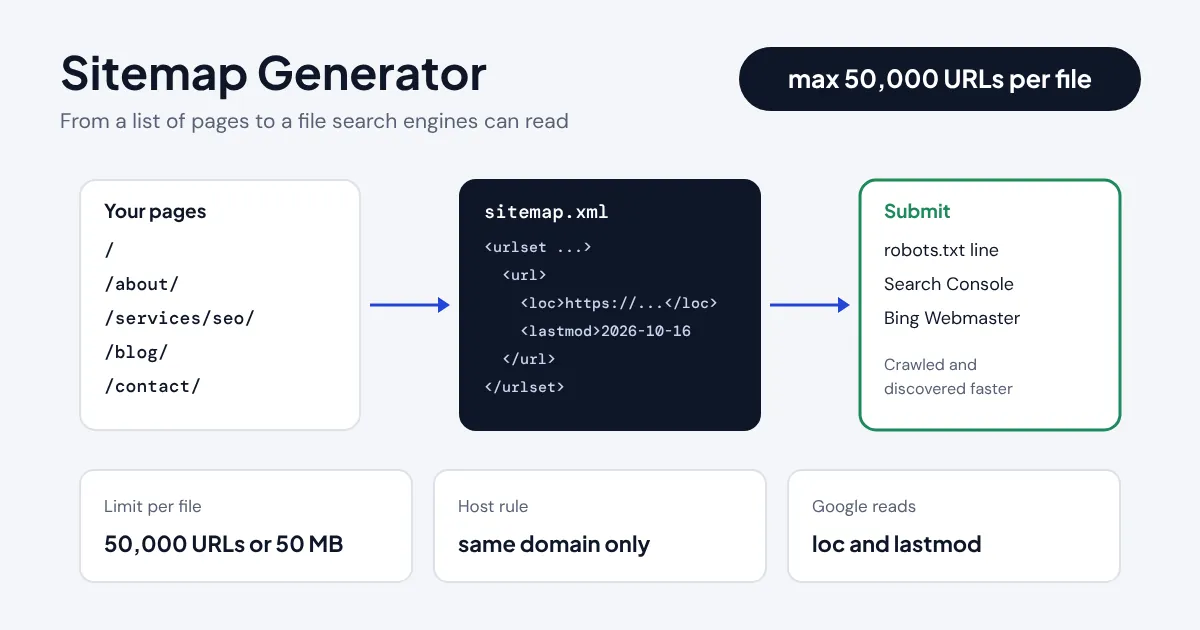
A sitemap generator writes the XML file that tells Google, Bing and other search engines which pages on your site you want crawled. It is most useful for sites without a CMS plugin: hand-coded HTML sites, static site builds, landing page collections, single-page apps with real URLs, and new sites that have few links pointing in yet. A sitemap does not guarantee indexing, but it makes discovery faster and gives Search Console a list to report coverage against.
This generator works from the list you give it rather than crawling, so it never misses pages hidden behind JavaScript and never includes pages you want kept out. Paste URLs from a spreadsheet, a CMS export or even raw HTML from your navigation, and it extracts the links, resolves relative paths against your domain, strips #fragments, drops mailto: and off-site links, escapes special characters and splits very large lists into multiple files with a sitemap index.
How Do You Build and Download a Sitemap?
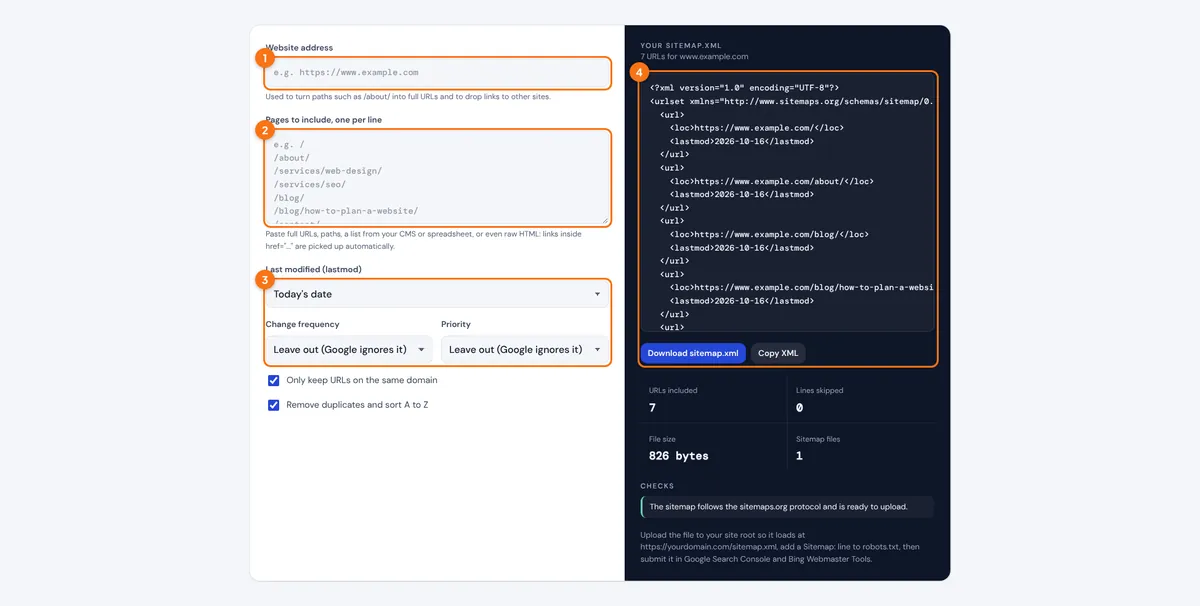
- Enter your website address exactly as your canonical URLs use it, for example https://www.example.com with or without www.
- Paste the pages you want indexed, one per line. Paths, full URLs and HTML with href links all work.
- Choose a lastmod setting. Leave changefreq and priority out unless another search engine you care about uses them.
- Read the checks, then press Download sitemap.xml and upload the file to the root folder of your site.
The Checks list explains every line that was skipped, such as links to another domain, duplicates or a www and non-www mismatch, so you can fix the source list rather than guess.
What Goes Inside an XML Sitemap?
A sitemap is a UTF-8 XML file with a urlset root element and one url entry per page. The only required child is loc, the absolute URL of the page. The format is defined in the sitemaps.org protocol, which Google, Bing and Yandex jointly support.
<url> <loc>absolute URL</loc> <lastmod>YYYY-MM-DD</lastmod> </url>
</urlset>
limit per file = 50,000 URLs or 50 MB uncompressed
Characters such as & must be written as & inside loc, and every URL must use the same protocol and host as the site the sitemap describes. A sitemap at https://www.example.com/sitemap.xml cannot list pages on https://example.com or on a subdomain. If your URLs contain spaces or accented letters, the generator percent-encodes them; the URL encoder and decoder shows the same conversion one address at a time.
What Does a Small Business Sitemap Look Like?
Picture a plumbing company in Ohio with seven pages: home, about, two service pages, a blog index, one blog post and a contact page. Entered as paths with today's lastmod, the generator produces seven url entries, sorted A to Z, in a file of under 1 KB. A trimmed version looks like this:
<url><loc>https://www.example.com/services/drain-cleaning/</loc><lastmod>2026-10-16</lastmod></url>
If the owner later adds 60,000 product pages, the tool splits them into sitemap-1.xml and sitemap-2.xml and writes a sitemap_index.xml that points to both, which is the file to submit. Pair the sitemap with a matching robots.txt file so crawlers find it on their first visit.
| Site size | Files you need | What to submit |
|---|---|---|
| Up to 50,000 URLs | sitemap.xml | sitemap.xml |
| 50,001 to 100,000 URLs | sitemap-1.xml, sitemap-2.xml, sitemap_index.xml | sitemap_index.xml |
| Multilingual site | One sitemap, with hreflang in the pages or the sitemap | sitemap.xml |
| Over 50 MB of XML | Smaller batches | The index file |
Which Sitemap Tags Does Google Actually Use?
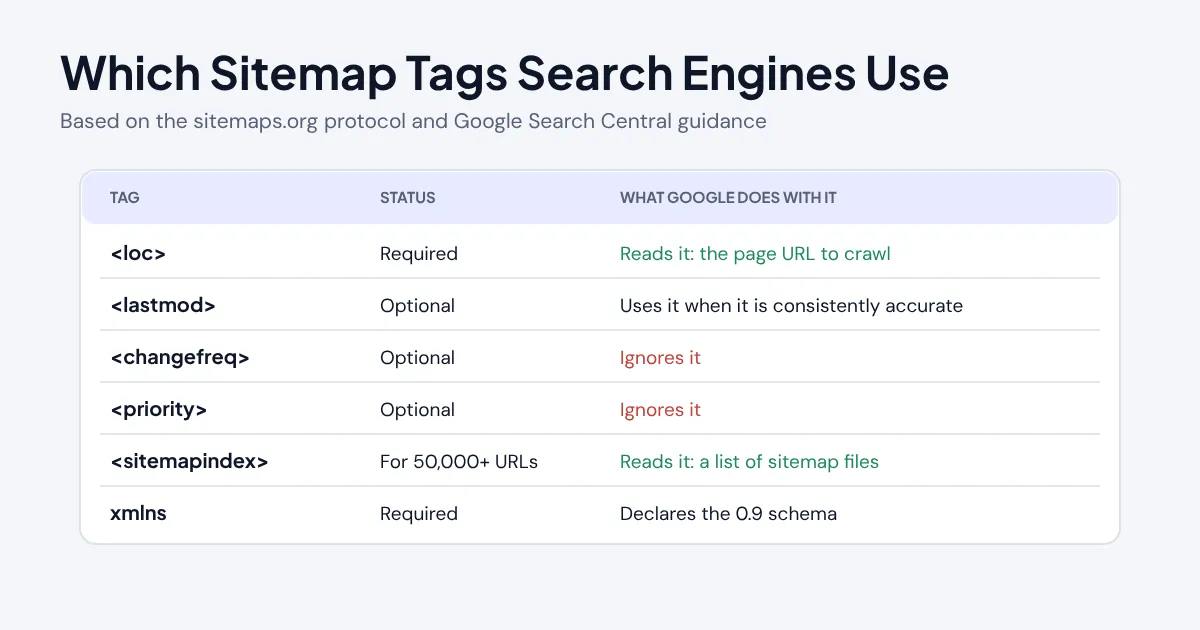
Google reads loc and uses lastmod when it is consistently accurate, but it ignores changefreq and priority entirely. That is stated plainly in Google's guide to building and submitting a sitemap. Setting every page to priority 1.0 does nothing, and a lastmod that changes on every build without real edits teaches Google to distrust the field.
Include only canonical, indexable URLs that return HTTP 200. Leave out redirects, 404 pages, pages blocked in robots.txt, pages with a noindex tag and parameter variations such as sort or filter URLs. For international sites, the hreflang generator builds the language annotations that tell Google which version to show in each country.
How Do You Submit a Sitemap?
- Upload it to the root. Place the file so it loads at https://www.example.com/sitemap.xml. A sitemap in a subfolder can only list URLs in that folder.
- Reference it in robots.txt. Add a line such as Sitemap: https://www.example.com/sitemap.xml so every crawler can find it.
- Submit it in Google Search Console. Open Sitemaps, enter the URL and check the status after a few days for errors or excluded pages.
- Submit it in Bing Webmaster Tools. Bing's index also feeds Yahoo and is a major source for DuckDuckGo, so it is worth the extra minute.
- Regenerate when pages change. Add new URLs and update lastmod only for pages whose content really changed.
Related Developer Tools
- Robots.txt Generator
- Robots.txt Validator
- Hreflang Generator
- URL Encoder and Decoder
- JSON Formatter
- UTM Builder
Frequently asked questions
Do I need an XML sitemap?
Small, well-linked sites can be found without one, but a sitemap helps new sites, large sites, sites with deep pages and sites with few external links. It also lets Search Console report which submitted pages are indexed.
How many URLs can one sitemap hold?
Up to 50,000 URLs or 50 MB uncompressed, whichever comes first. For more, split the list into several sitemaps and submit a sitemap index file. The generator does this automatically.
Does Google use priority and changefreq?
No. Google ignores both tags. It uses lastmod when the dates are consistently accurate, so a correct last modified date is more useful than either.
Where should I put sitemap.xml?
In the root folder of your site, so it loads at yourdomain.com/sitemap.xml. Then add a Sitemap: line to robots.txt and submit the URL in Google Search Console and Bing Webmaster Tools.
Can a sitemap list pages on another domain or subdomain?
Not normally. Every URL must match the protocol and host of the sitemap. The only exception is when you prove ownership of both sites in Search Console and reference the sitemap from the other host's robots.txt.
Should I include noindex or redirected pages?
No. List only canonical pages that return a 200 status and are allowed to be indexed. Redirects, error pages, noindex pages and URLs blocked in robots.txt send mixed signals and show up as errors in Search Console.