How to Use the Regex Tester
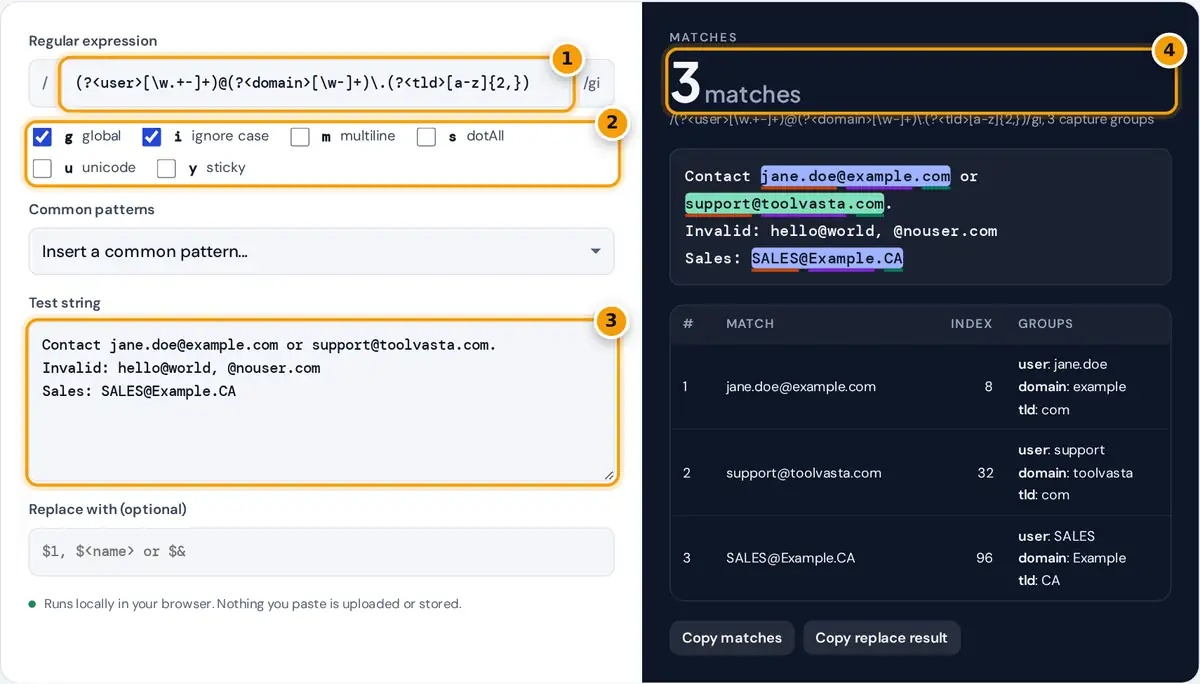
- Type the regular expression without slashes.
- Tick the flags you need, such as g for all matches and i for ignore case.
- Paste the text to test against.
- Read the match count, then the highlighted text and groups table.
Type a regular expression in the pattern box, without the surrounding slashes, and tick the flags you need. Paste the text to search in the test string box. Matches are highlighted as you type, alternating in two colors so neighboring matches stay distinct, and capture groups are underlined in their own colors. The table lists every match with its position, numbered groups and named groups.
Fill in Replace with to preview a substitution, using $1 for a numbered group, $<name> for a named group and $& for the whole match. The Common patterns menu loads tested starting points for emails, URLs, dates, phone numbers, Canadian postal codes and more. Patterns run with your browser’s JavaScript engine in a separate worker, so a runaway pattern is stopped after 1.5 seconds instead of freezing the page, and nothing leaves your device.
Regex Flags
| Flag | Name | Effect |
|---|---|---|
| g | global | Find all matches instead of stopping at the first |
| i | ignore case | A matches a, É matches é |
| m | multiline | ^ and $ match at the start and end of every line |
| s | dotAll | . also matches line breaks |
| u | unicode | Treat emoji as one character and enable \p{...} classes |
| y | sticky | Match only at the current position, with no skipping ahead |
Worked Example
The default pattern finds email addresses and splits them into named groups:
With the g and i flags it matches three addresses in the sample text: jane.doe@example.com (user jane.doe, domain example, tld com), support@toolvasta.com and SALES@Example.CA. It skips hello@world because there is no dot and top-level domain, and @nouser.com because nothing comes before the @. Untick i and the count drops to two, because [a-z] no longer matches the uppercase CA. Enter [$<domain>] as the replacement and the first line becomes “Contact [example] or [toolvasta].”
Regex Cheat Sheet
| Token | Matches | Token | Matches |
|---|---|---|---|
| . | Any character except a line break | \d | A digit 0 to 9 |
| \w | Letter, digit or underscore | \s | Whitespace |
| [abc] | One of a, b or c | [^abc] | Anything except a, b or c |
| a* | Zero or more a | a+ | One or more a |
| a? | Optional a | a{2,4} | Two to four a |
| ^ and $ | Start and end | \b | Word boundary |
| (...) | Capture group | (?:...) | Group without capturing |
| (?<n>...) | Named group | a|b | a or b |
| (?=...) | Followed by | (?<=...) | Preceded by |
Catastrophic Backtracking
Patterns with nested quantifiers, such as ^(a+)+$, can take exponential time when a match fails, because the engine tries every way of splitting the input. Against a string of 30 or more a’s followed by an exclamation mark, the attempt can run for minutes. This tester runs each pattern in a background worker and stops it after 1.5 seconds with a clear message. In production code, avoid nested quantifiers on overlapping patterns, prefer specific character classes, and anchor patterns where you can.
Which Regex Flavor Is This?
The tester uses the JavaScript (ECMAScript) engine built into your browser, the same one that runs in Node.js and Deno, so results match String.prototype.match, replace and RegExp.exec. Most syntax is shared with Python, Java, PHP (PCRE) and .NET, but details differ: JavaScript has no possessive quantifiers or atomic groups, and lookbehind support varies in other languages. See the MDN regular expressions guide for the full syntax.
Tips for Writing Reliable Patterns
- Start small. Match one piece of the text, confirm it, then extend the pattern step by step.
- Be specific.
\d{3}is clearer and faster than.*followed by checks. - Use non-capturing groups
(?:...)when you need grouping but not the captured text. - Name important groups with
(?<name>...)so replacements and code stay readable. - Test with text that should not match as well as text that should, as the sample does with invalid emails.
Finally, keep a few real samples of your data in the test string box while you work, so every change is checked against cases that matter.
Frequently asked questions
Which regex flavor does this tester use?
It uses the JavaScript regular expression engine built into your browser, the same one used by Node.js. Results match String.match, replace and RegExp.exec. Most syntax also works in Python, Java and PCRE, with small differences.
How do I see capture groups?
Wrap part of the pattern in parentheses. Each match in the table lists group 1, group 2 and so on, and named groups written as (?
Why does my regex only find one match?
Without the g flag, a regular expression stops after the first match. Tick the g flag, for global, to find every match in the text. The sticky y flag also restricts where matches can start.
How do I use a capture group in a replacement?
Type $1 for the first group, $2 for the second, or $
Why did the tester stop my pattern?
The pattern ran for more than 1.5 seconds, usually because of catastrophic backtracking from nested quantifiers such as (a+)+. The tester runs patterns in a worker so it can stop them without freezing the page.
Is my test text sent anywhere?
No. The pattern and text are processed by your browser in a background worker on your own device. Nothing is uploaded or stored, so you can test against logs or data you would not paste into a server tool.