Quick answer: An IP address lookup tells you what kind of address you have and who holds it. Type an address such as 8.8.8.8 to see straight away whether it is public or private, its binary and reverse DNS forms, then press Look up to fetch the owner, network range, country and abuse contact from the regional internet registry.
What Can an IP Address Tell You?
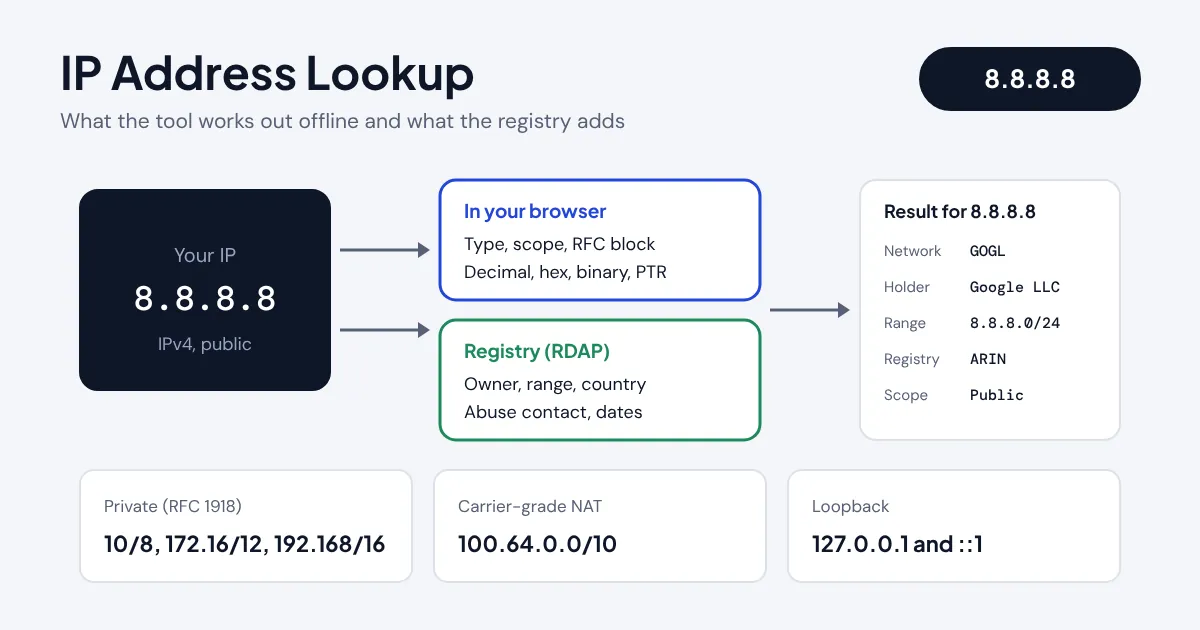
An IP address lookup identifies an address you have found in a server log, an email header, a firewall alert or a router screen. It answers two separate questions. The first is what the address is: IPv4 or IPv6, public or private, part of a documentation or loopback block, and how it is written in decimal, hexadecimal, binary and reverse DNS form. That part needs no internet connection, so this tool works it out instantly in your browser.
The second question is who holds the address block. Every public address is allocated by one of five regional internet registries (ARIN, RIPE NCC, APNIC, LACNIC and AFRINIC), and their records can be queried through RDAP, the Registration Data Access Protocol that has replaced old-style WHOIS text output. The lookup button sends only the address you typed to rdap.org, which forwards it to the right registry and returns the network name, organisation, address range, country, allocation type, abuse email and registration dates.
How Do You Check an Address from a Log or Email Header?

- Paste an IPv4 or IPv6 address into the box. Ports, CIDR suffixes, square brackets and zone IDs are removed for you.
- Press Look up owner and network, or press Enter, to query the regional internet registry.
- Read the summary: version, scope (public, private, CGNAT, loopback and so on), the standard that defines it and the legacy class.
- Check the registry table for the holder, range and abuse contact, then scroll to the address details for the decimal, binary and PTR forms.
If the address is private or reserved, the tool tells you so and skips the registry query, because those addresses are reused inside millions of networks and no registry records an owner for them.
How Is an IP Address Converted and Classified?
An IPv4 address is a 32-bit number written as four octets. To get the single decimal value, multiply each octet by a power of 256 and add the results. An IPv6 address is a 128-bit number written as eight groups of four hexadecimal digits, with the longest run of zero groups shortened to a double colon as set out in RFC 5952.
PTR name (IPv4) = d.c.b.a.in-addr.arpa
PTR name (IPv6) = the 32 hex digits reversed, dot separated, + .ip6.arpa
To classify an address, the tool compares it against each special-purpose block in turn. The list follows the IANA IPv4 Special-Purpose Address Registry and its IPv6 equivalent. Anything outside those blocks is a normal public address. For subnet maths on a range, such as working out the first and last usable host, use the IP subnet calculator.
What Does a Lookup of 8.8.8.8 Show?
Take Google's public DNS resolver, 8.8.8.8. In decimal it is 8 × 16,777,216 + 8 × 65,536 + 8 × 256 + 8 = 134,744,072. In hex that is 0x08080808, and the reverse DNS name is 8.8.8.8.in-addr.arpa. It sits outside every special block, so it is public, and its first octet (8) places it in the old Class A range.
The registry query returns network name GOGL, holder Google LLC, range 8.8.8.0 to 8.8.8.255 (8.8.8.0/24), allocation type Direct Allocation, registry ARIN and abuse contact network-abuse@google.com. That is exactly the information you need to report misuse coming from an address, or to confirm that traffic in your logs really comes from the company it claims to.
| Address | Decimal | Scope | Typical holder |
|---|---|---|---|
| 8.8.8.8 | 134,744,072 | Public | Google LLC (ARIN) |
| 1.1.1.1 | 16,843,009 | Public | APNIC and Cloudflare research prefix |
| 192.168.1.1 | 3,232,235,777 | Private | Your own router, no registry owner |
| 100.64.0.1 | 1,681,915,905 | CGNAT | Your broadband or mobile provider's NAT |
| 127.0.0.1 | 2,130,706,433 | Loopback | This device |
Which IP Ranges Are Private or Reserved?
Three IPv4 blocks are set aside for private networks by RFC 1918, and most home and office routers hand out addresses from 192.168.0.0/16 or 10.0.0.0/8. Mobile networks and many UK broadband providers also use the 100.64.0.0/10 carrier-grade NAT block, which is why an address beginning 100.64 to 100.127 on your router does not mean you have a public IP of your own.

On the IPv6 side, fc00::/7 is the private (unique local) range, fe80::/10 is link-local, ::1 is loopback, 2001:db8::/32 is reserved for documentation and normal public addresses fall inside 2000::/3. When you need several addresses in a block for planning, the VLSM calculator splits a network into differently sized subnets.
Can an IP Lookup Find a Person or Exact Location?
No. Registry data shows the organisation that holds the address block, usually an internet provider, hosting company or large business, not the person using the address at a given moment. The country is where the holder is registered, which can differ from where the device is, especially for cloud providers, VPNs and mobile networks. Commercial geolocation databases guess a town from routing data, but they are often wrong by tens of miles and never show a street address.
If an address is attacking your systems or sending abuse, report it to the abuse contact the lookup shows. In the UK, the National Cyber Security Centre publishes practical guidance on protecting accounts and devices, and only the provider (normally with a court order) can match an address and time to a customer.
Related Network Tools
Frequently asked questions
How do I find out who owns an IP address?
Enter the address above and press Look up owner and network. The tool queries the regional internet registry through RDAP and shows the network name, organisation, range, country and abuse contact for the block that contains it.
Is 192.168.1.1 a public IP address?
No. 192.168.0.0/16 is a private range defined in RFC 1918. It is used inside home and office networks and is never routed on the public internet, so it has no registry owner.
What is the difference between WHOIS and RDAP?
Both return registration data for IP blocks and domains. WHOIS sends unstructured text that varies by registry, while RDAP returns structured JSON over HTTPS with standard fields, which is why modern tools like this one use RDAP.
Why does my IP show a different country?
Registry records list the country where the address holder is registered. Large providers and cloud companies use addresses worldwide that are registered in one country, and VPNs or mobile networks often route traffic through another region.
What is a reverse DNS or PTR record?
It maps an address back to a host name. The lookup name is built by reversing the address and adding in-addr.arpa for IPv4 or ip6.arpa for IPv6. Mail servers often check that a sending IP has a matching PTR record.
Does this tool store the addresses I look up?
No. The analysis runs in your browser. The registry lookup sends only the address you enter to rdap.org, which passes it to the regional registry, and ToolVasta does not log it.