How to Take the Typing Speed Test
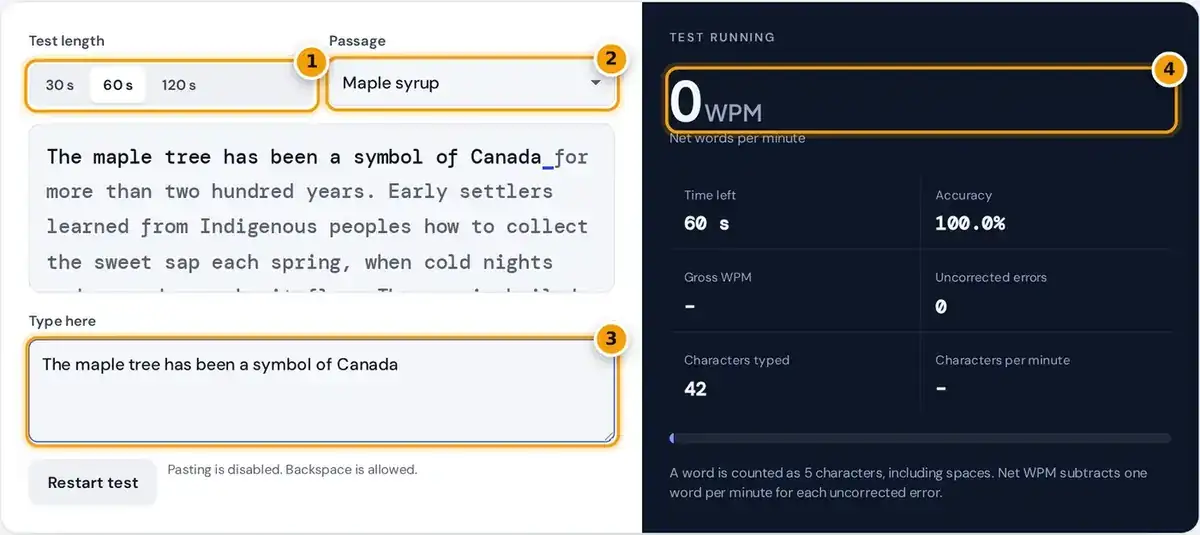
- Choose a 30, 60 or 120 second test.
- Pick a passage, from maple syrup to the space race.
- Click here and start typing the passage. The timer starts with your first key.
- Read your net WPM, then accuracy, errors and characters per minute beside it.
Choose a test length of 30, 60 or 120 seconds and pick one of six passages. Click in the typing box and type the text shown above it. The timer starts on your first keystroke.
Correct characters turn dark, mistakes turn red, and an underline marks your place. You can fix mistakes with Backspace, which raises your net score but costs time, so decide quickly whether it is worth it.
When the timer reaches zero, the typing speed test shows net WPM, gross WPM, accuracy, uncorrected errors, characters typed and characters per minute. Press Restart test to try again with the same or another passage.
How WPM Is Calculated
Words per minute treats every five characters as one word, including spaces and punctuation. This standard makes results comparable between passages with long and short words, and between the many typing tests you find online.
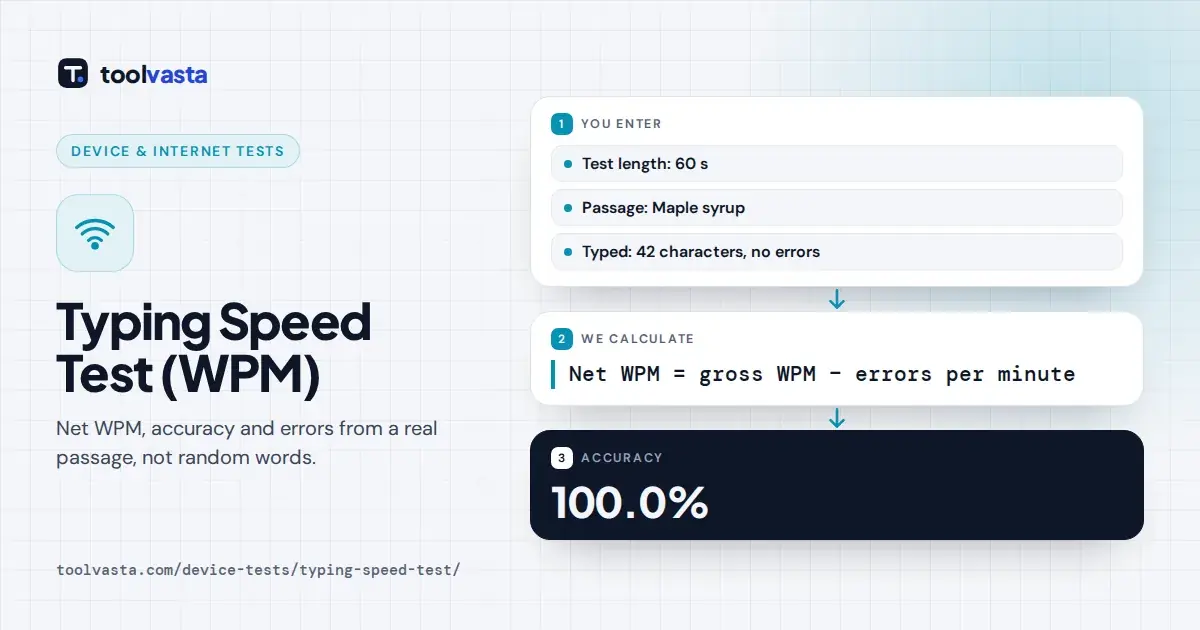
Gross WPM is the characters typed divided by five, then divided by the total minutes elapsed. Net WPM subtracts one word per minute for each of the uncorrected errors still wrong when the test ends.
Accuracy compares mistakes with all keystrokes you typed forward, including errors you later fixed. So correcting an error raises net WPM but never raises accuracy, which is exactly why careful typing pays off twice over.
net WPM = gross WPM − (uncorrected errors ÷ minutes)
accuracy = (keystrokes − mistakes) ÷ keystrokes × 100
Worked Example of a Typing Score
In this worked example you take a 30 second test, type 100 characters, and leave 5 wrong at the very end. Half a minute has passed, so the minutes value in each formula is 0.5.
Gross WPM is 100 divided by 5, which is 20 words, divided by 0.5 minutes, giving 40. Net WPM subtracts 5 errors divided by 0.5, which is 10, leaving a final net score of 30.
With 100 keystrokes and 5 mistakes, accuracy is 95%. These figures match what the tool reports for the same input, and the same math applies whether you choose a short or a long test length.
What Is a Good Typing Speed?
Most casual typists land between 25 and 40 net WPM, which is a fair guide to average typing speed. Around 60 WPM is fast, and 80 WPM or more puts you among very quick typists.
A beginner who uses hunt and peck, looking down for each key, is usually under 25 WPM. Moving to touch typing is the step that lifts most people into the range suited to office work.
These bands are general guidance, not a standard. Jobs in data entry or transcription often set their own minimum for a good WPM and accuracy, sometimes measured in keystrokes per hour rather than in words.
| Net WPM | Level |
|---|---|
| Under 25 | Beginner, often hunt and peck |
| 25 to 40 | Typical casual typist |
| 40 to 60 | Above average, suits most office work |
| 60 to 80 | Fast, professional level |
| 80 and above | Very fast, competitive typists |
How to Type Faster
Put accuracy first. Every error costs you twice, once to make it and once to fix it, so slow down until you reach about 97% accuracy, then gradually build speed from that steady, reliable base.
Learn touch typing from the home row: your fingers rest on A, S, D, F and J, K, L and the semicolon. The bumps on F and J let you find position without looking down.
Keep your eyes on the screen and aim for an even rhythm rather than bursts. Practice daily for about ten minutes, which builds muscle memory faster than one long session each week, then retest here.
- Aim for 97% accuracy before chasing speed.
- Rest your fingers on the home row and find F and J by their bumps.
- Keep your eyes on the screen, not the keys.
- Practice about ten minutes a day.
Posture and Ergonomics for Typing
Speed also depends a lot on comfort. The Cornell University ergonomics guidelines recommend a keyboard height that keeps your elbows relaxed near your body and your wrists straight and flat, not bent up or down.
Center the letter keys on your body and keep the screen comfortably far away. The OSHA computer workstation eTool notes that no ergonomic posture suits everyone, so adjust your chair and desk to fit you.
Take short breaks during any long practice sessions, and stretch your hands and shoulders. Tension slows your fingers and raises errors, so a relaxed, supported posture usually produces a better score than forcing extra speed.
Test Length, Fairness and Privacy
Use 60 seconds for a standard result. A 30 second test is good for warm-ups, while 120 seconds is harder to rush and shows the speed you can sustain over a longer stretch of text.
The passages are ordinary English prose with capitals, commas and full stops, so punctuation really counts. If you finish all six passages before time ends, the test stops and scores you on the time taken.
Pasting is blocked so results stay fair for everyone. For privacy, the test runs entirely in your browser, and nothing you type is stored or sent anywhere, so you can practice freely without an account.
Frequently asked questions
How is WPM calculated?
Words per minute counts every 5 characters as one word. Divide the characters you typed by 5, then by the minutes elapsed. Net WPM also subtracts uncorrected errors per minute from that figure.
What is the difference between gross and net WPM?
Gross WPM is your raw speed from every character typed. Net WPM subtracts one word per minute for each error left uncorrected at the end, so it rewards accurate typing over fast guessing.
What is the average typing speed?
Most casual typists fall between 25 and 40 WPM. Around 60 WPM or more is considered fast, and many office roles are comfortable with 40 to 60 WPM at high accuracy.
Does fixing mistakes affect my score?
Fixing mistakes removes them from the uncorrected error count, which raises net WPM. Accuracy still counts the original mistake, and the time spent pressing Backspace lowers your gross speed slightly.
Which test length should I choose?
Use 60 seconds for a standard result. A 30 second test is good for warm-ups, and 120 seconds shows your sustained speed because it is harder to keep up a burst for two minutes.
Why is my score different on other typing tests?
Tests differ in text difficulty, punctuation, capital letters, test length and how errors are penalized. This test uses real prose with punctuation, so scores can be lower than on lists of short common words.