How to Use the Word Scramble Maker
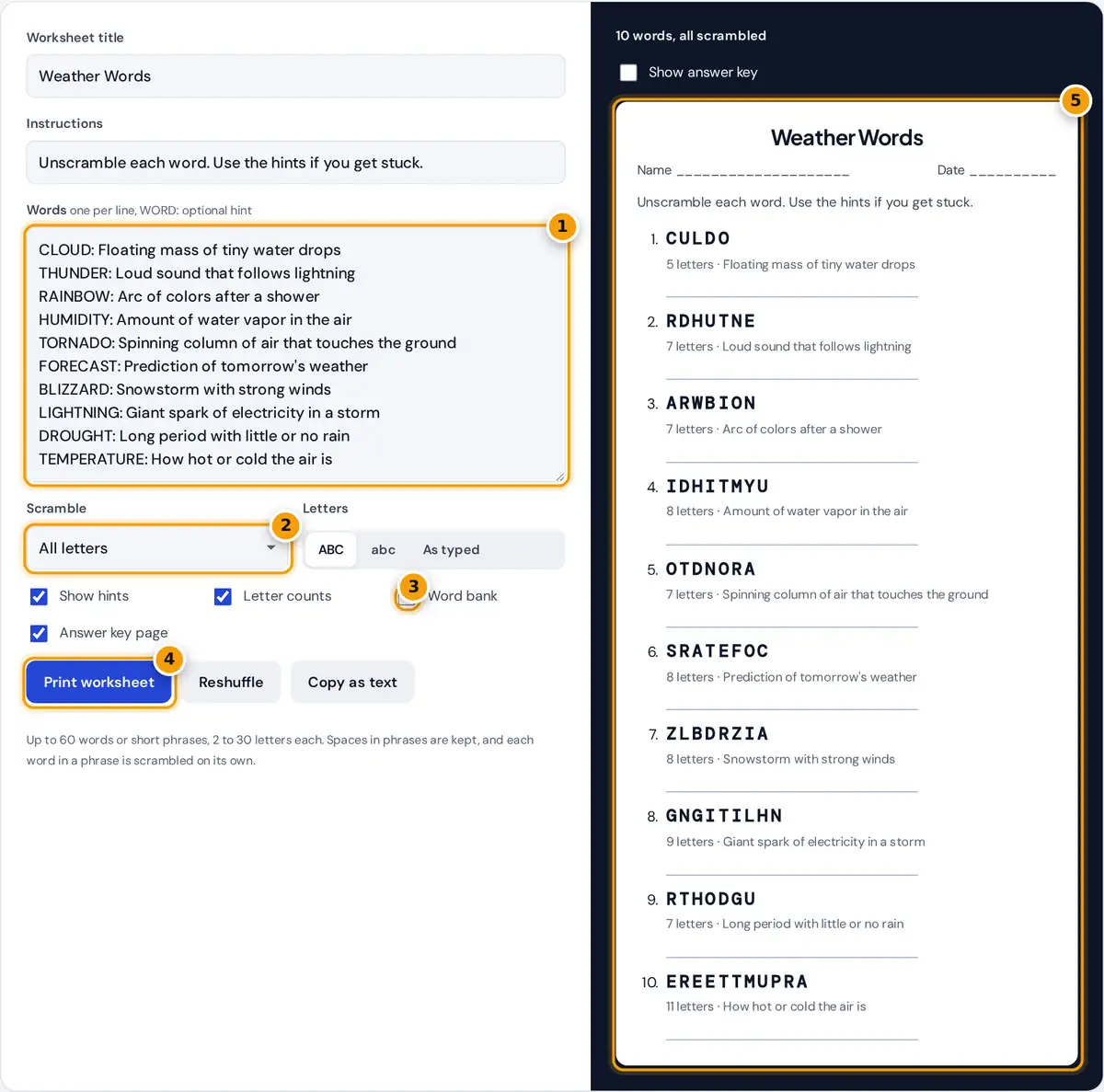
- Type your words, one per line, with an optional hint after a colon.
- Choose how much to scramble.
- Add hints, letter counts or a word bank.
- Print the worksheet with an answer key page.
- Check the worksheet preview.
Type or paste your word list, one word per line. Add a colon and a short hint after any word if you want clues, for example TORNADO: Spinning column of air. The worksheet preview updates as you type. Choose how much to scramble, the letter case, and whether to show hints, letter counts or a word bank. Press Reshuffle for a new arrangement, tick Show answer key to check the answers on screen, and press Print worksheet. With Answer key page ticked, the key prints on its own page so you can keep it separate from student copies.
How the Words Are Scrambled
Each word is shuffled with the Fisher-Yates method, the standard way to put a list in random order where every arrangement is equally likely. The tool then checks that the result is different from the original word, and shuffles again if it is not. Keep first letter and Keep first and last letters only shuffle the letters in between, which makes the puzzle easier for younger readers because the word still starts or ends the right way.
with repeated letters: n! ÷ (k₁! × k₂! × ...), where k is how often each letter repeats
Worked Example
CLOUD has 5 different letters, so it has 5! = 120 arrangements, and 119 of them are scrambled. BLIZZARD has 8 letters with Z twice, so it has 8! ÷ 2! = 40,320 ÷ 2 = 20,160 arrangements. With Keep first and last letters, a short word like CAT has only one letter in the middle, so it cannot be scrambled at all, and the tool tells you how many such words it found. In the same mode, BOOK keeps B and K and has only OO to shuffle, which gives the same word, so it is also flagged.
Choosing the Right Difficulty
| Learners | Scramble | Extras |
|---|---|---|
| Early readers, ages 5 to 7 | Keep first and last letters | Word bank, 3 to 5 letter words |
| Grades 2 to 4 | Keep first letter | Hints and letter counts |
| Grades 5 and up | All letters | Hints only |
| Teens and adults | All letters | No hints, longer words or phrases |
A word bank turns the activity into matching, which suits spelling practice and English language learners. Hints that define the word make it a vocabulary review instead.
Classroom Ideas for Word Scrambles
Word scrambles work well as a warm-up at the start of class, a quiet activity for early finishers or a review before a spelling test. Pair students and let them race to solve the list, or give each group a different shuffle of the same words. For language learners, show the word bank and ask students to use each unscrambled word in a sentence. Older students can build scrambles for each other from a chapter's key terms, which doubles as revision.
Tips for Better Worksheets
- Use 8 to 15 words. That fits one printed page with room to write.
- Group by theme. Weather, space, food or a novel's characters make the hints more useful.
- Check for accidental words. A scramble can form another real word, such as a rude one. Press Reshuffle if you spot one.
- Copy as text to paste the puzzle into a slide, an email or a learning platform.
Limits and Privacy
The maker accepts up to 60 words or short phrases with 2 to 30 letters each. Accented letters are supported, while digits and symbols are removed. Each word in a phrase is scrambled on its own and spaces stay in place, so the number of words is a built-in hint. The worksheet is built in your browser, and your word list is never uploaded.
Frequently asked questions
How do I make a word scramble worksheet?
Type your words one per line, add a hint after a colon if you like, and choose the options. The worksheet updates instantly. Press Print worksheet to print it, with the answer key on a separate page.
Can I print an answer key?
Yes. Keep Answer key page ticked and the key prints on its own page after the worksheet. You can also tick Show answer key to see the answers in the preview before printing.
Why could some words not be scrambled?
Some words have only one possible order. With Keep first and last letters, CAT has a single middle letter and BOOK has two identical ones. Switch to All letters or use longer words.
How do I make the puzzle easier for young children?
Choose Keep first letter or Keep first and last letters, switch on letter counts and the word bank, and use short words. The word bank turns the puzzle into matching, which suits early readers.
Can I use phrases or names with spaces?
Yes. Each word in a phrase is scrambled separately and spaces stay where they are, so ICE CREAM might become CEI MAREC. Hyphens are kept too, while digits and symbols are removed.
Is the word scramble maker free for classroom use?
Yes. It is free with no account, and you may print as many copies as you need for your class. Everything runs in your browser, so student word lists stay on your device.