To count words and characters, paste your text into a counter or open the word count panel in your editor: Microsoft Word, Google Docs and Apple Pages all have one built in. For a fast, private check, the free word counter shows words, characters, sentences and reading time as you type. The harder part is knowing which number matters. Essays and applications are judged in words, while social posts, text messages and search snippets are judged in characters, and every platform counts a little differently. This guide shows five reliable ways to count, the limits worth knowing and how to trim text without losing the point.
What Counts as a Word and What Counts as a Character?
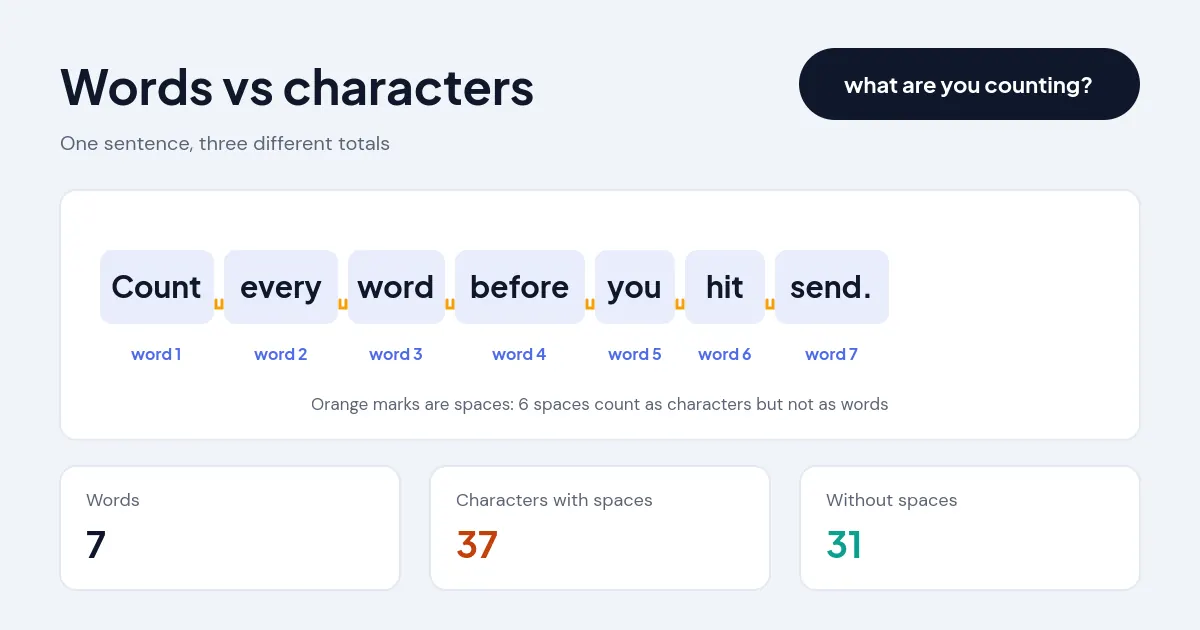
A word is any group of letters or numbers with a space on each side, and a character is every single symbol you type, spaces included. "Count every word before you hit send." is 7 words, 37 characters with spaces and 31 characters without them.
Words
Most counters split text at spaces and line breaks, then ignore anything that has no letters or digits. That means "don't" is one word, "follow-up" is one word, "2026" is one word and a lone ampersand or bullet point is zero. Numbers count as words, so a table full of figures can add more to your total than you expect.
Characters
Characters cover letters, digits, punctuation, spaces, line breaks and emoji. Some forms ask for a count "without spaces", which is common in translation pricing and some academic portals. Emoji are the tricky case: you see one symbol, but a phone may store it as several code units, so a basic counter can report 2 or more. A good character counter counts what a reader sees, then shows the platform-specific totals separately.
How Do You Count Words and Characters? 5 Easy Ways
You can count words and characters with an online counter, Microsoft Word, Google Docs, Apple Pages or a spreadsheet formula. Pick the one that matches where your text already lives.
1. Use an online counter
Paste the text into a browser-based counter when you are writing in an email, a form or a content management system with no count of its own. The ToolVasta counters run entirely in your browser, so nothing is uploaded. Set a word goal, such as 650, and a progress bar shows how far you are from it.
2. Microsoft Word
Word shows a running total in the status bar at the bottom of the window. For the full breakdown, open the Review tab and choose Word Count, or press Ctrl+Shift+G on Windows. The dialog lists pages, words, characters with and without spaces, paragraphs and lines. Tick "Include textboxes, footnotes and endnotes" if your assignment counts those too, because they are left out by default.
3. Google Docs
In Google Docs, open Tools, then Word count, or press Ctrl+Shift+C (Cmd+Shift+C on a Mac). Select a passage first to count only that part. Tick "Display word count while typing" to keep a live counter in the corner of the page while you write.
4. Apple Pages
In Pages on a Mac, choose View, then Show Word Count. The counter appears at the bottom of the document, and clicking it lets you switch between words, characters with or without spaces, paragraphs and pages.
5. Excel or Google Sheets
Spreadsheets are handy when you need to check dozens of product titles or meta descriptions at once. With the text in cell A2, these formulas work in both Excel and Google Sheets:
Words: =IF(LEN(TRIM(A2))=0,0,LEN(TRIM(A2))-LEN(SUBSTITUTE(TRIM(A2)," ",""))+1)
Copy the formulas down the column and sort by length to find the entries that run over.
What Word and Character Limits Should You Know?
The limits that matter most are essay word counts, social post character caps and the width at which search engines cut off titles and descriptions.
Essays and applications
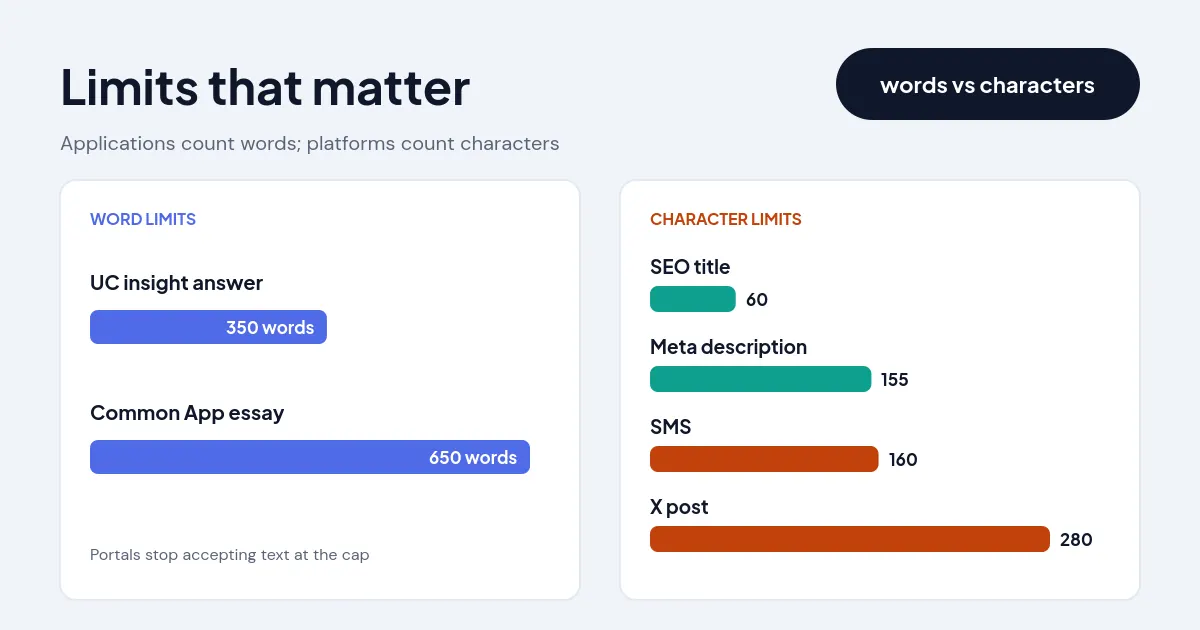
College essays have hard caps that the application portal enforces. The Common App personal essay allows 250 to 650 words, and the University of California personal insight questions limit each response to 350 words. Class assignments are often more flexible, with many instructors accepting 10% either side of the target, but follow the brief rather than assuming it.
Social posts and messages
X allows 280 characters for standard accounts, Bluesky 300, Threads 500, Instagram captions 2,200 and LinkedIn posts 3,000. A single SMS holds 160 plain characters, but one emoji switches it to Unicode and drops the limit to 70. X also counts every link as 23 characters and every emoji as 2, which is why its total can differ from a plain character count.
SEO titles and meta descriptions
Search engines do not publish a hard character limit. Google's guidance on title links explains that long titles are truncated as needed to fit the device width, which in practice means about 60 characters for a title and about 155 for a meta description. Put the main keyword and the benefit at the start so the important part survives any cut.
| Text | Measured in | Common limit |
|---|---|---|
| Common App personal essay | Words | 650 |
| UC personal insight answer | Words | 350 |
| SEO title tag | Characters | About 60 |
| Meta description | Characters | About 155 |
| SMS text message | Characters | 160 (70 with emoji) |
| X post | Weighted characters | 280 |
| Instagram caption | Characters | 2,200 |
Why Do Different Tools Give Different Counts?
Different tools give different totals because they disagree on edge cases, not because one of them is broken. The usual culprits are:
- Hyphens and dashes: some tools split "well-known" into two words, and a dash with spaces on both sides may or may not count.
- Numbers and symbols: a few counters skip standalone numbers, while most count "2026" as a word.
- Hidden content: Word leaves out text boxes, footnotes and endnotes unless you tick the box, while a pasted copy includes everything you selected.
- Emoji and accents: basic counters measure storage units, so one emoji can show as 2 characters or more.
- Links: X replaces every URL with a 23-character short link, however long the original is.
When a limit is strict, count with the same tool the reader or portal will use, and leave a margin of a few words or characters.
How Do You Cut Words Without Losing Meaning?
Cut words by removing repetition and filler first, then tightening sentences, and only then dropping whole ideas. A few edits that work on almost any draft:
- Delete warm-up phrases such as "it is important to note that" and "in order to".
- Replace weak verb phrases with one strong verb: "made a decision" becomes "decided".
- Remove doubled words such as "each and every" or "first and foremost".
- Split sentences longer than 25 words and cut the clause that adds least.
- Check the keyword density table for words you lean on too often.
Headings and titles deserve a final pass too. Run them through the case converter so every heading uses the same title case or sentence case style, then recheck the length of any title that has to fit a search result.
Frequently asked questions
Do spaces count as characters?
Yes. Spaces and line breaks count as characters on social platforms, in SMS and in most forms. Use the "without spaces" figure only when a brief asks for it.
How many words is 280 characters?
About 40 to 55 words. The average English word is around 4.7 letters, and with a space after each word that works out to roughly 49 words.
Does the title count toward an essay word limit?
Usually not, and neither do references or a cover page, but some instructors include them. Check the assignment brief, and for application portals, assume everything you paste into the box counts.
How many pages is 1,000 words?
About 2 pages single-spaced or 4 pages double-spaced in a 12-point font with 1-inch margins.